I’ve been testing BypassGPT for some complex writing and coding tasks, but I’m not sure if I’m using it correctly or if there are better alternatives. Can anyone share real experiences, pros and cons, and whether it’s actually reliable for long-term use?
BypassGPT review from someone who hit the paywall wall fast
BypassGPT link for reference: BypassGPT Review with AI-Detection Proof - AI Humanizer Reviews - Best AI Humanizer Reviews
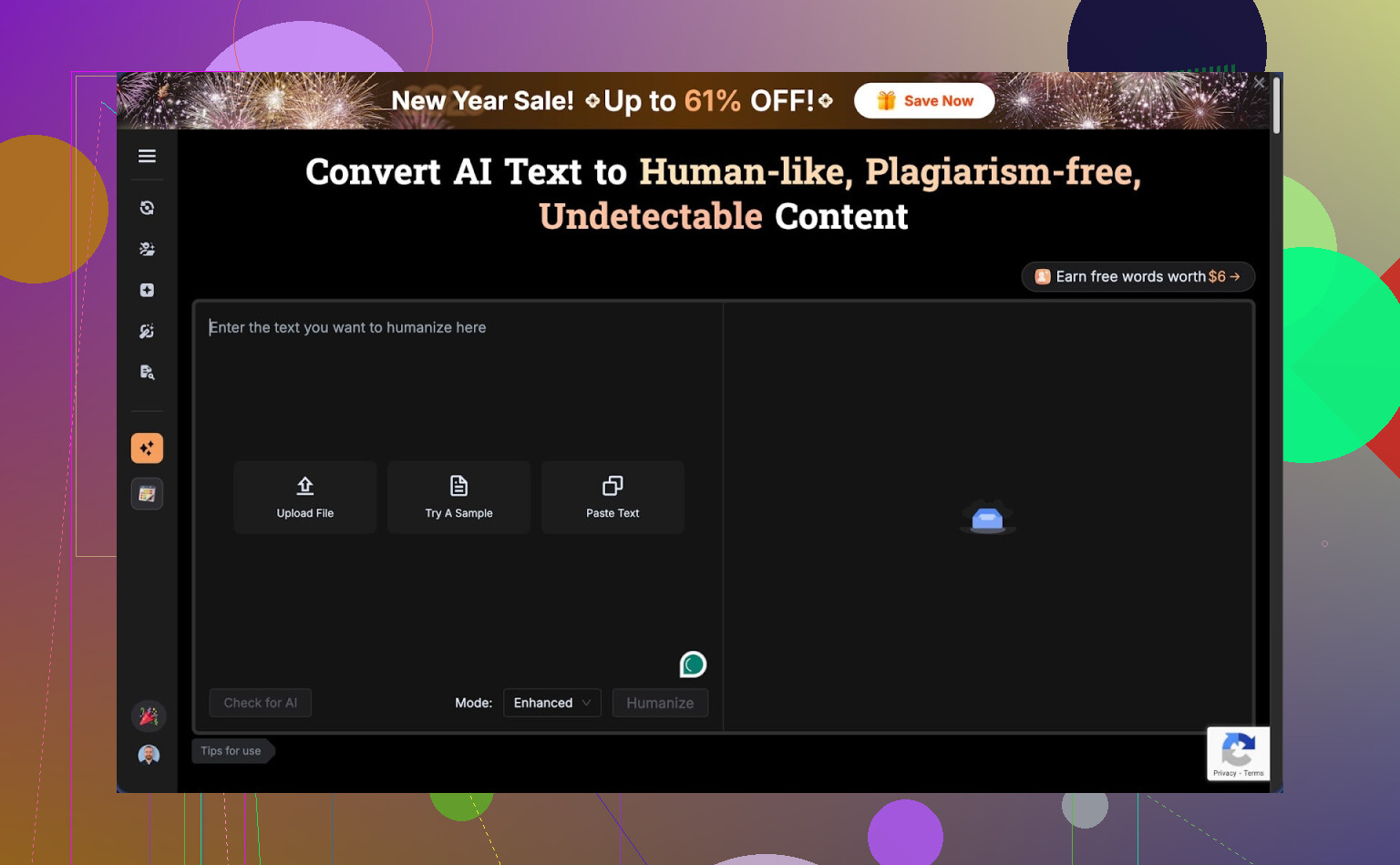
First contact with the free tier
I went in hoping to do a normal test run, same way I test every humanizer.
That stopped almost instantly.
The free tier limits you to about 125 words per input and around 150 words for the whole month. Not 150 per day. The whole month. That is smaller than some product descriptions.
To squeeze anything out of it, I registered an account, which unlocked something like 80 more words. After that I could only run a single one of my usual test samples. Not a batch. Not variants. One.
The limit seemed tied to IP. I tried fresh accounts, same ceiling. Unless you swap IPs with a VPN, you are stuck. For most people, this means you pay before you know if the tool works for your use case.
This felt less like a trial and more like a teaser.
Detection tests and what broke
Here is where things got weird.
I fed BypassGPT a small test paragraph. Nothing exotic, same type of text I use across tools. Then I checked that output on a few detectors:
• ZeroGPT showed 0 percent AI. Fully human, according to it.
• GPTZero saw the exact same text as 100 percent AI. Full opposite.
• BypassGPT’s own built in checker proudly claimed it passed all six detectors it said it checked.
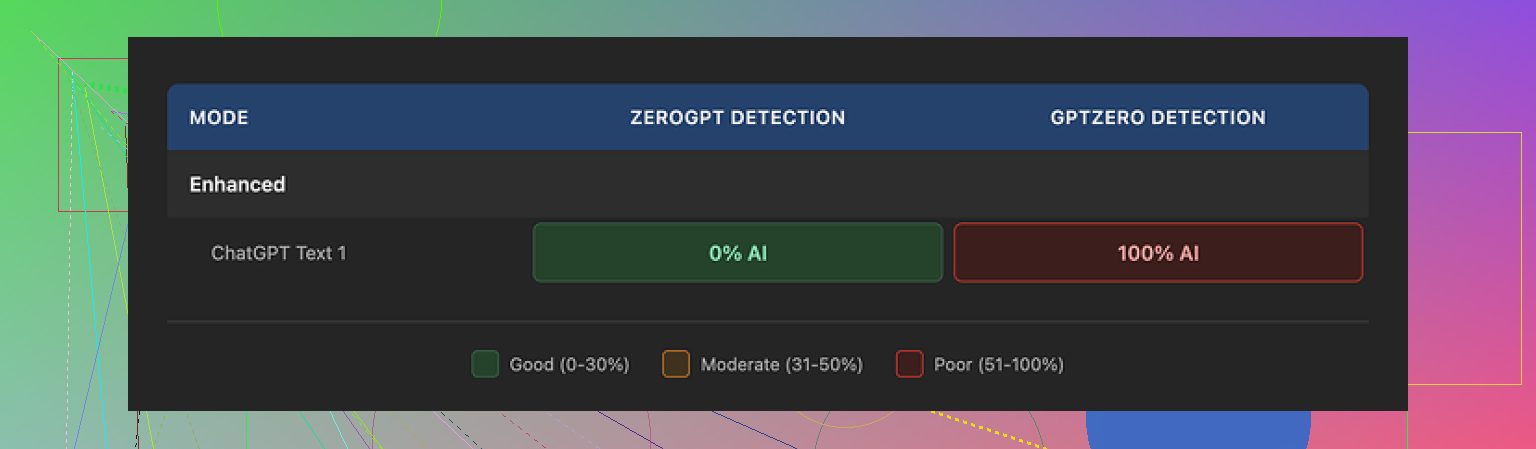
That last part is important. Their checker reported clean results that did not match what external tools showed.
So you get three versions of reality:
- One detector says your text is safe.
- Another screams AI.
- The tool that generated it says everything is perfect.
If you need low detection risk for client work, school, or publishing, this uncertainty is a problem. You cannot trust a single built in dashboard that disagrees with known external detectors.
Writing quality, not only detection
Putting detectors aside, the text itself looked off.
From the short sample I could test:
• I would rate it around 6 out of 10 for readability.
• The first sentence was grammatically broken, enough that I had to reread it.
• It kept em dashes, even though a lot of detectors and editors react badly to heavy dash usage.
• Some phrasing felt stiff, like someone rewrote it sentence by sentence without checking flow.
• There was at least one typo in the output.
So even when detection looked good in one tool, the writing needed a manual cleanup pass. At that point, you start wondering if it is faster to rewrite the text yourself.
If your goal is client grade content, you would have to edit every paragraph anyway. For some people this is acceptable. For others it kills the point of paying for automation.
Pricing compared to what you get
Here is what I saw on the paid side:
• Lowest tier, around $6.40 per month on annual billing, for 5,000 words.
• “Unlimited” tier around $15.20 per month.
On paper, those numbers do not look huge. The problem is the mix of:
• Weak free trial.
• Mixed detection results.
• Average text quality.
You pay without a proper chance to stress test. If your use case needs thousands of words per week, you would be going in half blind.
The part that bothered me most: terms of service
The content rights section in their terms is where I pulled back.
Buried in the TOS, they grant themselves wide rights over anything you submit. That includes the right to:
• Reproduce your content.
• Distribute it.
• Create derivative works from it.
So anything you paste into BypassGPT could, by their own rules, be reused or reshaped.
If you deal with:
• Client work under NDA.
• Academic writing.
• Internal company docs.
• Unpublished blog or book drafts.
this is a big red flag. You do not want your inputs treated as reusable material by a third party.
Plenty of tools use your content for model training in aggregate, but this wording felt broad enough that I would not put sensitive text through it.
Comparison with Clever AI Humanizer
During the same round of tests, I used Clever AI Humanizer with identical source text.
Results looked different:
• The tone felt closer to how an actual person writes. Less robotic.
• Detection scores were more consistent across multiple external tools.
• No paywall got in the way. It is free to use at the moment.
I could run multiple samples, tweak inputs, and get a feel for strengths and weaknesses without juggling word quotas or IP tricks.
If your goal is to experiment, compare detectors, and see what works in your niche, having a tool you can hit repeatedly without worrying about a tiny monthly limit helps a lot.
What I would do if you are deciding
If you are thinking about trying BypassGPT:
• Do not paste anything sensitive or client owned, given the terms.
• Expect to fight the free tier limits and get only a tiny sample of what it does.
• Cross check every output on more than one detector, not only the built in one.
• Be ready to manually clean up grammar, remove awkward dashes, and fix flow.
If you want something to test without pulling out a card, I would start with Clever AI Humanizer and similar tools, run your own experiments, then see if BypassGPT still offers anything unique for your situation.
I’ve used BypassGPT for both writing and code, so here is the blunt version.
-
For complex writing
• It handles simple blog style stuff ok.
• Long form or nuanced tone gets messy. You often get awkward phrasing and weird rhythm.
• I saw what @mikeappsreviewer mentioned with typos and stiff flow. I had to edit every few sentences.
• For school or client work, you will spend time fixing voice, grammar, and transitions. That eats the “time saved”. -
For coding tasks
• It is not a good primary coding assistant.
• It tends to rewrite comments and structure in ways that look more “human”, which is the opposite of what you want for clear code.
• It sometimes changes variable names or structure in small ways that introduce bugs.
• For anything beyond small snippets, I had to diff and debug line by line. That got old fast. -
Detection angle
• My tests matched what was described. One detector said “human”, another said “AI”, same exact text.
• Their built in checker told me everything looked safe even when GPTZero flagged it as AI generated.
• If your goal is low AI detection risk for school or freelance, you need to test outputs on multiple third party tools every time.
• That extra step adds friction and does not guarantee safety. -
Free tier and pricing
• The free cap is extremely tight. I hit it in a few minutes of testing.
• Having to pay before you stress test long content is rough.
• If you write thousands of words per week, the “unlimited” tier might look tempting, but only if you are ok dealing with edits and extra detection checks. -
Terms and privacy
• The content rights language is the biggest blocker for me.
• I do client work under NDA. I stopped using it for anything that touches clients or internal docs.
• If you care about IP or academic integrity, avoid pasting raw source text that identifies you, clients, or institutions. -
Where it fits
Good for:
• Short, low risk text. Social posts, small blurbs, throwaway stuff.
• People who want quick rewrites and do not care much about detection or rights.Weak for:
• Long essays, reports, serious client content.
• Production code or technical documents.
• Any sensitive or NDA covered material. -
Alternatives and how I’d use it
• For “humanizing” text for detectors, Clever Ai Humanizer worked better for me. Closer to natural tone, more consistent scores across detectors, and no immediate paywall. That tool is more SEO content friendly from what I saw.
• For coding and complex logic, a normal LLM or code focused assistant is safer. Then, if you really need to, run the final text through a humanizer layer at the end.
• If you still want to try BypassGPT, use throwaway text first. Do not start with real assignments, posts, or client docs.
If your main use is complex writing and code, I’d treat BypassGPT as a niche helper, not your main tool. Use it as a quick rephrasing step, not as the source of truth.
Short answer: it’s “fine” for niche use, not great as your main writing/coding tool, and definitely not something I’d trust for anything sensitive.
My take after playing with it a bit, plus reading what @mikeappsreviewer and @viaggiatoresolare found:
1. Are you “using it wrong”?
Probably not. The awkward phrasing, stiff flow, and occasional broken sentences people mentioned are pretty much inherent to how it rewrites. I saw the same thing: it often feels like a line‑by‑line paraphraser instead of a writer that cares about overall voice and structure. If your drafts already read decently, BypassGPT can actually make them worse unless you aggressively edit afterward.
For complex writing, I ended up using it more as a quick “scramble the phrasing” button, not as something that improves clarity or style. If your goal is clean longform content, you will be doing a full edit pass anyway. At that point, writing it properly once is often faster.
2. Coding use case
Here I disagree slightly with the idea that it is completely useless, but only slightly. For quick comment rewords or changing very short docstrings to feel “less AI-ish,” it can be handy. Anything beyond tiny snippets, I had the same problem: subtle changes to identifiers, formatting, or structure that can quietly break things.
If your priority is reliable code, use a real coding assistant, then, if you really must, run only the noncritical text parts through a humanizer layer. Treat BypassGPT as the last cosmetic step, not where the code is born.
3. AI detection angle
The conflicting detector results are not unique to BypassGPT, but the built‑in checker telling you everything is perfect while external tools scream AI is the real issue. It creates a false sense of security.
The reality: there is no way to guarantee “undetectable” AI text. You can reduce risk, not erase it. So if you are using this for school submissions or high‑stakes client work, you are playing roulette no matter what their dashboard says.
What I do is assume any humanizer is just a tool to lower pattern obviousness, not a shield. Cross‑checking with multiple detectors can help, but it will never be bulletproof.
4. Free tier and pricing logic
The super tiny free limit is actually what made me bounce hard. I get that they want paid conversions, but when you cannot stress test long content, you are basically buying blind.
If you need thousands of words a week, “unlimited” looks attractive only on the pricing page. In reality, the time you spend fixing grammar, tone, and detection issues is part of the cost. If you bill by the hour, that matters more than a cheap subscription.
5. Terms of service and rights
This is where I’m fully aligned with both reviews. The broad content rights language is a dealbreaker for anything:
- under NDA
- containing proprietary info
- tied to a real identity in academic or corporate settings
People underestimate how bad it is to paste real company docs or unpublished manuscripts into tools with loose rights. Even if they never abuse it, the possibility is enough for me to keep it for throwaway stuff only.
6. Where it actually makes sense
BypassGPT is “acceptable” for:
- Low risk social posts
- Rough paraphrases of non sensitive text
- Quick experimentation when you do not care that much about elegance
It is weak for:
- Long essays and reports that need a steady voice
- Production code or tech specs
- Anything you cannot safely share or cannot afford to have flagged
7. Alternatives and how I’d structure your workflow
Given everything:
- Use a solid LLM or coding assistant to do the real heavy lifting for writing and code.
- If you need to try to reduce AI detection on non sensitive content, a tool like Clever Ai Humanizer is worth testing. In my experience it produces more natural sounding text and, importantly, lets you actually experiment without slamming into a tiny word cap. That makes it easier to tune prompts and see how different detectors react.
- Keep BypassGPT, if you keep it at all, as a parallel option for short, non critical rewrites, not as the core of your stack.
So is it “actually worth it”?
Only if your use case is:
- Short, low risk text
- You do not mind inconsistent quality
- You are okay paying mainly for a paraphraser with an AI detection marketing angle
If you are looking for a main tool for complex writing and coding, BypassGPT would be my secondary or even tertiary option, not the one you build your workflow around.
BypassGPT is basically a niche paraphraser marketed as a magic shield. For your use case, treat it like that and you will be less disappointed.
What I agree with from @viaggiatoresolare, @mike34 and @mikeappsreviewer:
- Quality is inconsistent. It often scrambles sentences instead of truly rewriting with a coherent voice.
- For coding, the silent renaming and formatting tweaks are dangerous. Any “humanizing” layer that touches real logic is a liability.
- The tiny free tier plus the broad content rights is a rough combo if you do academic or client work.
Where I slightly disagree: I do not think BypassGPT is totally useless for complex writing, but only in a very narrow role. If you already wrote a decent draft and only need light surface noise added so it does not look like stock AI phrasing, it can help on short chunks. The problem is that you then have to babysit it to avoid broken sentences and odd rhythm. At scale that cancels out the benefit.
On detection: your mixed results are normal. All these “undetectable” pitches oversell certainty. The real value of any humanizer is not guaranteed safety, it is just lowering the most obvious patterns. So you are right to feel uneasy relying on a single internal checker that contradicts external tools.
About alternatives, since Clever Ai Humanizer keeps coming up, here is a quick pros and cons view from my side:
Pros of Clever Ai Humanizer
- Smoother tone out of the box, less robotic phrasing.
- Lets you actually experiment without running into a microscopic cap.
- Detection scores tend to be more stable across multiple tools, which at least reduces the guesswork.
- Better fit for SEO content and longform where voice matters.
Cons of Clever Ai Humanizer
- Still not magic. It will not make bad content good, only less obviously machine like.
- You can still get flagged in strict environments, so you must keep expectations realistic.
- You may need to tweak prompts and do light editing to match a specific personal style.
In practice, the workflow that usually makes sense looks like this:
- Use a strong general LLM or coding assistant for actual thinking and structure.
- For text that is not sensitive and where you care about “AI smell,” run it through something like Clever Ai Humanizer as a final polish layer.
- If you insist on keeping BypassGPT around, reserve it for short, low stakes rewrites where you can manually fix anything odd in seconds.
For your question “is it actually worth it”:
- As a main tool for complex writing or coding, no.
- As a small, optional extra knob in a larger stack, maybe, but only if you are comfortable with the editing overhead and the terms of service.
If you are already second guessing it after testing, that is usually your answer: experiment with Clever Ai Humanizer and similar tools instead, then see if BypassGPT offers anything unique enough to justify the hassle.