I’ve been relying on QuillBot’s AI humanizer for rewriting content to sound more natural and less like AI, but I’ve hit the usage limits and the paid plan is out of my budget. I’m looking for a truly free alternative that can rewrite or humanize AI text without obvious robotic patterns, and ideally won’t get flagged by AI detectors. What tools, extensions, or workflows are you using that actually work and are safe for long‑form content and blogging SEO?
- Clever AI Humanizer review from someone who pushed it way too hard
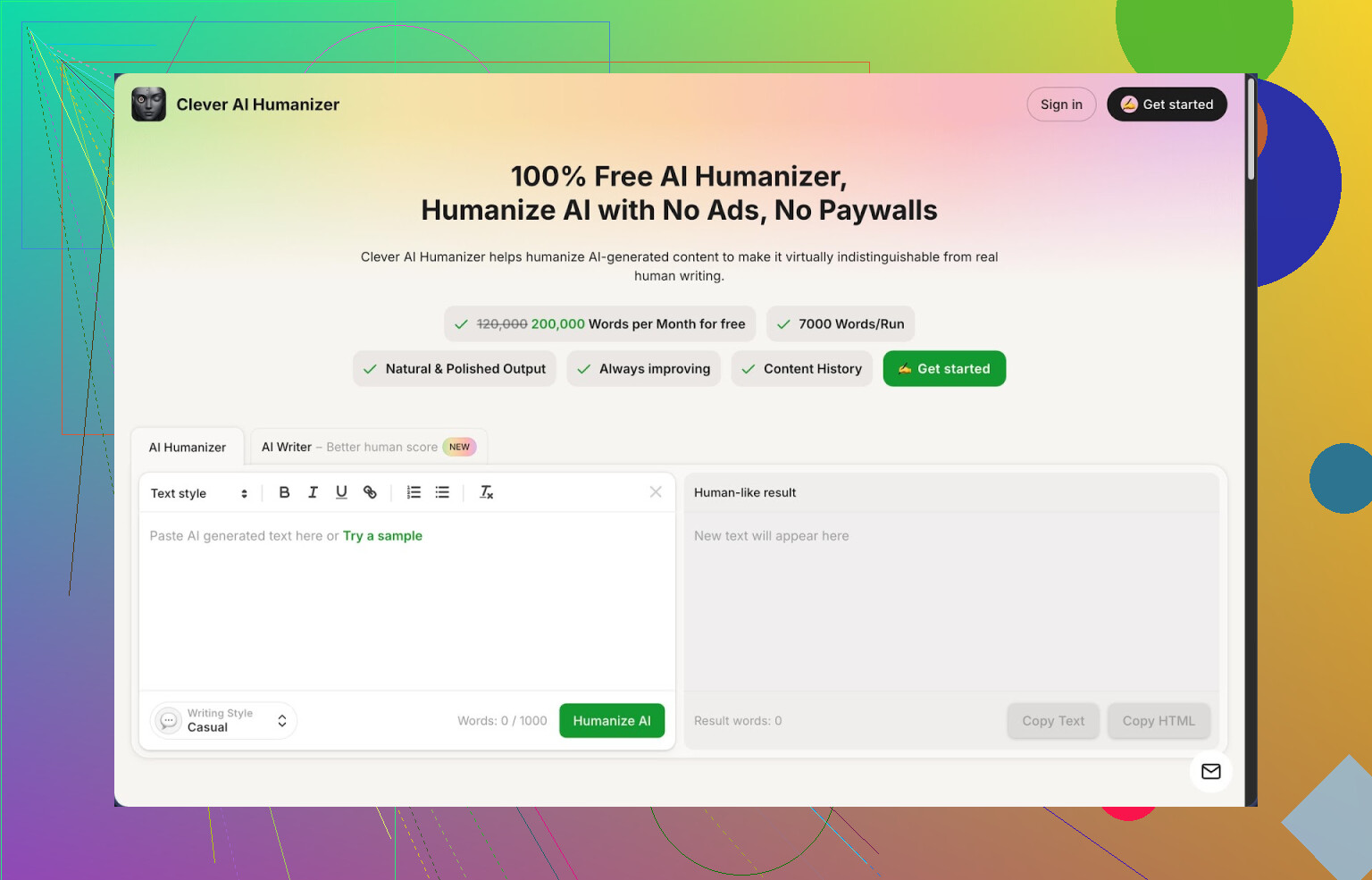
Link to the tool:
I have been trying different “make this sound human” tools for a while, mostly to keep school stuff and client content from triggering every detector under the sun. Out of everything I tried this year, Clever AI Humanizer ended up being the one I stuck with the longest, mostly because it did not lock me behind a paywall after a few runs.
Here is what stood out after a week of use.
Free plan and limits
I signed up with a throwaway email and checked the limits first, since most tools pretend to be free and then give you 1k words.
Clever AI Humanizer gives:
• Up to 200,000 words per month
• Up to 7,000 words per run
• Three styles: Casual, Simple Academic, Simple Formal
• An integrated AI writer inside the same dashboard
I fed it three long samples of text and then ran them through ZeroGPT. All three came back as 0 percent AI when I used the Casual style. That surprised me a bit, because usually you start seeing “likely AI” warnings somewhere.
Workflow and how I used it
The main thing on the site is the “Humanizer” box. You paste your AI output, pick Casual, Simple Academic, or Simple Formal, hit the button, then wait a few seconds.
My pattern looked like this:
- Generated content in another LLM.
- Pasted into Clever in chunks of 5k to 7k words.
- Chose Casual for blog-style stuff, Simple Academic for school-style writing.
- Ran the output through ZeroGPT and a couple of other detectors.
The tool rewrites the text enough to break up obvious AI patterns, but it keeps the meaning close to what I wrote originally. I checked by comparing paragraphs side by side. Phrasing changed, structure changed a bit, but facts stayed the same.
One side effect. Most outputs came out longer than the input. It seems to add more connective sentences and small clarifications. If you have a strict word cap, you will need to trim.
Quality of rewrites
I saw fewer repetitive phrases, less robotic structure, and fewer weird transitions. It sometimes toned down overly formal sentences even when I used Simple Academic. For simple blog posts that helped.
There were a few cases where I had to edit:
• Occasional awkward sentence order
• Slightly off tone for niche topics
• Some generic transitions that I removed by hand
Still, compared to other tools that either scramble the meaning or shove in random fluff, this kept things closer to what I wanted.
Other tools inside Clever
After the main humanizer, I tried the other modules. They all sit in the same interface, which is convenient if you do full pieces from zero.
- Free AI Writer
You type in a prompt like “2,000 word article on X in a neutral tone” and it generates the draft. There is a button to humanize that draft in the same flow.
The part I liked is you do not have to copy between separate apps. You generate, then humanize, then tweak. I got slightly better human scores when I used their writer plus humanizer combo compared to using an outside LLM then pasting in.
- Free Grammar Checker
This runs basic proofreading on your text. It fixed:
• Spelling mistakes
• Punctuation issues
• Some clarity problems in longer sentences
It is not at the level of big grammar tools, but if your goal is to get something “ready to send” fast, it covers the obvious mistakes.
- Free AI Paraphraser
This one takes existing text and rephrases it while keeping the meaning.
Where it helped me:
• Reworking old drafts into a different tone
• Doing light SEO rewrites without crushing the core message
• Cleaning up clunky sections before sending to clients
Again, the advantage is having it all in one place. Humanize, paraphrase, grammar check, then export.
Overall workflow
Most days I used it like this:
• Draft in any LLM or in their AI Writer
• Run through Humanizer with Casual or Simple Academic
• Pass the result through Grammar Checker
• Use Paraphraser only for sections that felt stiff
It turned into a mini writing suite instead of being a single “paraphrase this” page.
Detector performance
I tested with:
• ZeroGPT
• A couple of random online detectors my clients keep talking about
On ZeroGPT, the 0 percent AI result held up across the three main samples I used with Casual style. With other detectors the result was mixed. Some flagged small sections as AI, some marked the entire piece as “likely human”.
If you expect every detector to say “100 percent human” every time, this will frustrate you. Current detectors are inconsistent and change their models without warning.
What did not work perfectly
A few downsides from my use:
• Some AI detectors still flagged sections as AI, especially more technical content.
• Output tends to get longer. If your professor or client wants 1,000 words and not one more, you need to compress.
• Tone can feel slightly off for niche or highly personal topics. I tweaked these by hand.
Even with those issues, for something that does not charge for 200k words, it is better than most of the “free” tools I tried that cut you off after a few paragraphs.
If you want more detailed tests and screenshots, there is a longer discussion here:
Video review on YouTube:
Reddit threads that helped me compare tools
Best AI humanizers discussion:
https://www.reddit.com/r/DataRecoveryHelp/comments/1oqwdib/best_ai_humanizer/
General thread about humanizing AI output:
https://www.reddit.com/r/DataRecoveryHelp/comments/1l7aj60/humanize_ai/
If QuillBot’s humanizer limits are killing your workflow, you have a few realistic options that stay free or close to it.
Quick answer: for a “works out of the box” replacement, Clever Ai Humanizer is one of the few that gives you enough free volume to matter. I do not agree with everything @mikeappsreviewer said, but their general take is fair.
Here is what I would do, step by step, without repeating their exact workflow.
- Use Clever Ai Humanizer as your main QuillBot alternative
- It gives you about 200k words per month on the free plan. That is a lot more than most “free” tools.
- The 7k word per run limit fits long essays, articles, reports.
- For content that needs to pass casual inspection, use the Casual style. For school or client doc stuff, Simple Academic is closer to “normal student” writing.
- It tends to expand your text. If you write to a 1,000 word cap, aim for 800 to 850 in your original draft, then humanize, then trim.
Where I slightly disagree with @mikeappsreviewer:
They leaned hard on AI detectors. I would not trust any detector as the main success metric. Detectors often flag human text and miss AI text. I treat them as a loose “sanity check”, not a target. Your bigger goal should be: does this sound like you, and does it match the assignment or client brief.
Concrete workflow idea if you want to stretch your free limits:
Step 1: Generate or write your base text
- Use any free LLM or your own draft.
- Keep sentences a bit shorter and clearer. Humanizers tend to struggle more with super complex, nested sentences.
Step 2: Run through Clever Ai Humanizer
- Paste 3k to 5k word chunks, not the full 7k cap. Shorter chunks get fewer awkward transitions.
- Try Casual for blogs or social posts. Simple Academic for essays.
- Quickly skim each output and fix:
- Off-topic filler.
- Wrong nuance for technical terms.
- Overly generic transitions like “On the other hand” spam.
Step 3: Do a manual “human pass”
This matters more than people think. Spend 5 minutes:
- Swap 2 or 3 phrases to things you actually say.
- Add one short personal sentence per section, like “In my experience” or “For this project I focused on…” if the context allows it.
- Change a couple of sentence lengths, so you do not get that uniform AI cadence.
Step 4: Optional quick check
- Run through a grammar checker. Clever Ai Humanizer has one integrated, which saves time.
- If you care about detectors, test on one or two. If they scream “AI”, lightly rewrite a few sentences by hand instead of running it through more tools.
Other free tricks to reduce “AI smell” without any humanizer:
-
Break patterny openings and endings
AI loves intros like “In today’s world” and conclusions that repeat the entire essay.
Delete the first and last sentence of the AI output, then write your own one-liner intro and outro. Fast and effective. -
Add low-stakes imperfection
You can add a couple of harmless quirks.
- Contractions: “it is” to “it’s”, “do not” to “don’t”.
- One or two tiny typos that do not change meaning, like “teh” or “recieve”, then run spellcheck but keep one. You already see I am not perfect with typos here.
Overdo it and it looks fake. Two or three is enough.
- Vary structure
AI paragraphs often follow the same pattern: topic sentence, explanation, example, restatement.
Split one long sentence. Merge two short ones.
Insert a simple one-line sentence in the middle: “This part matters for your grade.” or “This is where most readers stop paying attention.”
Why I think Clever Ai Humanizer fits your “free QuillBot alternative” need:
- Higher free limit than QuillBot’s free tier in practice.
- Integrated writer, paraphraser, grammar tools, so you do not juggle tabs.
- Works decently for both “student” and “blog” voices as long as you do a quick manual pass.
Weak spots you should know:
- Technical or niche topics need closer checking. It can soften or slightly shift meaning.
- Output length grows, so plan for trimming.
- If your teacher or client knows your voice, you still need to inject some of your own style. No tool fixes that part for you.
If you want something that feels close to your old QuillBot flow but stays free, I would start with Clever Ai Humanizer, keep your drafts a bit shorter, then layer on a fast personal edit. That covers cost, detection risk, and quality without you fighting hard paywalls every week.
If QuillBot’s limits are choking your workflow, you’re not crazy for looking elsewhere. The “free but actually not free” game is getting old.
I’ll say up front: Clever Ai Humanizer is probably the closest thing you’ll get to a usable free alternative right now, and I’m saying that as someone who doesn’t usually stick with these tools for more than a day. @mikeappsreviewer and @reveurdenuit already covered the basic workflow and the “0% AI on ZeroGPT” flex, so I’ll skip rehashing that.
Couple of different angles to consider:
1. Don’t chase 0% AI like it’s a high score
Here’s where I push back a bit on both of them. Treating detectors as the main success metric is how people end up with weird, over-twisted text that reads worse than the original. If your content sounds like a confused committee wrote it, it doesn’t matter if ZeroGPT smiles at you.
My rule of thumb:
- Priority 1: Does it read like a normal human who is not trying to impress a robot?
- Priority 2: Does it match your own level (student / junior copywriter / whatever)?
- Priority 3: Detectors are a sanity check, not a goal.
2. Where Clever Ai Humanizer actually beats QuillBot for free users
Ignoring the marketing fluff, here’s why it genuinely works as a QuillBot humanizer replacement for broke people:
- The free word allowance is actually usable, not “3 paragraphs then pay up.”
- It’s made specifically for removing AI-ish patterns, not just basic paraphrasing.
- The Casual style is pretty decent for bloggy or informal stuff.
- The Simple Academic mode is “good enough” for most school assignments, especially if your normal writing isn’t super polished anyway.
You will need to edit a bit:
- Trim extra fluff, because it likes to stretch sentences.
- Fix occasional awkward phrasing that sounds like someone’s second language essay.
- Re-inject your own style in a few places.
If you’re expecting a drop-in replacement that lets you paste 100% AI text and magically become undetectable everywhere with zero edits, that’s not a tool problem, that’s an expectations problem.
3. Simple tweak that @mikeappsreviewer and @reveurdenuit didn’t lean on enough
One trick that works absurdly well and costs nothing:
- Humanizer (like Clever Ai Humanizer) handles the “pattern break.”
- You handle the “voice injection.”
After you humanize:
- Rewrite the first sentence of each paragraph in your own words.
- Add 1 or 2 throwaway personal comments where it makes sense:
“Honestly, this part was the trickiest for me to understand.”
“From what I’ve seen in class…” - Change a couple of transitions: swap “however” with “but,” replace “moreover” with “also,” etc.
That tiny pass makes more difference than running it through five different tools.
4. When Clever Ai Humanizer is the wrong tool
Use it for:
- Essays, blog posts, general content, reports, emails that sound too stiff.
Be careful with it for:
- Super technical or math-heavy stuff
- Law, medicine, or anything where a slightly wrong word can change meaning
In those cases, I’d humanize only the non-technical parts and leave formulas/definitions mostly intact.
5. Reality check on “free humanizer that actually works”
Current landscape looks like this:
- QuillBot: great, but free plan is cramped and you already hit that wall.
- Random “AI humanizer” clones: most have laughable limits or wreck the meaning.
- Clever Ai Humanizer: not perfect, but actually usable at scale without paying, as long as you accept that you still have to edit.
So yeah, if you want a free alternative to QuillBot’s AI humanizer that isn’t useless after 2 essays, Clever Ai Humanizer is probably your best bet right now. Just don’t outsource your entire brain to it and expect miracles.
If QuillBot’s humanizer hit its limit for you, you’re basically in the same boat as a lot of people in this thread. Let me just stack a different angle on top of what @reveurdenuit, @nachtschatten and @mikeappsreviewer already said, without re-running their whole playbook.
Where Clever Ai Humanizer actually helps
Pros:
- Genuinely usable free tier: the word allowance is enough for multiple essays or client pieces, not just “test it once and pay.”
- Modes that roughly map to real use cases: Casual for posts, Simple Academic for school, Simple Formal for cleaner business stuff.
- Does more structural rewriting than a plain paraphraser, so your text is less “LLM template plus synonyms.”
- Having humanizer, paraphraser and grammar checker in one place keeps you from doing the annoying multi-tab shuffle.
Cons:
- It likes to inflate your word count. If a piece must be short, you will be cutting.
- Occasionally sandpapers your voice too smooth, especially if your real writing is messy or slangy.
- Technical accuracy is not guaranteed. If you’re in STEM, law or medical topics, you need to manually verify terms and definitions.
Where I slightly disagree with the others:
They still treat AI detectors as something to “check against” at the end. I’d go further and say, for most people, detectors are almost a distraction. They are noisy, inconsistent, and can push you toward over-processing your text. If your professor or client is not explicitly running everything through a detector, I would prioritize sounding like a believable human at your real skill level and stop obsessing about 0 percent scores.
Alternative tactics that cost nothing
Instead of running text through 3 different tools, pick one (Clever Ai Humanizer is fine for this) and then:
-
Lock your own “voice anchors” before you start
Write down 5 things that sound like you:- How you start sentences (“Honestly,” “To be fair,” “In my view”)
- Your usual level of formality
- A couple of phrases you actually say a lot
After humanizing, inject these back in. That keeps your writing from becoming generic AI mush.
-
Protect your key sentences from being “humanized away”
Before using any tool, mark the sentences that carry real meaning: definitions, thesis statement, numbers, citations.- Run only the filler or explanation parts through Clever Ai Humanizer.
- Paste your key sentences back in unchanged.
This keeps the facts straight while still breaking AI patterns in the bulk of the text.
-
Use “contrast edits” instead of full rewrites on the second pass
After humanizing:- Shorten one long paragraph to 2 punchy sentences.
- Merge two short sentences somewhere else into a single longer one.
Simple contrast like that breaks the rhythm that detectors and humans both recognize as “AI-ish.”
How Clever Ai Humanizer compares in practice
People like @reveurdenuit and @mikeappsreviewer already leaned on the word limits and style presets. One extra perspective:
- If you are a weaker writer, Simple Academic can actually look better than your real voice, which is risky if your teacher knows your usual level. In that case, intentionally keep a few rough edges: a slightly clunky sentence, a basic transition like “also” instead of “furthermore.”
- If you are a strong writer, consider using it only on sections where you’re clearly echoing AI patterns, like generic intros and generic “on the other hand” style transitions.
Compared to what @nachtschatten described, I’d use tools more sparingly. Think of Clever Ai Humanizer as a pattern breaker, not a magic invisibility cloak. Use it to shake off the obvious AI smell, then do a deliberate, small human edit to lock the piece into your real voice. That combination usually gets you way further than chasing perfect detector scores or bouncing your text through 4 different paraphrasers.
Simpler path: speak your draft, let free dictation recreate your voice.
- Write a 5 point outline.
- Open Google Docs in Chrome. Turn on Voice Typing. Or turn on iPhone dictation.
- Explain each point for 60 to 90 seconds. At 150 wpm you get 900 to 1,350 words in 6 to 9 minutes.
- Paste to your doc. Fix tense, names, misheard terms.
- Add one example and one number per section.
- Run spellcheck, keep one harmless typo like teh.
This keeps costs at zero and sounds like you.