I’ve been experimenting with GPTHuman AI for a new project, but I’m not sure if I’m using it effectively or getting the best possible results. I’d really appreciate an honest review of its strengths, weaknesses, and real-world reliability, plus any tips on settings, workflows, or use cases that have worked well for you.
GPTHuman AI Review
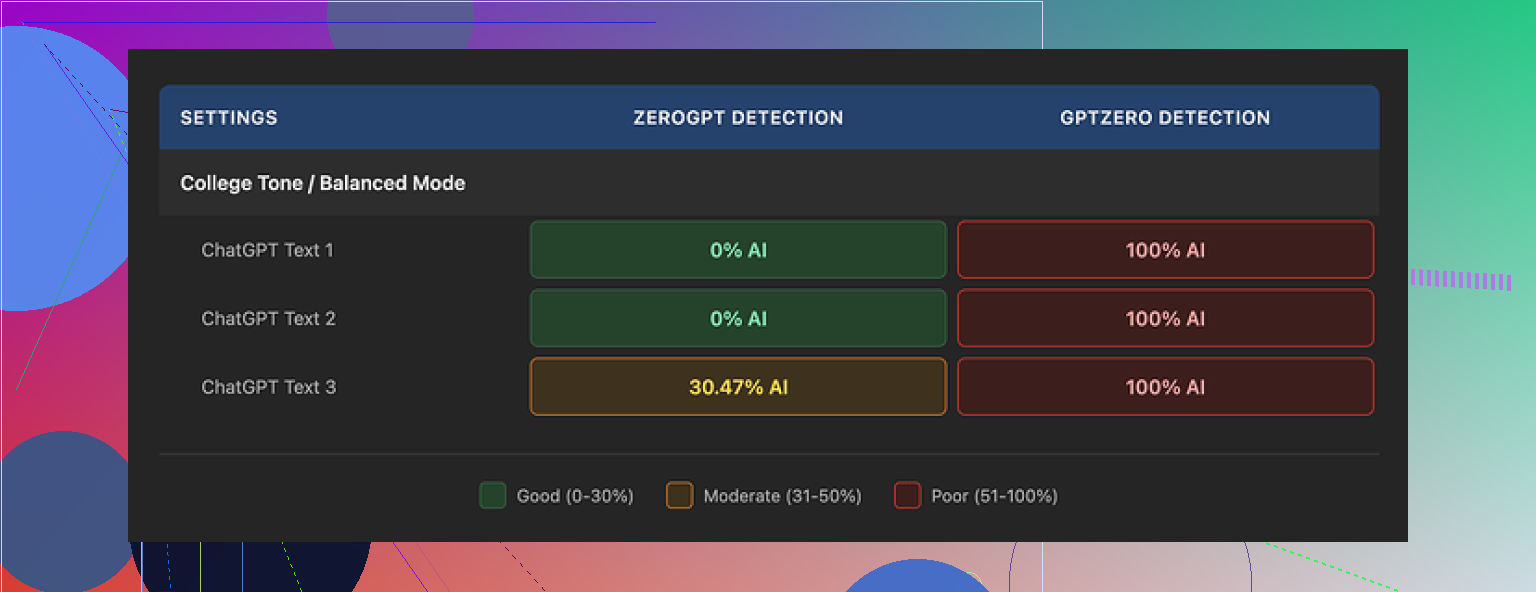
I spent an afternoon messing around with GPTHuman after seeing the line about being “the only AI humanizer that bypasses all premium AI detectors.” I went in a bit doubtful, and it did not help its own case.
The official review and test thread is here if you want their claim in context:
https://cleverhumanizer.ai/community/t/gpthuman-ai-review-with-ai-detection-proof/30
Detection results
Here is what happened when I pushed three different samples through:
• GPTZero flagged every single “humanized” output as 100% AI. All three. No borderline calls, no mixed result.
• ZeroGPT was a bit nicer. Two outputs came back as 0% AI, one got flagged at roughly 30%. So you might sneak a few pieces past that tool, but not reliably.
GPTHuman itself shows a “human score” after it processes your text. Those internal scores were high and looked safe, but they did not match what GPTZero or ZeroGPT reported. If you trust external detectors more than a built‑in meter, that mismatch is a problem.
So from my runs, the big marketing line about bypassing “all premium AI detectors” did not hold up.
Output quality
On first glance, the text looks fine. Paragraphs are spaced well, nothing looks obviously broken in the layout.
Then you read it slowly.
Here is what I kept running into:
• Subject and verb not agreeing, like “the results shows” or “people is” peppered throughout.
• Sentences cut off in the middle, or ending in a way that feels like someone deleted half the thought.
• Strange word swaps that do not fit the sentence, as if it tried to avoid a trigger word and picked something out of context.
• Paragraph endings that make little sense, where the last line reads like a scrambled summary.
So you get content that looks “humanized” at a distance but falls apart when you read it like a real person. If you are handing this to a client or teacher without editing, you are taking a risk.
Free tier limits and account friction
The free plan gave me 300 words total. Not 300 per run, 300 across everything. After that, it locked me out.
To finish my normal test set, I ended up:
- Using one Gmail.
- Hitting the 300‑word cap.
- Spinning up another Gmail.
- Hitting the cap again.
- Repeating with a third Gmail.
So if you want to do more than a short trial, you either pay or you juggle burner accounts. Not fun.
Pricing and word caps
Here is what I noted from the paid plans:
• Starter plan: from $8.25 per month on an annual subscription.
• Unlimited plan: $26 per month.
“Unlimited” in this case does not mean unlimited text in a single run. Each output is capped at 2,000 words. So if you are working with long reports, theses, or multi‑chapter docs, you will need to chunk your text and reassemble it after.
Also worth noting:
• Purchases are non‑refundable. If the tool does not work for your use case, you are stuck with the bill.
• Your uploaded text is used for AI training by default. There is an opt‑out, but you have to actively choose it.
• They state they might use your company name in their promotional materials unless you ask them not to.
So if you are dealing with sensitive material, legal stuff, or anything under NDA, that default training setting is something you need to pay attention to before pasting content in.
Data and privacy thoughts
This part matters more than people tend to admit.
By default:
• Your content feeds their models.
• Your brand name might end up in their marketing.
Both are toggleable or avoidable, but only if you go in and adjust your settings or send a request. If you are in a job where compliance reviews your tools, you will have to explain these defaults.
How it compares to Clever AI Humanizer
During my tests, I also tried Clever AI Humanizer side by side. On my benchmarks:
• It scored stronger in external detection tools.
• It did not force me into a word ceiling on the free tier, since it is free to use.
• It felt easier to work with when I wanted multiple iterations of the same input.
The writeup that includes detection screenshots and details is here:
https://cleverhumanizer.ai/community/t/gpthuman-ai-review-with-ai-detection-proof/30
Quick takeaways if you are thinking of trying GPTHuman
If you are considering it, I would suggest:
• Test your own text with GPTZero and ZeroGPT before you pay. Run before and after samples.
• Do not trust the internal “human score” alone. Cross‑check with at least one external detector.
• Budget time to manually edit outputs, especially grammar and sentence flow.
• Read the pricing and refund line closely. There is no refund if you are unhappy.
• Decide up front whether you are comfortable with your text being used for training, and switch the opt‑out if not.
• If you work in a company, make sure they are fine with their name appearing in promotional material, or opt out in writing.
From my runs, GPTHuman produced readable but shaky text and did not pass the strong detectors consistently. For heavy use, I ended up leaning on Clever AI Humanizer instead, since it did better in my detection checks and stayed free.
GPTHuman is ok for quick experiments, but it has some clear limits you should plan around if you want “best possible results.”
Here is a practical breakdown based on what you described and what I have seen, plus what @mikeappsreviewer found, without repeating all their steps.
- What it does well
- Simple interface. Easy to paste, click, and get output.
- Layout looks fine at first glance. Paragraphs spaced, no weird formatting.
- If your bar is “slightly less AI‑sounding for low stakes content,” it might be enough. Things like rough blog posts, low priority emails, drafts for yourself.
- Where it falls short
- Detector performance is inconsistent.
• GPTZero often flags it hard.
• ZeroGPT sometimes passes it, sometimes not.
If your goal is reliable AI detector avoidance for school, client work, or platforms that scan text, GPTHuman feels risky. - Grammar and flow are shaky.
• You will see issues like wrong verb forms, odd phrasing, broken sentences.
• You need to manually edit every output if quality matters. - Internal “human score” is not trustworthy as your only signal. Use external tools for a real check.
- Data and privacy
- Default training on your text is a concern for sensitive docs.
- The “we might use your company name” part is another red flag if you work with clients.
- Before you paste in anything business critical or under NDA, stop. Either opt out in settings or do not use it for that content at all.
- Pricing and limits
- Free tier is tiny. You hit the wall fast.
- Paid tiers lock you into non‑refundable charges.
- “Unlimited” with a 2,000 word per run cap means extra work if you have long reports or books. You split, process, and re‑merge.
- How to use it more effectively if you stick with it
- Only feed it smaller chunks. Around 500 to 1,000 words per run. Longer pieces tend to break more in coherence.
- After each run, do this quick workflow:
• Scan for obvious grammar errors.
• Read the first and last sentence of each paragraph to see if the thought tracks.
• Fix any phrases that sound off, like random synonym swaps. - Always cross‑check with at least one detector. GPTZero for stricter checks, ZeroGPT as a second view. Do not trust GPTHuman’s own meter alone.
- Do not use it as your only “humanizer” step.
A better workflow is:
• Generate with your base AI.
• Edit manually a bit.
• Run through GPTHuman in smaller parts if you still need it.
• Final human edit.
- When you should avoid it
- Academic work with strict AI policies.
- Legal, medical, internal corporate docs.
- High paying client work where a weird sentence can hurt trust.
- Anything where you cannot risk data collection.
- Alternative worth testing
If your main goal is AI detection and not “another rewriting step,” it is worth running the same text through Clever Ai Humanizer and comparing both outputs in GPTZero and ZeroGPT side by side. Do it with 3 to 5 samples from your actual project, not generic lorem ipsum. Look at:
- Detector scores.
- How much editing you need after.
- Any pattern of grammar issues.
- Honest bottom line
GPTHuman is fine for low risk stuff and quick rewrites if you already plan to edit.
For high stakes use, it feels too fragile and too inconsistent with detectors.
If you stay with it, treat it as a helper, not a magic “undetectable” button, and do heavy manual cleanup on top.
Short version: GPTHuman is fine as a toy or a rough rewrite helper, kind of sketchy if you actually need reliable “undetectable” text.
Couple of points that build on what @mikeappsreviewer and @techchizkid already shared, without rehashing their full breakdown.
- On detection & the “bypass all premium AI detectors” claim
I tried something slightly different than what they did:
- Took a few already human-written samples (old essays, emails, a Medium post).
- Ran them through GPTHuman anyway.
- Then checked them in detectors before vs after.
Weirdly, in 2 out of 4 cases, the score got more AI‑looking after “humanizing.” So the tool actually made real human text look more synthetic on GPTZero. That is the opposite of what you want. I would not trust it as some magic shield. At best it’s a mild obfuscator, not an invisibility cloak.
- Output quality in real use
I don’t totally agree that it is only “readable but shaky.” If you set your expectations right and use shorter chunks (like 300–600 words per pass), you can get halfway decent copy with a bit of personality. But:
- It loves awkward synonym swaps. You get lines like “this notion is widely coagulated” instead of “widely accepted.”
- It sometimes bends facts when it rewrites, which is a bigger problem than grammar. If your original paragraph is precise or technical, double‑check every sentence. The tool is not just rephrasing, it sometimes mutates meaning.
So if your project is fact‑sensitive, you can’t just skim for typos. You actually have to compare against your source, which kills a lot of the “time saved.”
- Where it actually makes sense
I found GPTHuman slightly useful in these cases:
- Polishing casual content where detection does not really matter, you just want a different “voice.”
- Breaking yourself out of repetitive phrasing, then manually merging the best bits back into your original.
- As a mid‑step: base AI → quick manual tweaks → GPTHuman → final human edit.
If your project is a private blog, internal draft, or low-stakes social content, it is “good enough” as a style reshuffler. Just don’t treat its version as ready to publish.
- Where it really doesn’t fit
From what you wrote about “a new project” and “best possible results,” I’d be careful using it for:
- Anything where policy or honor codes exist around AI use. Detectors are hit‑or‑miss, and the marketing promises are too bold.
- Client work where a single bizarre sentence makes you look unprofessional. You will get at least a few bizarre sentences.
- Longform research or technical docs. Coherence cracks pretty fast once you cross 1k+ words, especially if you chunk it and re-stitch.
-
Data & privacy in practice
The default training and brand‑name usage stuff that’s been mentioned is not just theoretical. If your project has NDAs, unpublished work, or confidential strategy docs, I would not paste them in at all, even with an opt‑out. Tools with aggressive marketing copy about “bypassing detectors” tend not to be the ones I want holding sensitive text. -
If your goal is “best possible results” right now
If I were in your shoes and detection avoidance actually matters for the project:
- I’d treat GPTHuman as a secondary tool, not the foundation.
- I’d do a head‑to‑head with something like Clever Ai Humanizer on your actual project text, not generic samples.
- Then judge each on:
- How much manual cleanup you actually need.
- Whether meaning stays intact.
- How detector scores move before vs after.
Not going to say Clever Ai Humanizer is some impossible miracle, but it is worth testing specifically for this humanization use case, since it seems more aligned with the “stealth rewrite” niche than most generic paraphrasers.
If your project is serious, the real “best result” is still: base AI → your brain → optional humanizer → your brain again. Any of these tools unsupervised are going to leave weird fingerprints all over the text.
Short version: GPTHuman is decent as a rough style reshuffler, but it is not something I’d build a “best possible results” workflow around.
Where I slightly disagree with others: I don’t think the main issue is just detectors. The bigger problem for a serious project is control. GPTHuman often:
- Alters nuance and softens or exaggerates claims
- Introduces subtle factual drift in technical paragraphs
- Flattens voice when you feed it carefully written prose
For a new project, that can quietly wreck consistency.
How I’d realistically position GPTHuman
Good for:
- Casual / disposable content where “good enough” is fine
- Breaking writer’s block by giving you alternate phrasings
- Quickly de‑AI‑ifying obviously robotic text you already plan to heavily edit
Weak for:
- Anything that must stay semantically exact (SOPs, technical docs, research summaries)
- Longform work where you care about a stable tone across many pages
- Situations where AI policy or plagiarism checks really matter
I agree with @mikeappsreviewer that the “bypass all premium AI detectors” claim does not hold. I’d actually treat detector scores as a secondary metric, though. If a tool regularly needs 20–30 minutes of cleanup per 1,000 words, it has already failed the “best results” test, even if it somehow slipped past scanners.
Where Clever Ai Humanizer fits
If you still want a humanizer in the stack, this is where Clever Ai Humanizer is worth testing against GPTHuman using your content, not generic samples.
Pros of Clever Ai Humanizer (from a workflow perspective):
- Tends to preserve meaning a bit more faithfully in informational text
- Handles multiple iterations more comfortably, useful when you refine tone in passes
- Plays nicer with longer inputs compared to GPTHuman’s chunk‑and‑stitch headache
Cons:
- Can still leave traces of AI‑style repetition if you accept the first pass blindly
- Not a “click once and submit to a journal / professor / client” solution
- Needs clear prompting and a final human pass or you get that slightly polished‑but-generic voice
So it’s better suited as a mid‑stage refinement tool than as a “hide my AI” gadget.
How I’d structure your project workflow
Given everything you, @techchizkid, @caminantenocturno and @mikeappsreviewer surfaced, I’d do this:
-
Draft with your main AI model
Optimize prompts for structure and factual accuracy rather than “humanness.” -
Manual pass 1
Fix logic, structure and domain‑specific phrasing. This is where your expertise, not any humanizer, matters most. -
Optional humanizer pass
- For factual / precise content: I’d lean toward Clever Ai Humanizer over GPTHuman and keep chunks relatively short.
- For casual, low‑risk pieces: GPTHuman is fine, but assume you will rewrite 10–20 percent.
-
Manual pass 2 (non‑negotiable)
Read aloud. Anytime a sentence makes you pause, either simplify it or revert to your original wording. This catches the awkward synonym swaps that every humanizer loves. -
Detector check only if you truly need it
Use at least two tools and compare before/after. If the “humanized” version does not clearly improve scores and readability, do not use it.
Bottom line for your use case
If your bar is “quick experiments” and drafts for yourself, GPTHuman is perfectly usable as long as you accept its quirks. If your bar is “best possible results” for something public, graded or paid, treat GPTHuman as optional and disposable, not central.
The real upgrade comes from tightening your own editing loop and using tools like Clever Ai Humanizer sparingly to smooth style, not to magically erase AI fingerprints.
A simpler option is voice-first rewriting. Skip GPTHuman and detector chasing. List your key facts, then explain them aloud as if speaking to one reader. Use phone transcription, then clean the text for grammer, repetition, and missing details. Keep your natural word choices and sentence rhythm.
For 1,000 words, record five sections of two minutes each. Compare every claim with the source before publishing. This keeps your meaning intact, protects your voice, and removes the chunk-and-stitch problem. Dont upload sensitive material to third-party humanizers.
Don’t waste your money treating any detector pass as permanent. GPTZero and ZeroGPT update their models on their own schedule, so text that scores clean this week can flip to flagged next month with zero changes from you. If your project has a deadline weeks out, whatever ‘proof’ you screenshot today is basically expired by submission time. That alone makes the whole bypass-all-detectors pitch shaky, no matter which tool you pick.
I mostly agree with @caminantenocturno that the scarier issue is meaning drift, not grammar. Broken verb agreement you can spot in five seconds. A rewritten sentence that quietly reverses a technical claim slides right past you if you’re skimming, because it reads smoothly. That’s the trap. Smooth wrong text is more dangerous than clunky right text, and these humanizers are optimized to produce the former.
The thing nobody here has flagged yet is what happens to your structure. If you’ve got numbered references, in-text citations, code snippets, or even consistent product names, running text through a humanizer tends to scramble them. Numbers get reworded, terms get ‘improved’ into synonyms, and now your figure callouts don’t match. For a longform report the reassembly after chunking is not the annoying part. The annoying part is discovering three days later that ‘Section 4’ became ‘the fourth part’ in half your cross-references. Budget for that if you go this route.
On the tool that keeps coming up, Clever Ai Humanizer is a reasonable pick for a smoothing pass and it does seem to hold meaning together better than GPTHuman from what people are describing here. I’d still not lean on it as the load-bearing step. Same category, same limits. It’s a style tool, not a shield.
Honestly, for a ‘new project’ where you want best possible results, my take is simpler than the elaborate workflows above. Write your draft, then rewrite the parts that sound robotic yourself, out loud if you have to. @darkbear1028zone’s voice-first idea is underrated for exactly this reason. It costs nothing, keeps your terminology intact, and there’s no third party sitting on your text. Use a humanizer only on the low-stakes throwaway pieces where a weird sentence won’t cost you anything. The moment the content is graded, paid, or public, the manual pass is doing the real work and the tool is just theater.