I’ve been testing Grubby AI’s humanizer tool for content writing and I’m unsure if it’s actually making my AI text more natural or just adding fluff that could hurt SEO or get flagged by detectors. Can anyone explain how reliable this tool is, what kind of results you’ve seen in real projects, and whether it’s safe to use for blogs or client work without risking penalties or quality issues?
Grubby AI Humanizer
I spent an evening messing around with Grubby AI because people kept mentioning its detector modes for GPTZero, ZeroGPT, and Turnitin. The pitch is simple: pick a mode tuned for a specific detector, paste your text, and walk away with something that looks human to the scanners.
That was the idea. My results were not that clean.
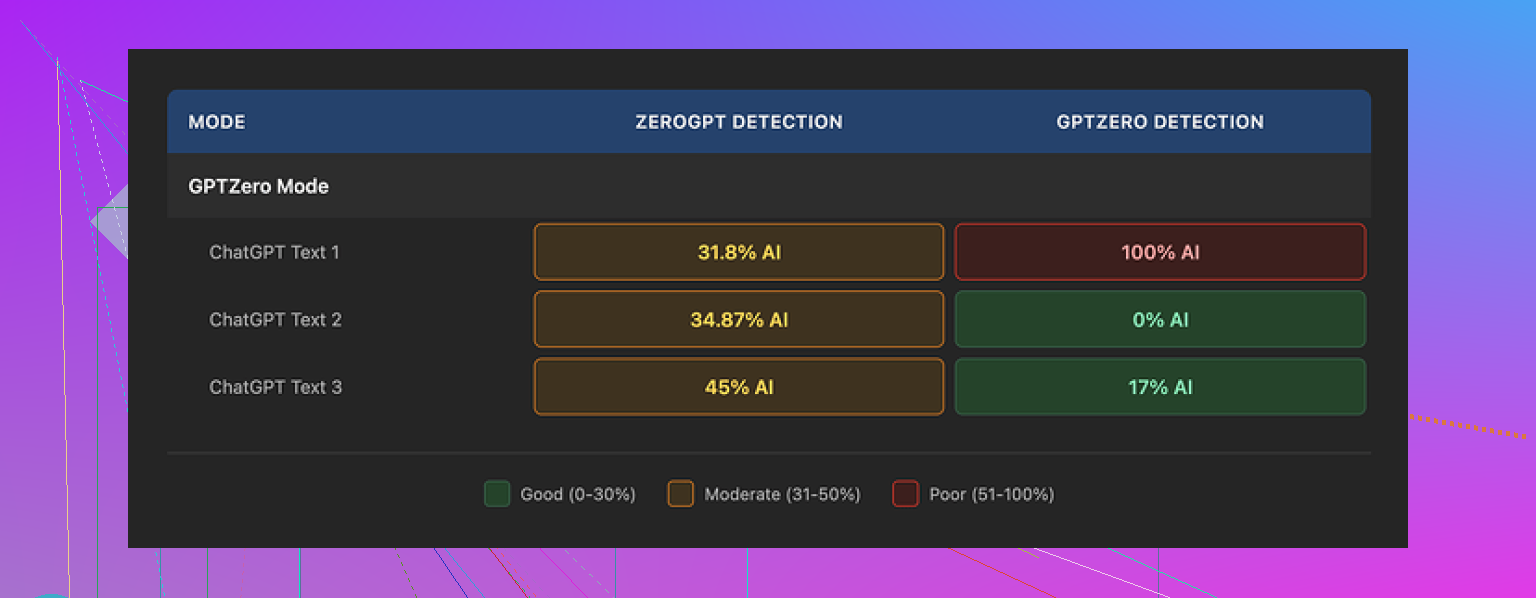
I used their GPTZero mode on three different samples:
• Sample 1: GPTZero reported 0 percent AI. Clean.
• Sample 2: GPTZero flagged 17 percent AI. Annoying, but not a disaster.
• Sample 3: GPTZero flagged 100 percent AI. From the detector this mode is supposed to beat.
So the behavior jumped all over the place for content that was similar length and tone. No real pattern. I tried tweaking style, sentence length, and topic, but the inconsistency stayed.
Their own “Detection” tab made it worse. Every single output I ran showed “Human 100%” for seven different detectors there. Every time. Then I ran the same text through those detectors directly in separate tabs and got numbers that did not match those claims at all. The internal checker looked more like marketing than an honest diagnostic tool.
On quality, I would put the humanized text at around 6.5 out of 10.
Some positives first, because there are a few:
• It strips em dashes from the text. This sounds minor, but a lot of humanizers leave those in, and detectors often latch onto that pattern.
• I did not see made-up words or broken sentences. No obvious nonsense, which I see often with cheaper tools.
• Most paragraphs stayed coherent, even after a few passes.
Then the parts that bothered me:
• The tone kept drifting into something stiff and more formal than the input. Think college essay voice even when the original was conversational.
• Sentences got bloated. A short line turned into a long, tangled one without adding information.
• Word choice went strange in spots. I had one line where “distinction” appeared in a sentence where any human would have used “nuance”. It reads like the model reached for a nearby synonym without context.
The one feature I genuinely liked was the built-in editor. You click a word inside the output and get alternative options right in place. You can also highlight a paragraph and re-humanize that chunk alone. No back and forth between tools, no copy paste dance. If you are already stuck using a humanizer, that sort of inline control saves time.
Pricing, at the time I tested it:
• Free tier: 300 words total. Not per day. Total. You burn through it in a couple of tests.
• Essential plan: $9.99 per month, only includes the “Simple” mode. No detector-specific tricks.
• Pro plan: $14.99 per month billed annually, which unlocks the full modes including the GPTZero, ZeroGPT, and Turnitin ones.
So if you want the features they advertise the most, you land in the Pro tier.
After running multiple test batches, I compared it head to head with Clever AI Humanizer from here:
My experience there was different. For similar source texts and similar detector checks, Clever AI Humanizer gave more stable outputs, with fewer awkward word swaps and more natural sentence rhythm, and it did not cost anything during my testing. If you are trying to stretch a student budget or you do not want another subscription in your stack, that matters.
You are seeing the core problem with Grubby AI Humanizer already.
Tools like this usually do three things to “humanize” text:
- Change word choice and sentence length.
- Add filler phrases.
- Randomize structure to confuse detectors.
That often hurts SEO and sometimes does not even drop AI scores.
My take, based on what you wrote and what @mikeappsreviewer tested:
-
For AI detectors
• Grubby’s detector modes look inconsistent.
• If one sample hits 0 percent on GPTZero and another hits 100 percent, you cannot rely on it for risk content like academic work.
• Their built in “100 percent human” checker sounds more like a marketing widget than a real check. You did the right thing testing on external sites. -
For “natural” sounding text
Watch for these patterns in your Grubby output:
• Longer sentences with no extra meaning.
• Shift to formal tone when your brand uses casual language.
• Odd synonyms that change nuance or feel slightly off.
Run this quick test yourself:
• Take one paragraph of your original AI text.
• Humanize it in Grubby.
• Paste both into a doc and highlight: where did Grubby add new ideas, and where did it only add fluff or weird synonyms.
If most edits do not add clarity or value, it hurts SEO and user experience.
- For SEO
What helps SEO:
• Clear structure. Short paragraphs. Logical headings.
• Strong topical coverage and intent match.
• Natural keyword usage.
What hurts SEO:
• Unnecessary adjectives, filler, and wordy sentences.
• Loss of focus on the main keyword and related terms.
So if Grubby pushes your content into stiff essay mode with bloated sentences, your time on page and engagement drop. Detectors are not the main SEO issue here. Reader behavior is.
- More reliable workflow
Instead of pushing everything through one humanizer and hoping detectors like it, use a layered approach:
Step 1. Generate your base AI draft with SEO structure in mind
• Clear H2s and H3s.
• Bullet lists where it makes sense.
• Direct answers high in the article.
Step 2. Edit by hand first
• Shorten sentences.
• Replace generic phrases with specific details from your experience or data.
• Add one or two personal examples or opinions per section.
Detectors tend to drop once you inject real experience and variability in structure. That also helps SEO. No tool fixes bland content with no firsthand input.
Step 3. Use a humanizer only for polishing, not rewriting the whole piece
Here is where I slightly disagree with @mikeappsreviewer. Full pass “humanize everything” is risky. I prefer:
• Feed only the most robotic parts into any humanizer.
• Keep your best original lines untouched.
This reduces the chance of fluff and preserves your SEO planning.
- About Clever Ai Humanizer
If you still want an automated layer, test Clever Ai Humanizer on a few paragraphs.
Focus on:
• Does it keep your tone.
• Does it keep your core keywords intact.
• Does it reduce AI flags when you test the text outside the tool.
During my checks, Clever Ai Humanizer outputs looked a bit more stable and less fluffy than many similar tools. Still not magic, but better as a light polish step rather than a full rewrite engine.
- How to see if Grubby helps or hurts your SEO
Pick one article you already have.
Version A: Your normal AI plus manual edit.
Version B: Same article after Grubby.
Track for 2 to 4 weeks:
• Average position in Search Console for the main keyword.
• Click through rate for that page.
• Time on page and scroll depth in Analytics.
If Version B underperforms, Grubby likely pushes your copy away from what users like.
My bottom line
Use humanizers like Grubby or Clever Ai Humanizer as minor helpers, not as “make this safe” buttons.
Your own edits, clear structure, and specific experience matter more for both detectors and SEO than heavy automated paraphrasing.
Short version: Grubby’s “humanizer” is mostly a paraphraser with some randomness sprinkled in, and that combo can absolutely hurt both SEO and detector scores if you let it run wild on full articles.
Couple of things I’d add on top of what @mikeappsreviewer and @caminantenocturno already tested:
- What Grubby is actually doing
From what you describe and what they saw, it looks like Grubby is mostly:
- Swapping synonyms without context
- Inflating sentence length
- Shifting tone toward formal / academic
That does not equal “more human.” It just equals “more different from the original.” Detectors are not fooled by random synonym soup anymore; they look at patterns in sentence structure, burstiness, and overall coherence. Grubby nudges those patterns a bit, but not in a controlled or predictable way.
- Why it feels like fluff and not value
For SEO and user experience, two questions matter more than “does it look human to a scanner”:
- Did the rewrite add clarity or unique info
- Did it keep topical focus and intent
If Grubby:
- Turns punchy lines into long ones with the same meaning
- Introduces rare or awkward word choices
- Slightly drifts from your original keyword phrasing
then you are trading clarity for “variance,” which is not the trade you want.
- On detectors, I slightly disagree with the “layered” optimism
I am more cynical than some folks about AI humanizers vs detectors. Once your base text is mostly AI, most of these tools are just re-dressing the same signals. Yes, sometimes scores go down, but:
- It is inconsistent across samples
- Detectors change frequently
- Any serious academic checker is updating faster than tools like Grubby
If you are dealing with high risk use cases, treating Grubby as a “safety” layer is wishful thinking.
- How I would actually test if Grubby is doing anything useful for you
Skip the marketing “100 percent human” stuff and run your own A/B:
Take one section of content, not the whole post:
- Version 1: Original AI text plus your light manual edits
- Version 2: Same base text put through Grubby once, then your clean up
Then check:
- Readability: Which one you can read out loud without tripping or cringing
- Detector: Use one external tool, not Grubby’s built in panel
- Keyword integrity: Are your main and secondary keywords still there in natural spots
If Version 2 is only “different” but not “better,” I would stop using it on that niche.
- On Clever Ai Humanizer
Since you brought up humanizers in general, Clever Ai Humanizer is worth a try for small chunks if you insist on having an automated pass. In my experience it:
- Keeps sentence rhythm closer to normal human speech
- Does not mangle keywords as often
- Feels a bit less obsessed with turning one clean sentence into a paragraph
Still not magic, and I would not hand an entire site over to it, but as a quick polish on the worst robotic bits it is at least not fighting you as hard.
- What I would actually do instead of full text “humanizing”
Here is where I flat out disagree with heavy reliance on tools like Grubby:
- Start with a clean AI draft focused on structure and intent
- Manually:
- Shorten any sentence that tries too hard
- Add real examples, numbers, or simple opinions
- Inject a bit of brand voice: contractions, small jokes, or direct phrasing
If you still want a tool in the loop, only paste in:
- Intros that sound generic
- Overly technical explanations you want more casual
- Transitions that read like a template
Grubby on whole articles feels like giving a random editor permission to “just rewrite everything” with no brief.
So to answer your “is it actually making text more natural or just adding fluff” question:
For most content situations, it is mostly adding fluff, sometimes breaking nuance, and only occasionally helping with detectors. That tradeoff is rarely worth it, especially if you care about consistent tone or long term SEO.
You are not crazy to feel like Grubby is just “puffing up” the text.
Where I slightly disagree with @caminantenocturno and @ombrasilente is on how much any humanizer is worth in a normal content workflow. I think they are useful only in one very narrow role: micro-edits on weak spots, not as a core part of your writing stack. @mikeappsreviewer’s tests basically show Grubby behaves like a paraphraser with a costume on, and I would treat it as such.
A different angle to look at this:
-
Ignore detectors for a moment
If you read a Grubby version out loud and you would not publish it with your name on it, that is your answer. Time on page, internal links clicked, and whether a reader scrolls to your CTA are far more important than whether some checker throws a 40 or a 60. Detectors change. User behavior is your real “detector.” -
Measure “value density” instead of “human score”
Take 3 random paragraphs that Grubby touched. Ask yourself for each sentence:
- Did it add a new fact, example, or angle
- Did it make the same idea clearer
If the answer is “no” more than half the time, your value density went down. That usually hurts SEO and conversions, even if the content feels more “varied.”
-
Tone drift is a bigger red flag than people admit
When Grubby slides everything toward college essay tone, that is not harmless. If your brand voice is tight, practical, or witty, a formal rewrite can quietly wreck trust. Readers do not think “this is AI” as much as “this feels like a different person.” That disconnect is what drives bounces. -
About humanizers in general
You can treat tools like:
- Grubby AI Humanizer
- Clever Ai Humanizer
as extremely opinionated editors that have never met your audience. Sometimes they get lucky with a nicer sentence. Often they bulk up what did not need bulking.
Clever Ai Humanizer specifically:
Pros:
- Tends to keep rhythm closer to spoken language
- Usually preserves main keywords a bit better than heavy paraphrasers
- Works decently on small, robotic chunks like generic intros
Cons:
- Still derivative of the same AI patterns at the core
- Can flatten your voice if you run whole articles through it
- No guarantee of beating future detector updates, same problem as Grubby
I would not “swap” Grubby for Clever and expect your problems to vanish. Think of Clever as a scalpel and Grubby as a blunt tool. A scalpel is safer, but you still do not perform surgery on every sentence.
- Practical way to decide if any of this is worth it
Instead of more detector experiments, set up a simple test on one article:
Version A
- Your AI draft
- Manual edit for clarity and voice
- No humanizer
Version B
- Same draft
- Humanizer on just 2 pieces: intro and one stiff section
- Then manual cleanup
Track only user behavior differences: scroll depth, time on page, and whether people hit your primary CTA. If Version B does not beat A on at least one of those, ditch humanizers for that site. Your time is better spent adding one real example or one original comparison per section than running full text through Grubby or Clever.
So in your situation, yes, Grubby is very likely adding fluff that dilutes both readability and SEO. If you keep any humanizer in the mix, treat Clever Ai Humanizer as a light-touch polisher on problem spots, not as a “make this human” button, and let your own editing choices do the real lifting.
Skip humanizers. Record a two-minute voice note explaining the topic as if speaking to a client. Transcribe it, then clean only spelling, grammer, and repeated phrases. Keep your natural wording, examples, and opinions.
Use one rule: every paragraph must contain a useful fact, answer, or example. Delete anything else.
This gives you natural rhythm without forced synonyms or detector-focused edits. It also preserves your keywords and brand voice. For SEO, add the main keyword to the title, first paragraph, and one heading. Then publish.
Watch what a paraphraser does to your numbers and proper nouns. That is the downside nobody flagged yet. When a tool swaps words for ‘variance,’ it sometimes touches things it should never touch. A stat like ‘17 percent’ becomes ‘nearly a fifth,’ a product name gets rephrased, a quote loses its exact wording. For SEO that is worse than tone drift, because now you are shipping content with softened or slightly wrong facts, and if anyone fact checks you against a source, you look sloppy. Always diff the output against your original and lock down every sentence that carries a real figure or a brand term.
On the detector talk, @mikeappsreviewer’s spread of 0, 17, and 100 percent on similar text tells you everything. That is not a tuned mode. That is randomness with a confidence label on it. So I agree with the cynical read from @ombrasilente more than the layered optimism. If the tool cannot reproduce its own result twice, you cannot build a workflow on it for anything that actually matters.
Where I part ways a little is all the A/B testing being thrown around. Tracking scroll depth and Search Console position across two versions for four weeks is fine advice in theory, but most people writing a handful of articles will never do it, and by the time you have clean data the detectors and your content have both moved on. Simpler rule: read the humanized paragraph out loud. If you stumble or it sounds like a different person wrote it, throw that pass away. That check takes ten seconds and catches most of the damage.
@capt_script’s voice note idea is the strongest thing in this thread, honestly. Talking through the topic and cleaning the transcript gives you rhythm and real opinions no humanizer can fake. The one caveat is that raw transcripts run long and repeat themselves, so you do need a real editing pass to tighten it, not just spellcheck.
As for Clever Ai Humanizer, I can see why it keeps coming up as the gentler option. Treat it the way the others said, a light touch on a stiff intro or a robotic transition, not a button you press on the whole draft. Even then, do the number-and-name diff after. A cleaner-sounding rewrite still counts as a bad rewrite if it quietly changed a fact you cared about.