I’m trying to connect legacy serial devices to a modern Ethernet network and I’m confused by all the Serial to Ethernet technology options (device servers, converters, gateways, etc.). I’m not sure what hardware and protocols I actually need for reliable, low-latency communication and remote management. Can someone explain the practical differences, best practices, and what to watch out for so I don’t pick the wrong solution for my setup?
Short version: there are like 5 names for the same 3 things, and marketing makes it worse. Here’s the practical breakdown so you don’t buy the wrong toy.
1. The main hardware types
-
Serial device server / serial to Ethernet gateway
- Box with 1–16 serial ports (RS‑232/422/485) and Ethernet.
- Typical features: TCP server/client, UDP, virtual COM driver, web config, sometimes Modbus, SNMP, VLAN.
- Use when: you want each serial device reachable over the network by IP/port and maybe appear as a COM port on Windows/Linux.
- This is what most industrial people actually use.
-
Simple serial to Ethernet converter / adapter
- Cheap little box or dongle, often about the size of a deck of cards or smaller.
- Very basic: usually just a raw TCP socket to serial, sometimes only one mode, limited config, no advanced buffering or security.
- Use when: hobby / lab setup / one device / non‑critical.
- Watch out: crappy latency, dropouts under load, questionable power and EMI.
-
Protocol gateways
- For example: Modbus RTU to Modbus TCP, or old proprietary serial protocol to some fieldbus.
- They actually understand the serial protocol and convert it to another protocol, not just tunnel bytes.
- Use when: your application speaks a specific protocol and you do not want to rewrite the software.
- Watch out: gateway must support your exact protocol details and timing quirks.
-
Software based “Serial to Ethernet Connector” solutions
- No hardware, just software running on a PC or server with a real COM port.
- That machine shares the serial port over TCP/IP, and other machines see a virtual COM port.
- Useful when: you already have a local PC near the equipment and want to put multiple clients on the network.
- The product actually named Serial to Ethernet Connector does exactly this and is worth a look if you like the idea of keeping real hardware close to the device and handling all network stuff in software.
If you want a nicely organized overview of how all of this fits together, this guide is worth bookmarking:
practical guide to modern serial over IP networking
2. How to choose for your use case
Ask yourself these first:
-
How critical is latency?
- Human interface / SCADA / configuration tools: latency under 50–100 ms is usually fine.
- Tight control loops and legacy timing‑sensitive protocols: avoid going across half the internet. Keep gateway local and network simple.
-
Do you control the software that talks to the serial device?
- If yes: you can connect directly to a TCP socket on the device server and skip the whole “virtual COM” layer when possible. Less overhead, better reliability.
- If no: your app insists on COM1 or /dev/ttyS0 etc, so you need either:
- A device server that comes with a virtual COM port driver, or
- A PC next to the device running something like Serial to Ethernet Connector to “share” a real COM port over the network.
-
Is the protocol simple or special?
- Simple text commands or generic binary: any decent device server is fine.
- Modbus RTU, DNP3, proprietary stuff with weird timing: look for a vendor that actually mentions those protocols, or keep the serial part local and just remote into that machine.
-
How many devices and ports?
- 1–2 ports: single or dual port device server or software solution is fine.
- Many ports: multiport device server or a PC with a multiport serial card plus Serial to Ethernet Connector to fan it out.
3. Best practices for reliability and low latency
-
Keep the serial line short, the Ethernet long
Put the serial to Ethernet box as close to the legacy device as you can.
RS‑232 over long distances is pain. Let Ethernet do the distance part. -
Use fixed IP and documented port numbers
DHCP shenanigans at 3 am will ruin your week.
Give each device server a static IP and write down: “Device X is 10.10.5.23, port 4001”. -
Start with raw TCP before fancy features
Turn off any “packetization timeout,” “Nagle,” or weird buffering if low latency matters.
Some boxes try to collect bytes before sending to reduce overhead, which is the opposite of what you want for snappy responses. -
Virtual COM ports are fragile at scale
They work, but:- Extra driver layer
- Can hang if network blips
- Windows loves to hold onto dead COM ports
For mission critical systems, connect your application directly to IP/port if you can.
-
Isolate from random IT network nonsense
Use a separate VLAN or at least QoS for your serial‑over‑IP traffic.
You do not want camera streams or backups clogging the same link as your control serial data. -
Plan for remote management
Pick device servers with:- Web UI plus SSH or Telnet
- Syslog/SNMP support
- Config backup/restore
That way you do not have to drive out to a site to change baud rate.
4. Common pitfalls to watch out for
-
Baud rate / framing mismatch
If something behaves randomly, first check baud, data bits, parity, stop bits. Device servers often default to 9600 8N1, your device might be 19200 or odd parity. -
Power and grounding
Cheap converters + industrial noise = ghosts.
Look for industrial temp range, surge protection, isolation, and decent power input if this is going into a plant or noisy environment. -
One client vs multiple clients
A lot of serial protocols assume only one master. Many device servers can technically allow multiple TCP clients to connect, but the serial side will get a mashed mess.
If you must have multiple clients, use software like Serial to Ethernet Connector on a local machine and manage access there, or implement a proper broker at the application layer. -
Nasty “keep alive” behavior
Some boxes drop TCP sessions after idle time, which older software interprets as “device died”. Disable aggressive timeouts or send periodic keep‑alives from your app.
5. A concrete “safe” setup pattern
For typical “legacy serial boxes into modern Ethernet” where you want solid performance and remote control:
- Put a 1 or 2 port serial device server very close to each legacy device.
- Static IP for each, one TCP port per serial port.
- Configure serial settings to match the device exactly.
- If your software can handle IP: connect directly to that IP/port.
- If your software can only talk COM:
- Either use the vendor’s virtual COM driver for the device server, or
- Grab a small PC/industrial PC, plug the serial into that, then use Serial to Ethernet Connector to share the port to other PCs over the LAN.
This setup keeps the serial line short and simple, uses Ethernet for distance and flexibility, and gives you decent remote management without too much drama.
If you post your exact device type, baud rate, distance, and how the existing software expects to talk, people can help you narrow it down to “buy this kind of box” or “use software only and skip hardware converters.”
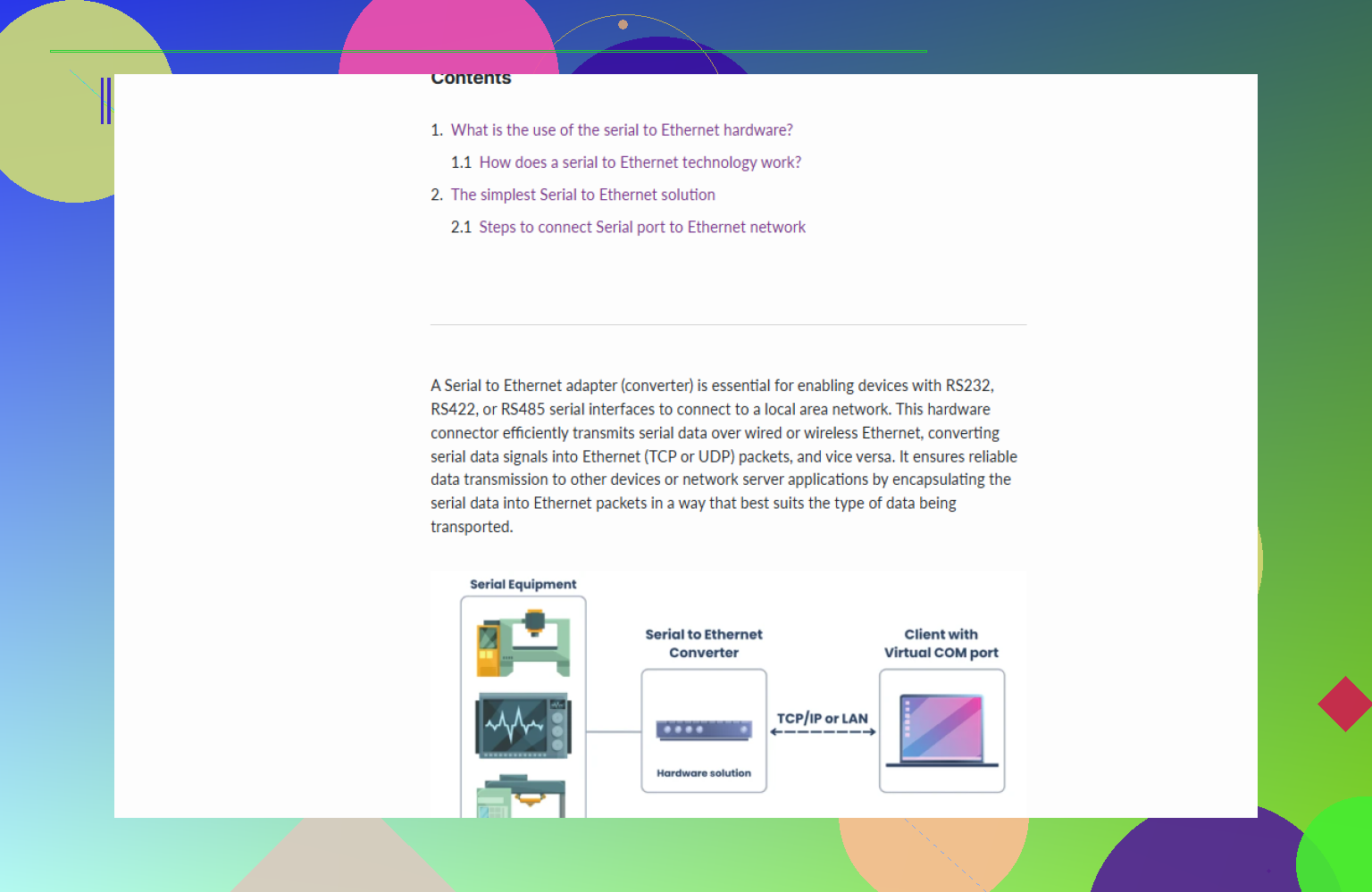
You’re not crazy, the terminology is a mess. I’ll try to fill in a few gaps around what @viaggiatoresolare already covered, without rehashing all of it.
1. The naming confusion in practice
Vendors love to slap random labels on boxes:
- “Device server”
- “Serial to Ethernet gateway”
- “Terminal server”
- “Serial device hub”
Functionally, 90% of them are just: serial on one side, TCP/UDP on the other, maybe with a virtual COM driver. So when shopping, ignore the name and look for:
- Supported serial standards: RS‑232 vs RS‑485 vs RS‑422
- Whether it has a virtual COM / TTY driver for your OS
- Whether it can do raw TCP server mode (important if you can change your software)
- Whether it mentions your actual protocol (Modbus RTU, etc.), or only “transparent mode”
Marketing term ≠ technical capability.
2. Device server vs protocol gateway: what really matters
Where I’ll slightly disagree with @viaggiatoresolare is on protocol gateways. They’re great, but they’re not automatically safer than a transparent device server.
Use a protocol-aware gateway when:
- Your existing app talks something “modern” like Modbus TCP or Ethernet/IP
- Your field device is stuck on a serial version of the same or similar protocol
- You want the gateway to handle mapping, register translation, maybe even scaling
But beware:
- If the gateway misinterprets a weird corner case of your protocol, you’re stuck.
- Debugging becomes a pain because you’re no longer just “tunneling bytes”; you now need to sniff both serial and IP sides and understand the mapping.
For many legacy things that just speak simple ASCII commands, a transparent device server is actually easier to live with.
3. Latency: what actually bites you
Everyone says “low latency”, but the killers are usually:
-
Packetization & Nagle
- Many cheap boxes delay sending serial data until they see a timeout or buffer threshold.
- Turn off anything like “Nagle” or “TCP/serial packing” if your protocol is chatty and interactive.
-
Oversubscribed networks
- Putting serial-over-IP on the same VLAN as video, backups, or Wi-Fi guests is asking for jitter.
- If it’s industrial or control-related, give it a VLAN or at least QoS.
-
Virtual COM drivers doing retries
- When the network burps, the driver might freeze the app while it retries.
- From the app’s point of view, it looks like the serial port just hung.
If you can modify the software, talking directly to IP:port instead of via virtual COM almost always gives you more predictable behavior.
4. Remote management: what people forget until it hurts
If these devices are going out into the field, focus on:
-
Config backup/restore
Can you export/import a config file? That saves you from manually clicking through 40 settings on 10 boxes. -
Central monitoring
SNMP or at least syslog is underrated. You want to know when a port keeps flapping or a box reboots every hour. -
Firmware upgradability that doesn’t suck
Some cheap adapters require a special Windows-only tool that only works if your NIC IP is in the same /24 and if the moon is full. Read the manual before buying 30 units.
Here’s where a software solution like Serial to Ethernet Connector can shine: if you already have a reliable PC next to the equipment, letting that machine handle the serial hardware and then sharing it over the network via software can be way easier to manage and update than a bunch of anonymous black boxes in cabinets.
5. Software vs hardware: where I’ve seen people go wrong
Common mistake:
“Let’s put a tiny serial device server 200 meters away in a noisy panel and never touch it again.”
What actually happens:
- Someone misconfigures baud/parity remotely.
- No one can reach the web UI because networking changed.
- You drive 2 hours to stare at a blinky LED.
Alternative that sometimes works better:
- Small industrial PC (or existing local PC) with a real multiport serial card.
- Run Serial to Ethernet Connector on that PC.
- Other systems on the LAN access those serial ports as if they were local.
You get:
- Solid drivers (OS knows it’s real serial)
- Local logging / debugging
- Easier to tunnel in via RDP/SSH and run vendor tools
If that sounds like your environment, you can grab the installer from here:
download Serial to Ethernet Connector for Windows or Linux
That page has the current builds and is easier than digging through vendor menus.
6. Things to explicitly check before buying anything
This is the boring part that saves you from RMA hell:
-
Electrical side
- RS‑232 vs RS‑485 vs RS‑422
- Isolation rating
- Surge/ESD protection
- Power input range and method (DIN rail supply, PoE, wall wart)
-
Serial parameters supported
- Max baud rate you actually need (some “industrial” units still top out annoyingly low)
- Odd/even/mark/space parity support
- Number of stop bits you need
-
Network/security
- Does it support SSH or only Telnet/HTTP?
- Can you lock down which IPs connect to the serial TCP port?
- Any support for TLS if that matters to IT?
-
Licensing gotchas
- Virtual COM drivers sometimes require per-port or per-server licenses.
- Software like Serial to Ethernet Connector also has licensing, so plan that into your port count.
7. How I’d decide in your shoes
Without knowing your exact devices, here’s a rough decision tree:
- If your software is fixed to a COM port and devices are near a PC:
- Use that PC with Serial to Ethernet Connector and share the real COM ports.
- If your software can be changed to use IP/port directly and you have 1–4 devices per location:
- Get decent quality serial device servers, static IPs, one TCP port per serial port.
- If you’re converting Modbus RTU to Modbus TCP and don’t want to touch app code:
- Use a Modbus-aware protocol gateway, but test it in a lab with your actual traffic first.
- If the gear is remotely located with poor physical access:
- Favor something manageable and monitorable, or a small PC + Serial to Ethernet Connector, over the cheapest adapter on Amazon.
If you post one concrete example (device model, baud rate, cable distance, what software talks to it, and how many locations), it’s a lot easier to say “yeah, go for a 2-port device server” or “no, put a PC there and use Serial to Ethernet Connector instead.”
You’re basically choosing between “remote the wire” and “translate the protocol.” @chasseurdetoiles and @viaggiatoresolare nailed the categories, so I’ll focus on when each approach hurts or helps in real life, plus where a software tool like Serial to Ethernet Connector fits.
1. When a hardware device server is the wrong answer
Everyone’s first instinct is “buy a serial device server box.” That works, but there are cases where it is a headache:
- You need to run flaky vendor config tools that bang on COM1 directly.
Some of those tools hate virtual COM drivers from hardware boxes, especially under Windows updates. - You have to support multiple remote users who insist on taking turns but actually do not.
Cheap device servers just mash their traffic together.
In those cases, putting a small PC by the serial gear and using Serial to Ethernet Connector to share the real COM port over your LAN is usually calmer.
2. Serial to Ethernet Connector: pros and cons
Pros
- Uses the OS’s native serial driver, so weird timing quirks and custom baud rates often “just work.”
- Easy to spin up multiple virtual clients, with actual access control and logging.
- Debugging is nicer: RDP/SSH into the box, run vendor tools locally, capture traffic.
Cons
- You need a machine on site, with OS maintenance and patching.
- If that PC dies, all your serial ports vanish at once.
- Licensing cost scales with port count and servers, so for a single dumb sensor it can be overkill.
For a panel with several legacy devices in one place, I personally lean toward that software approach; for single scattered devices, a small hardware server like the ones @chasseurdetoiles described is cleaner.
3. Where I slightly disagree with the others
- Virtual COM from hardware boxes is not just “fragile at scale,” it is often the most failure prone part even in small setups. If your application can be modified, talk raw TCP directly. I would treat virtual COM as a compatibility crutch, not a design goal.
- Protocol gateways are attractive for Modbus and friends, but they hide problems. Before committing, always run a week of soak testing with your real traffic pattern. Transparent tunneling plus application level smarts is sometimes safer.
4. Concrete rule of thumb
- One or two legacy devices, simple protocol, you can tweak the app:
Good quality 1 or 2 port device server, app talks raw TCP. - Cluster of legacy devices, ugly or fragile software, need remote multi user access:
Local PC with multiport serial card, share ports via Serial to Ethernet Connector, remote clients see stable COM ports.
Both approaches are valid; pick based on who you trust more to maintain things over time: a little black box in a cabinet, or a small PC you can log into and fix at 2 a.m.