My Nikon camera deleted a batch of photos from my SD card, and I’m trying to figure out if they can still be recovered. These were important pictures, and I haven’t taken any new photos because I don’t want to overwrite the data. I need help with safe Nikon SD card photo recovery steps and what software or methods actually work.
I ran into this with a Nikon card once, and I would not write the photos off yet. Deleted shots often come back, even after a quick format. What mattered in my case was not the way the files vanished. What mattered was whether new data had already landed on top of them.
First move, stop using the SD card. Right now. Don’t shoot more photos, don’t record video, don’t reformat it again. Every new file cuts into your odds because RAW and JPEG data gets replaced piece by piece.
If you did a quick format by mistake, recovery still works pretty often. A full format is rougher. A secure erase is worse. Those are the cases where I stop feeling optimistic.
If there’s no backup, I’d go straight to recovery software. I’ve used Disk Drill for this. It picked up Nikon formats like NEF and NRW, plus standard JPEGs, and I didn’t have to fight the interface for an hour.
What I did looked like this:
- Pull the SD card out of the camera and plug it into your computer with a card reader.
- Install Disk Drill on your computer, not onto the SD card. Sounds obvious, still worth saying.
- Select the card, then hit Search for lost data.
- Run Universal Scan. For accidental deletion and quick-format messes, it usually covers the basics well.
- Wait for the scan to finish, then preview what it finds. If your RAW files open in preview, I’d take that as a strong sign.
- Recover the files to your computer or another drive. Don’t put them back on the same card. I did this once years ago and, yep, bad idea.
If you also lost video files, try Advanced Camera Recovery after the main scan. Camera video gets fragmented sometimes, and the extra pass has found clips for people when the normal scan came up short.
One annoying part, recovered RAW files often come back with scrambled names or no original folder layout. That’s common. The software may identify files by their internal signatures instead of rebuilding the card exactly as it was. Ugly filenames do not mean the image data is bad.
Also, don’t panic if recovered NEF files refuse to open in the default Windows Photos app. I’ve seen Windows act dumb with Nikon RAW support. Try a program that knows NEF files first before calling them corrupted.
Before you scan, check for copies you forgot about. I mean old imports on your PC, SnapBridge transfers, cloud sync, random vacation folders, all of it. I’ve seen people spend time recovering files they already had sitting in some buried Pictures folder with a weird date stamp. Kinda dumb, but it happens.
If the SD card doesn’t show up at all, keeps dropping connection, or looks physically damaged, I’d stop there. Same if the scan starts and the card keeps disconnecting. A failing card gets worse fast, and pushing it too hard is how people turn a recoverable problem into a dead one. That’s when I’d look at a pro recovery service.
So yes, there’s still a shot. Accidental delete, quick format, photos gone after a trip, none of those mean the card is done. If you stop using it early and recover from a computer, your odds go up a lot.

Yes, you still have a shot.
If the Nikon only deleted the photo index, the image data often stays on the SD card until new shots overwrite it. You did the right thing by not taking more photos. Keep doing that.
I agree with @mikeappsreviewer on the main point, stop using the card. Where I differ a bit is this, I would not spend too much time testing the card in the camera again. Cameras love to “fix” cards and make things worse.
What I’d do first:
- Put the SD card in a card reader, not back in the Nikon.
- Check if your computer sees the full card size. If it shows weird capacity, the card itself might be failing.
- Make a byte-for-byte image of the card first, if possible. This matters if the card is unstable. Tools like USB Image Tool, Win32 Disk Imager, or dd on Mac/Linux work fine.
- Run recovery on the image, not the original card.
That step gets skipped a lot, and it saves people when the card starts dying mid-scan.
For software, Disk Drill is a solid pick because it handles Nikon RAW formats like NEF and normal JPG files well. I’d still sort results by file type and date after the scan, since Nikon recoveries often come back with ugly names and mixed folders. Annoying, but normal.
One more thing people miss, if your Nikon wrote to two cards at once, or if you had backup recording enabled, check the second card. Sounds dumb, but I’ve seen pepole panic over “deleted” photos that were sitting on Slot 2 the whole time.
If you want a simple guide, this easy SD card photo recovery walkthrough covers the process in plain english.
If the card clicks, disconnects, gets hot, or won’t mount, stop. At that point software is not the move. That’s when pro recovery starts making sense.

Yes, probably recoverable, but I’d add one thing that @mikeappsreviewer and @codecrafter only touched on lightly: check whether the photos were actually “deleted” or just hidden behind a damaged Nikon folder structure.
I’ve seen cards where DCIM looked empty, but the image data was still there and recoverable with a normal file browser on another machine, or the card had filesystem errors that made the camera act weird. So before going full panic mode, test the card read-only if you can and see whether anything shows up.
Also, slight disagreement with the “full format = basically hopeless” vibe. On SD cards, even after formatting, recovery can still work depending on how the camera handled it. It’s not great, but it’s not automatic game over either.
What I’d do:
- stop using the card completely
- use a card reader, not the camera
- if possible, copy the entire card to an image file first
- then scan that image with recovery software
Disk Drill is a legit option here, especially for Nikon NEF, JPG, and sometimes video files. If filenames come back mangled, that’s normal. What matters is whether the image opens.
Also worth reading if you’re comparing tools: best SD card recovery software recommendations for photos and camera files
If the card mounts, scans, and previews your shots, you’ve still got a decent shot. If it keeps disconnecting or shows 0 bytes, stop messing with it becuase that turns into a hardware problem fast.
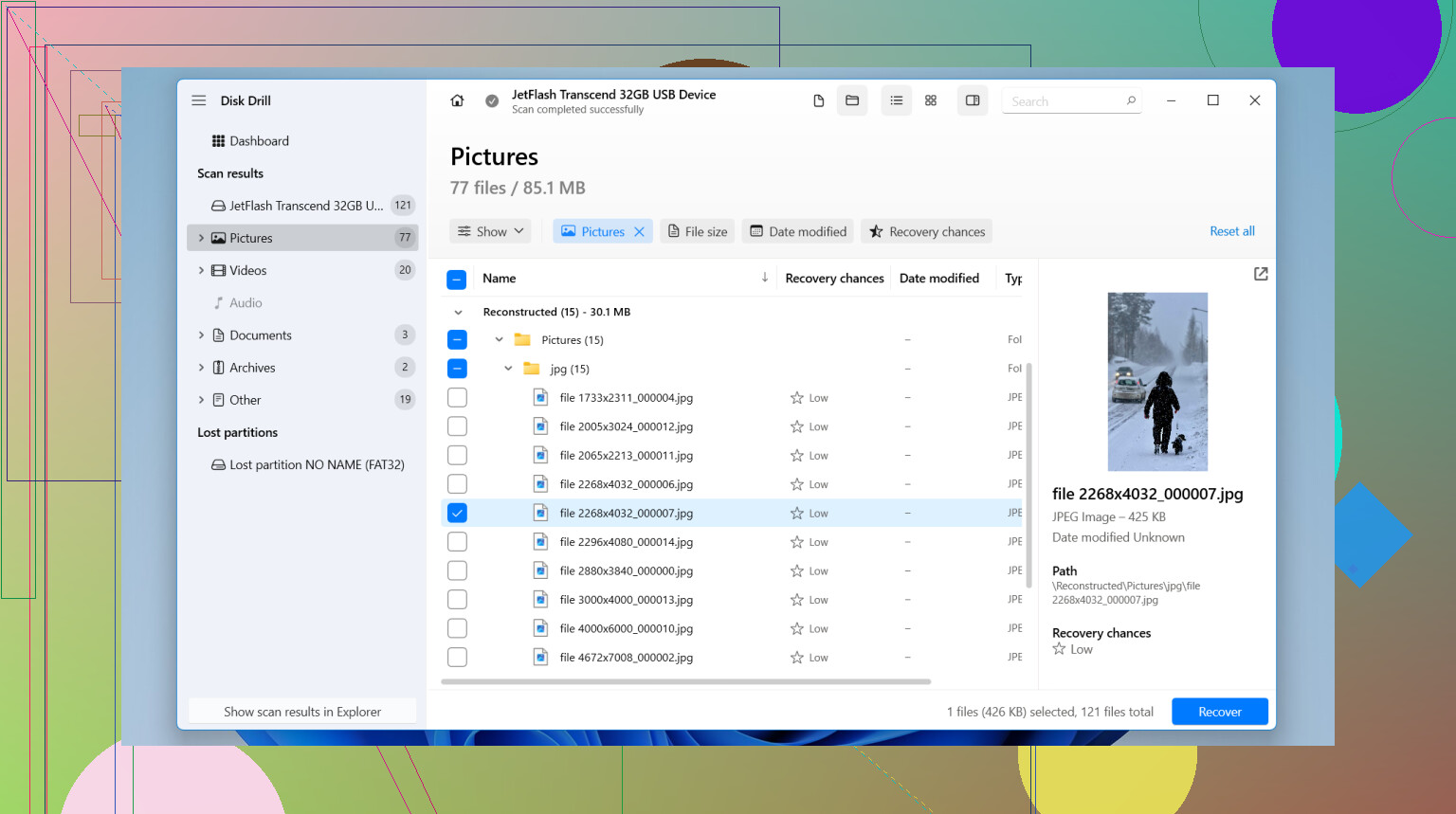
Good chance, yes. I mostly agree with @codecrafter, @chasseurdetoiles, and @mikeappsreviewer on the big rule: keep that SD card untouched.
Where I’d slightly disagree is the urge to jump straight into a long recovery scan. Before that, check whether Nikon just messed up the filesystem entry. On some cards, the photos are still sitting there but the folder table is broken, so another computer may see more than the camera does.
My take:
- Lock the SD card with the tiny side switch if your adapter has one
- Read it on a computer only
- Try a file system check only in read-only mode if your OS supports it, not a repair
- Look for hidden folders, odd DCIM subfolders, or files with zero previews but real size
If normal browsing shows nothing useful, then recovery software makes sense. Disk Drill is a solid option for Nikon cards.
Pros of Disk Drill:
- good NEF and JPG detection
- previews help separate real recoveries from junk
- simple enough if you do not want command-line tools
Cons:
- deep scans can dump messy filenames
- full recovery usually means paying
- on a failing card, scanning the original media is still risky if you skipped imaging first
So yes, recoverable is possible. If the card is stable, image it, then test with Disk Drill on the image. If the card drops offline or reports weird size, stop before software makes a bad card worse.