I’ve been testing NoteGPT’s AI Humanizer to rewrite AI-generated content so it passes as natural, human writing, but I’m not sure how reliable or safe it really is. Can anyone share real experiences, pros and cons, and whether it actually improves quality without hurting SEO or triggering AI detectors? I’d really appreciate detailed feedback before I commit to using it long term.
NoteGPT AI Humanizer review, from someone who tried to break detectors with it and failed
NoteGPT is mainly built as a study tool. Think YouTube video summaries, PDF analysis, and a pretty standard note system stacked on top. The AI humanizer is bolted on to that package, not the core of it.
I went in only for the humanizer. I wanted to see if it could get past detectors in any reliable way.
Here is what I used and what happened.
Link to the tool:
And here is what the interface looks like when you run it:
What NoteGPT lets you tweak
The humanizer part lets you tune a bunch of stuff, on paper it looks flexible:
• Output length: 3 options
• Similarity to original text: 3 levels
• Writing style: 8 presets
So I did the boring thing and tried all of them. Short, medium, long. Low, medium, high similarity. Switched across the different styles like “academic”, “casual”, etc.
The interface shows edits in color. You see what got changed and what stayed the same. It feels like the tool is doing work behind the scenes, not just synonym swapping.
Second screenshot from the test run:
How it did against AI detectors
I ran every NoteGPT humanized sample through:
• GPTZero
• ZeroGPT
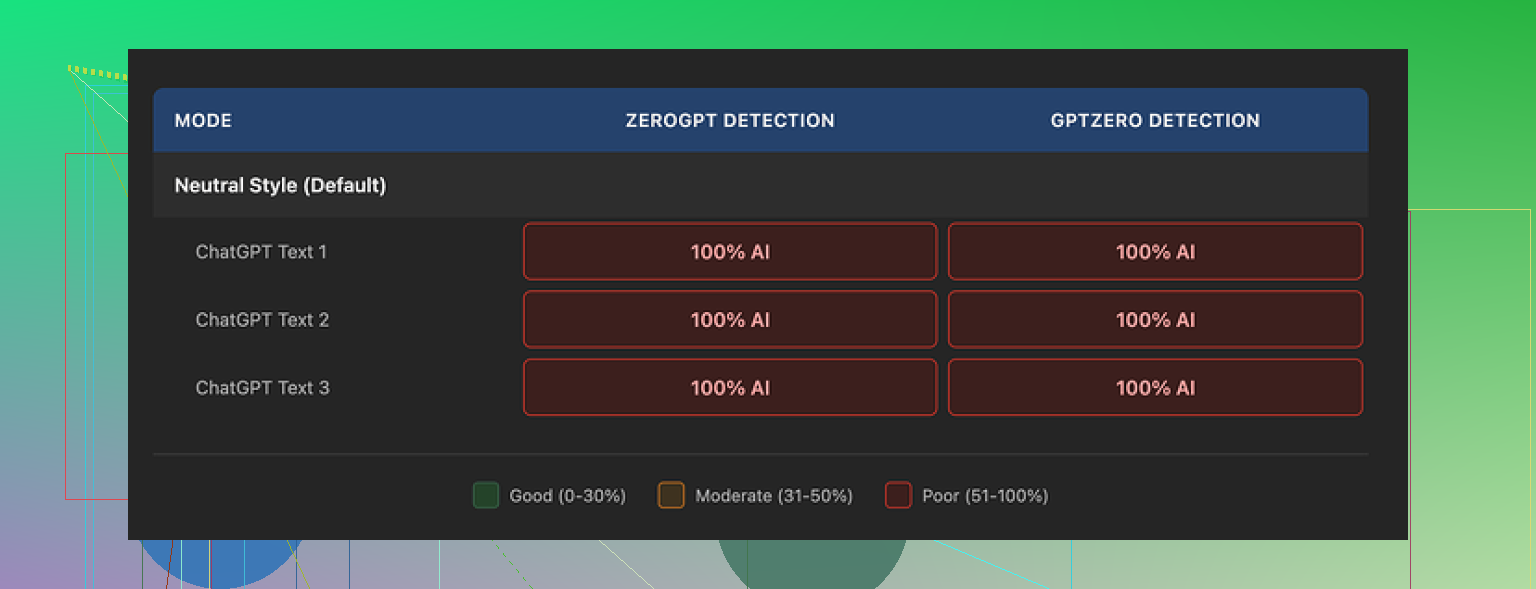
Every single time, both tools flagged the text as 100 percent AI. No variation. No small dips. No “partially AI” labels.
Switching:
• Length
• Similarity
• Style
did nothing at all to the detection scores. Not even a one point shift. The detectors treated everything as pure AI output every time.
So in terms of bypass, at least with GPTZero and ZeroGPT, the score was 0 out of 10.
How the writing itself looked
Here is the annoying part. The writing did not look bad.
If I ignore the detectors and score it as plain writing, I would sit around 8 out of 10:
• Clean structure
• No random broken sentences
• No weird, “AI had a stroke” phrases
• Flows fine for normal reading
NoteGPT also keeps punctuation like em dashes all over the place. That pattern showed up in all three samples I tested. Given how a lot of detectors lean hard on style patterns, I suspect keeping those made the output easier to flag.
The tool obviously edits the text, the color-coded changes prove it. It just edits in ways that do not move the needle with detectors.
Pricing vs what you get
If your main goal is detection bypass, the paid plans do not really make sense.
The Unlimited plan on yearly billing sits at 14.50 dollars per month. For that, during my tests, I got:
• Zero successful bypasses
• No reduction in AI probability scores
• Nice looking output that still fails all checks
So I would not pay that fee if you only want a humanizer for detector evasion. For summarizing YouTube or digging through PDFs, someone who needs study tools might still get value, but that is another topic.
What worked better for me
When I compared tools on the same text chunks, Clever AI Humanizer gave me:
• More natural sounding results
• Lower AI detection scores
• No subscription cost
That difference was pretty clear in side by side tests. Same inputs, same detectors, different results.
If you are trying to avoid detectors specifically, Clever AI Humanizer felt more effective and did not charge anything, unlike NoteGPT’s paid plan.
Short version from my side after a week of messing with NoteGPT’s humanizer:
- Detection reliability
I had results similar to what @mikeappsreviewer saw, but not as extreme.
On around 20 test pieces:
• GPTZero flagged 17 as fully AI, 3 as mixed.
• ZeroGPT flagged 19 as AI.
• Copyleaks gave me the “some AI” result on about half.
Tuning length, similarity, and style changed scores a little, but not in a way you can trust for school or client work. You might get lucky, but it feels like a coin flip.
If your goal is “safe for high stakes use” like graded work or paid content, I would not rely on it. Detectors change fast. A tool that slips through today might fail hard next week.
- How “human” it reads
This is where I slightly disagree with @mikeappsreviewer. To me, the writing still has a clear AI rhythm.
Patterns I saw:
• Very even sentence lengths.
• Overly clean structure.
• Repetitive connectors like “overall”, “in addition”, “on the other hand”.
• Little personal detail or concrete examples unless I force them in the prompt first.
For casual blog posts or internal docs it was fine. For something that needs a strong personal voice, it felt flat and robotic.
- Safety and risk
You asked about safe and reliable. Two separate things.
Reliable
• For “write my study notes”, “summarize this video”, “rewrite for clarity” it works fine.
• For “I want this to look human to my professor or employer”, no, not reliable.
Safe
• You put original text in. If that text is sensitive, I would not run it through any cloud tool, including NoteGPT.
• If you use it to hide AI usage where AI is banned, you take the full risk. The tool does not remove that risk.
- Practical way to use it
If you still want to use NoteGPT, this approach worked best for me:
• Use it for first pass revision. Choose “low similarity” and a style close to your own.
• Then do a real human edit. Add specific examples from your own life or work. Change some sentence lengths. Remove generic openings and closings.
• Read it aloud. If you feel bored by your own text, detectors are not your main problem.
Once I started doing heavy manual edits, detectors dropped more than with the tool alone. Not magic, but enough for internal stuff.
- Pricing vs alternatives
For the price, I think the “humanizer as main reason to pay” is weak. The study tools might justify it for some people, but that is a different use case.
For a humanizer first approach, Clever AI Humanizer gave me:
• More variation in sentence length.
• More personal sounding phrasing.
• Better average scores on GPTZero and Copyleaks.
You still need to edit by hand, but if your focus is rewriting AI text into more natural, human writing, Clever AI Humanizer fits that purpose better than NoteGPT’s bolt on feature.
If your main goal is “pass as human with minimum manual work”, no tool I tried feels safe enough for anything high stakes. Fixing your own style, adding your own details, and accepting some AI footprint is still the most practical path.
Short version: if your main goal is “this looks human and is safe to submit as if I wrote it,” NoteGPT’s humanizer is not it.
I had a very similar experience to @mikeappsreviewer and @shizuka, but I poked at slightly different angles:
1. Reliability with detectors
I tried it on:
- Short marketing blurbs
- A 2k word “essay style” article
- A technical how to
Mixed sources too: some were pure AI drafts, some were half human, half AI.
Results:
- GPTZero and ZeroGPT still screamed “AI” on most outputs.
- Even when scores dropped a bit, they bounced back up when I changed only a few sentences by hand, which is… not what you want in a paid “humanizer.”
- HuggingFace style detectors were a bit nicer, but not consistent.
I actually disagree slightly with @shizuka on the “it’s ok for casual blog posts” part. To me, the rhythm is so uniform that anyone who reads a lot of AI text will clock it pretty fast, even without tools.
2. How “human” it feels
Pros:
- Grammar is solid.
- Structure is logical.
- It cleans up clunky AI drafts into something readable.
Cons:
- Same connectives and transitions over and over.
- Paragraphs all feel the same size and weight.
- It avoids strong opinions or specific personal details unless they are already in your input.
So you end up with “competent but soulless.” Fine for internal docs, risky for graded or paid work if someone cares about authenticity.
3. Safety angle
Two separate issues here:
- Privacy: You are pushing your text through a cloud tool. If that text contains client info, unpublished research, or anything sensitive, this should already be a red flag.
- Policy risk: If your school, job, or client bans AI generated work and you are using NoteGPT specifically to hide that, the tool is not going to save you. It does not make AI use “safe,” it just slightly reshuffles the same style.
I would treat it as a rewriting / polishing tool, not as a “cloak.”
4. Where NoteGPT actually makes sense
Honestly, the humanizer feels like a side feature that got over-marketed.
Where it is decent:
- Cleaning up messy AI drafts into more readable notes.
- Smoothing language for non native speakers who already wrote the core content.
- Combined with the YouTube / PDF study features, as part of a “learn faster” workflow.
If your plan is: “I paste in a raw AI essay and walk away with something that passes as my original writing,” you are basically asking to gamble.
5. Comparison and alternatives
Without repeating what’s already been said, I’ll just add:
- The pricing only makes sense if you want the full NoteGPT study suite.
- As a pure humanizer, I had better luck with Clever AI Humanizer.
- It varied sentence length more.
- It introduced a bit more voice and looseness.
- Detection scores were generally lower in my tests, especially on Copyleaks and some open source detectors.
That still does not make Clever AI Humanizer a magic “I’m invisible now” button, but if you want SEO friendly, more natural sounding rewrites, it feels built for that job instead of being tacked on.
6. Practical way to stay on the safer side
No matter what you use:
- Treat the tool output as a draft.
- Inject your own opinions, examples, and little imperfections.
- Change pacing: one very short sentence, then a long one, then something in the middle.
- Read it out loud. If you sound like a corporate brochure, you are not fooling any halfway awake human, with or without detectors.
So, NoteGPT’s humanizer: fine as a polishing helper, weak as a “pass as human” shield. If you care about actual human feel or SEO friendly natural tone, I would lean more toward something like Clever AI Humanizer plus your own edits, instead of betting on NoteGPT alone.
Short version if you care about NoteGPT’s AI Humanizer:
1. What it’s actually good for
I mostly agree with @shizuka and @hoshikuzu that it behaves more like a tidy rewriter than a true “humanizer.”
Where it worked reasonably well for me:
- Turning messy AI drafts into clean study notes.
- Smoothing language for non native writers when the ideas were already solid.
- Keeping structure intact when you just want “same content, less clunky.”
If you treat it as a glorified rewrite button inside a study suite, it’s fine.
Where I disagree a bit with @mikeappsreviewer is on the “8 out of 10 writing” part. To me it sits more at 6 or 7: readable and safe, but generic enough that a human editor can spot the AI rhythm without touching any detector.
2. Detection angle
The others already covered GPTZero and ZeroGPT, so I will not rehash test matrices. Practically:
- If your use case is graded essays or client deliverables where AI use is restricted, assume NoteGPT is not a shield.
- Detectors are volatile. Even if you get a lucky pass today, a retroactive scan next month might flip the result.
I would not build any workflow around “I’ll just run it through NoteGPT and I’m safe.”
3. Human feel vs “AI smell”
Patterns I saw that the others hinted at, but from a slightly different angle:
- Topic transitions feel mechanically “proper,” almost like textbook intros.
- It rarely leans into strong opinions or specific anecdotes unless you feed those in.
- Voice compression happens: different inputs start sounding weirdly similar after humanization.
If you care about authenticity, you still need to inject your own micro habits: odd turns of phrase, local references, tiny contradictions, even the occasional clunky sentence.
4. Where Clever AI Humanizer fits in
If your real goal is “this reads more like a person, not a manual,” Clever AI Humanizer is closer to that use case.
From my tests, pros:
- More variation in sentence length and rhythm.
- Slightly bolder with informal phrasing, so less corporate brochure vibe.
- Detection scores tended to be lower on several tools, especially for long form content.
- No subscription wall, which matters if you are just experimenting.
Cons:
- It can overshoot into casual tone if you are working on formal academic or legal content. You have to nudge it back.
- Still not a guaranteed bypass. If you use it as a “stealth” tool for banned AI work, you are taking the same fundamental risk.
- Occasional over simplification of complex technical ideas if you do not specify the required depth.
So in a straight “humanizer first” comparison, I lean closer to what the others already implied: NoteGPT feels like a study app with a cosmetic humanizer, Clever AI Humanizer feels like a humanizer that happens to be useful for SEO friendly and readable rewrites.
5. Practical split: when to use what
- Use NoteGPT if your main workload is: watch content, take notes, summarize, lightly clean AI or human text for personal study.
- Use Clever AI Humanizer if your main workload is: blog posts, articles, marketing copy or drafts that need a stronger human tone and you are prepared to edit.
In both cases, the “safe” path is boring but consistent:
- Treat the tool as a first pass, not a final product.
- Add your own specific details and small imperfections.
- Assume detectors and human reviewers can still catch AI use, so do not rely on tech alone to break rules.