I used Originality AI’s Humanizer on some content and now the review results are confusing me. Parts are flagged as AI-written even though I drafted them myself, and I’m not sure what the scores actually mean for publishing or SEO risk. Can someone explain how these Humanizer reviews work, how reliable they are, and what I should change (if anything) before posting my content online?
Originality AI Humanizer review, from someone who tried to break it
I went into this one thinking, “If any team understands AI detection, it is the people who build one of the strict detectors.” That was my assumption. Then I ran tests on the Originality AI Humanizer here:
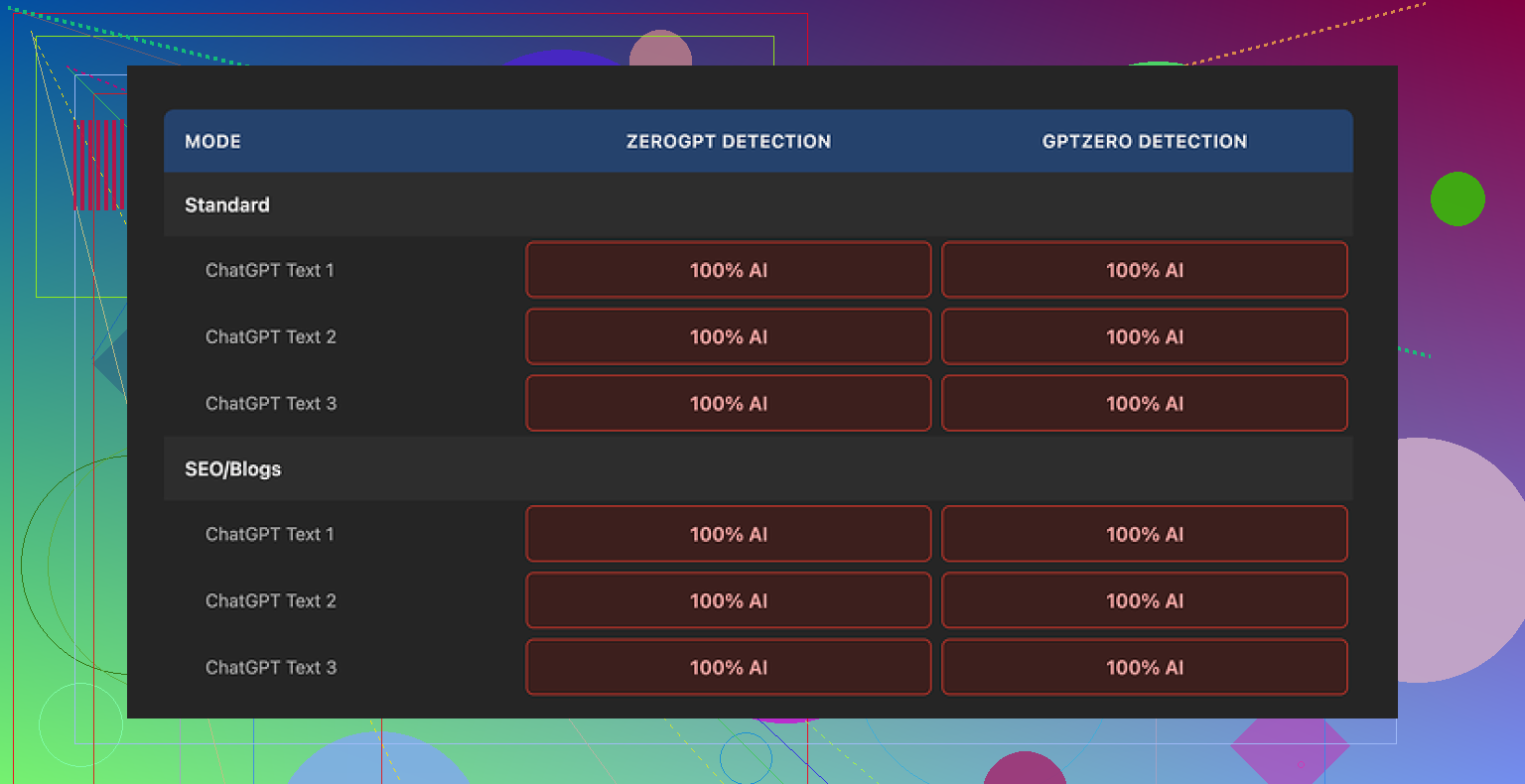
Short version: every single sample I pushed through it got flagged as 100% AI by both GPTZero and ZeroGPT.
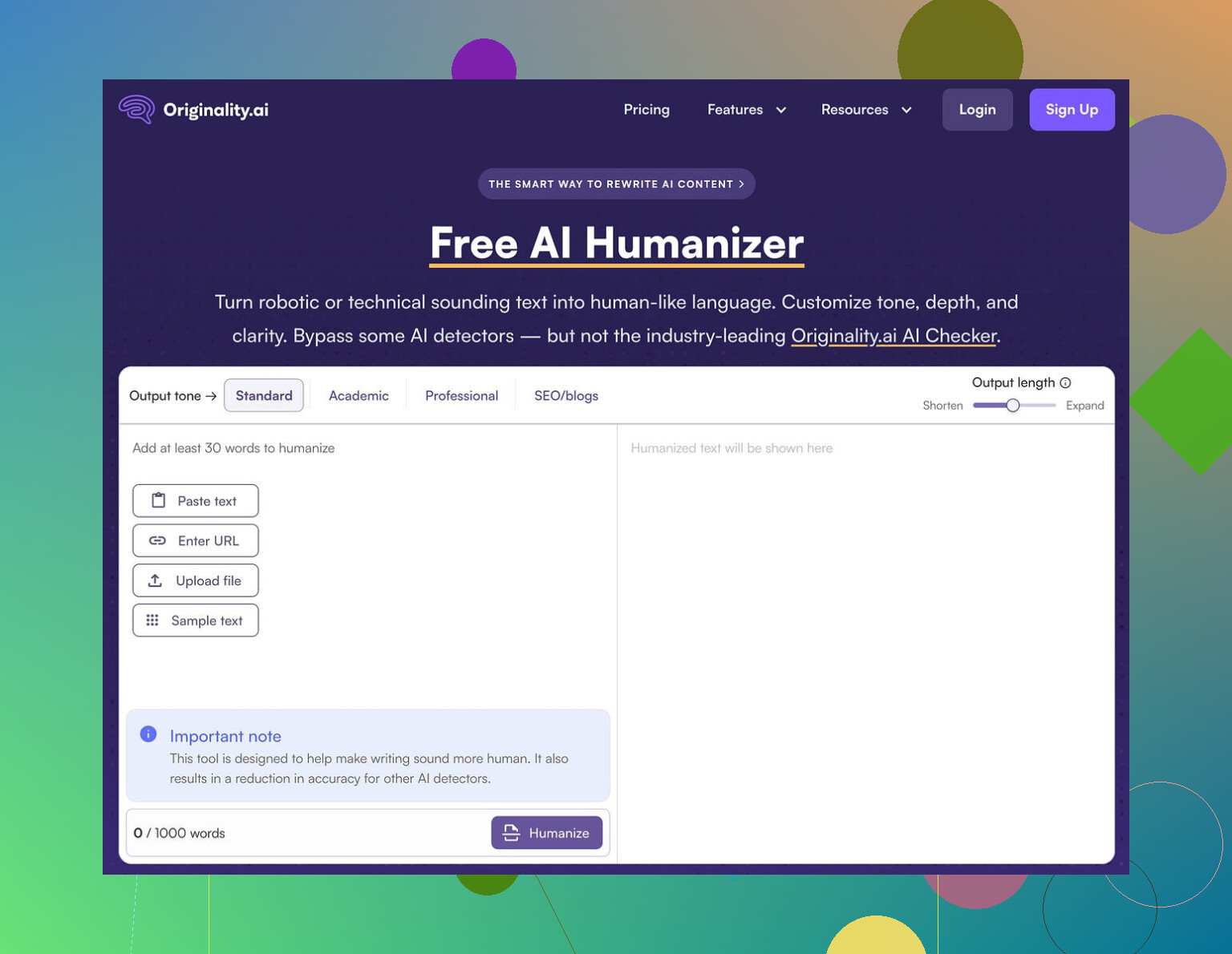
What I tested
I took standard ChatGPT style text, the kind detectors usually jump on. Nothing fancy, no pre-editing. Then I:
• Ran it through Originality AI Humanizer in “Standard” mode
• Ran the same base text through the “SEO/Blogs” mode
• Checked each output in GPTZero and ZeroGPT
• Repeated with different samples to see if I was missing something
Every time, both detectors screamed 100% AI.
There was no difference between Standard and SEO/Blogs in terms of detection scores. Different labels, same outcome.
Where it falls flat
After staring at the original and “humanized” versions next to each other, the reason seemed obvious.
The tool barely changes your text.
It keeps:
• The same sentence rhythm
• The same favorite AI words and phrasing
• The same overuse of em dashes
• Mostly the same structure
So instead of a rewrite, you get something like a light touch-up, and even that feels minimal. It reminds me of running text through a shallow paraphraser on the lowest setting.
Here is the issue with that. If the tool barely edits anything, then any “quality” you notice in the output is still coming from the original ChatGPT text. You are not looking at the humanizer’s style, you are looking at ChatGPT with a couple of words swapped.
It is hard to even review the writing quality, because the humanizer does not leave a clear fingerprint.
Screenshot from one of the runs:
Practical stuff that worked fine
To be fair, a few parts of the tool are decent if you think of it as a basic text expander, not as a detection workaround.
What I noticed:
• Price: It is fully free at the moment and does not force you to create an account.
• Word cap: Limited to 300 words per session. I got around that by opening fresh incognito windows and pasting in chunks. It is clunky, but it works if you are stubborn.
• Output length: There is a slider that lets you control how long the output is. If you want to stretch a short paragraph into something longer for a blog post, it sort of does that.
• Privacy policy: Surprisingly solid. Written clearly, with a retroactive opt-out for AI training. That matters if you are feeding in client work or anything sensitive.
So as a small, free, low-effort text rephrasing toy, it is not broken. It just does not do what the “humanizer” label makes you hope for.
Where it feels more like a funnel than a tool
After a few runs, it felt less like a serious bypass tool and more like an on-ramp into their main business.
Originality’s money product is detection. The humanizer sits right next to it, free, easy, and friendly. You try it, you see detection scores, and at some point you are nudged toward their paid ecosystem.
From a business standpoint it makes sense. From a user standpoint, if your goal is:
• Lower AI detection scores
• Text that passes GPTZero or ZeroGPT
• Output that reads less like ChatGPT
this thing does not help.
I did not get a single sample where the detection scores dropped in a meaningful way. No drop to “mixed,” no “likely human,” nothing. Straight 100% AI on every test.
If your goal is to beat AI detection, this tool gives you zero value.
What I ended up using instead
After trying a bunch of these tools, the one that performed better for me on both quality and detection scores was Clever AI Humanizer.
Their write-up and tests are here:
What stood out to me with Clever AI Humanizer:
• It is also fully free right now
• Text changes are deeper, not surface level
• Detection scores dropped instead of staying pinned at 100%
• The writing felt less like “ChatGPT with synonyms”
It is not magic, you still need to read and edit your own content, but if your goal is to reduce AI detection flags, Clever AI Humanizer did a better job in my tests than Originality AI Humanizer.
If you are already using Originality’s detector, their humanizer might look tempting as an all-in-one workflow. Based on my runs, I would not rely on it for anything detection related. Use it only if you need a small, free text expander and you do not care about AI flags.
Short answer. The scores are not a pass or fail for publishing, and they do not tell you if you “cheated”. They tell you how much your text statistically resembles common AI patterns. That includes human writing that looks “AI-ish”.
A few key points that trip people up:
-
Why your human text gets flagged
• Detectors look at patterns, not intent.
• If you write in a clean, neutral, well structured way, detectors often call it AI.
• Short sentences, repeated structures, safe vocabulary, overuse of “also”, “however”, “in addition”, etc, often set them off.
• If you edited your draft with an AI at any point, even lightly, the pattern can stay. -
What Originality’s scores mean in practice
• “X percent AI” is a probability guess from their model, not a ground truth label.
• 70 to 100 percent AI means “this looks a lot like AI we trained on”.
• 0 to 30 percent AI means “this looks closer to the human data we trained on”.
• A human can get 100 percent AI. An AI can get 0 percent AI with enough editing.For publishing, no one outside a specific client or platform cares about those scores unless they explicitly require a threshold. Search engines do not use those tools.
-
Why the Humanizer is confusing you
You expected “I wrote this, then I used their humanizer, so their detector should say it is human”.
In practice:
• The Humanizer does light paraphrasing. It often keeps structure, rhythm, and favorite words, like @mikeappsreviewer already pointed out.
• So if your text already had patterns that look like AI, the output still looks the same to detectors.
• That is why you see human parts flagged and AI looking sections sometimes pass.I slightly disagree with Mike on one thing though. I do not think the Humanizer is always useless on detection. On some niche or messy drafts, minor edits can nudge scores down a bit. It is not reliable though and not something you want to depend on.
-
How to interpret this for “is it safe to publish”
Ask these questions instead of staring at the percentage:
• Do you own the rights to the content.
• Is it factually correct.
• Does your client, school, or platform have a written AI policy that mentions Originality, GPTZero, etc.If no one is requiring you to hit a certain score, the Originality number is only a signal, not a gate.
-
How to get fewer AI flags on stuff you genuinely wrote
You do not need a tool for this, but tools help:Manual edits that lower detection risk:
• Insert your own specific stories, dates, examples, numbers, and opinions.
• Change generic phrases into how you naturally talk.
• Vary sentence length. Mix short, medium, and some long sentences.
• Add minor imperfections. A slightly odd phrasing or a mild typo sometimes pushes it away from “perfect AI style”. Do not overdo it.
• Move paragraphs around. Change the order of points.Tool approach:
• If you insist on a humanizer, test more than one.
• Run small samples through Originality, GPTZero, and ZeroGPT or similar, then compare.
• I have seen better detection drops with Clever Ai Humanizer than with Originality’s Humanizer in mixed tests. It tends to change structure more, not only words. You still need to review the output, but if your goal is “publish with fewer red flags on detectors”, it is a more useful option than Originality’s own tool. -
What I would do in your position
• Stop treating the Originality score as a moral verdict. Treat it like a spam filter score, sometimes wrong.
• If a client or school uses Originality, ask for their acceptable range or policy in writing.
• For important pieces, take your human draft, pass it through something like Clever Ai Humanizer for a deeper rewrite, then revise by hand. Focus on adding your voice and details, not on hitting 0 percent AI.
• Keep original drafts and timestamps as proof you wrote the text yourself.
Once you shift from “I must get 0 percent” to “I need clear, accountable, readable text that meets the policy”, those confusing flags from Originality stop mattering as much.
You’re running into the core problem with all these detectors: they’re probabilistic vibes checkers, not lie detectors.
A few things that might help you re-frame what you’re seeing:
-
Why your own writing is getting flagged
Detectors are trained on patterns, not on how the text was actually produced. If your natural style is:- super clean, logical structure
- “academic” or “blog-optimized” tone
- predictable transitions like “however”, “in addition”, “on the other hand”
then statistically you look a lot like AI output. That is enough to tip the score, even when every word is yours.
I’ve had completely human emails, written in a rush, get hit as “likely AI” just because they were short, neat, and used safe vocabulary. So your confusion is normal, the tool isn’t actually checking your intent or your process.
-
How to read those Originality percentages without losing your mind
I disagree a tiny bit with how some people treat the score as “just noise.” It is not pure noise. It does tell you:- how strongly your text matches the stuff their model thinks is AI
- where your writing style overlaps with common AI patterns
What it does not tell you:
- whether you “cheated”
- whether the text is allowed to be published
- whether Google is going to smite your site
Unless a client, school, or platform has a written rule like “must be under X percent AI on Originality,” the number is only a hint, not a gate. For publishing in general, it basically has zero official meaning.
-
Why the Originality AI Humanizer is making everything worse, not better
You kind of ran into what @mikeappsreviewer described: the humanizer is a very shallow rewriter. It tweaks, it nudges, but it usually keeps:- the same skeleton of sentences
- the same overall flow
- the same “AI-ish” phrasing habits
So from the detector’s perspective, it is almost the same text. In some cases, it can even tighten the prose and accidentally make it more AI-like. That is probably why you’re seeing your “real” writing get flagged after using it.
I’m actually harsher on it than @shizuka here. Light paraphrasing can help in fringe cases, sure, but if a tool is sold as a “humanizer” and then barely moves detection scores, that is not a great deal for you.
-
What this means for actually hitting publish
Instead of staring at the percentage, I’d look at three concrete things:- Does your contract / syllabus / platform TOS mention specific detectors or thresholds
- Do you have your earlier drafts or docs as proof you wrote it
- Is the text accurate, original (in the plagiarism sense), and in your voice
If those are fine, the “AI-written” label from a third-party model is not a legal or moral verdict. It is more like a spam score that sometimes misfires.
-
If you still want lower AI flags in practice
Since you asked about what the scores “mean for publishing,” I’ll be blunt: most of the time, they mean “someone might hassle you if they take them too literally.” So if you need lower scores to avoid drama, focus on what the models are actually sensitive to.Instead of only relying on Originality’s own humanizer, try this combo:
- Add specific, personal stuff: concrete dates, names, “this happened when…”, small opinions that only you would say.
- Break the neatness: vary sentence length, occasionally start a sentence with “And” or “But”, drop in a slightly messy phrase you really use.
- Reorder your points: detectors get very used to “intro / 3 bullet arguments / recap conclusion”. Flip the order or interleave points.
And yeah, if you want a tool in the loop, something like Clever Ai Humanizer is more useful than a light paraphraser because it actually does deeper structural changes instead of just swapping words. That kind of change is what tends to move detection scores instead of leaving them stuck at “100 percent AI” territory. You still have to review the output and re-inject your own voice, but it gives you a better base than what Originality’s humanizer is doing.
-
What I’d do with your current piece
- Ignore the idea that a high AI score = “not safe to publish.”
- Check if anyone who matters to you has a written policy. If not, treat the score as a noisy opinion.
- If you must reduce the score: run your draft through something like Clever Ai Humanizer for a heavier rewrite, then manually edit back in your style and examples. Do it in 200–300 word chunks and re-test a few sections.
- Keep your original docs and timestamps. If someone challenges you, you can show the draft history instead of arguing about some probability number.
So no, the detector is not secretly telling you “you cheated.” It’s just telling you that your writing style, plus their light humanizer, happens to look too much like the patterns their model was trained to call “AI.”
Short version: the tool is not “wrong,” it is just answering a different question than you are asking.
Analytical breakdown of your situation:
-
What the scores really tell you
You are reading “70% AI” as “I cheated 70%.” The model is really saying “70% chance this statistically fits the bucket I call AI.”
That bucket is heavily influenced by:- clean structure
- predictable transitions
- generic examples
which a lot of good human writers also use. So your confusion is logical, but the detector is behaving as designed.
-
Why the Humanizer makes things look weirder
I agree with @shizuka and @mikeappsreviewer that Originality’s Humanizer is shallow. Where I differ slightly: I think its main flaw for you is consistency. It keeps your tone too uniform.
Detectors love uniformity. Same pace, similar sentence length, stable tone from start to finish. If your original draft is already tidy, the Humanizer doubles down on that, so sections you wrote yourself can end up looking “more AI” after the pass. -
What the scores mean for publishing decisions
The key question is not “What is my AI score” but “Who, if anyone, is going to act on that score?”- If a client, teacher or publisher explicitly cites Originality in their policy, treat the number as a compliance signal.
- If they do not, then the number is basically an internal QA hint, nothing more. Search engines are not keying on that meter.
I slightly disagree with @hoshikuzu here: the score is not totally useless noise, but it is also not a reliable gatekeeping tool. Think of it as a kind of “style radar” rather than an ethics test.
-
A different tactic than just “humanize it harder”
Instead of repeatedly running the same content through Originality’s Humanizer and chasing a lower percentage, switch your goal:
Aim for “distinctive, traceable authorship” instead of “minimal AI score.” That means:- Keep your draft history in Google Docs / Word with timestamps. That is concrete proof you wrote it.
- Mark research notes, outlines and earlier versions. If anyone questions it, you show the evolution of the piece, which a detector cannot see.
- Add 2 or 3 hyper specific bits in each major section. Think “the time my client in 2022…” or “when I first tried X in my own workflow…”. Even if a detector still flags it, a human reviewer can tell it is grounded in your life, not generic filler.
-
Where Clever Ai Humanizer actually fits
If you still want a tool in the loop, I would not use Originality’s Humanizer for detection avoidance. It is closer to a light style polisher.
Clever Ai Humanizer is better thought of as a “reset button” for structure rather than a synonym swapper, which tends to move detection scores more. It has its upsides and downsides:Pros of Clever Ai Humanizer
- Tends to alter sentence structure and rhythm, not just vocabulary, which reduces that “AI-flat” feel.
- Often produces more varied sentence lengths and transitions. Detectors usually find that more human-like.
- Currently free, so you can experiment on small chunks of text without risk.
- Good as a starting point if your draft is too stiff and you want something looser to edit by hand.
Cons of Clever Ai Humanizer
- Can drift from your original nuance, so facts and subtle claims need a close read after.
- Output is not instantly in “your” voice. You still have to inject your personality and examples.
- If you rely on it too heavily, your writing slowly converges on “tool voice” again, which can eventually look AI-like to future detectors.
- No guarantee of zero detection flags. It can reduce risk, not erase it.
Compared to what @shizuka and @mikeappsreviewer described, I would use Clever Ai Humanizer more as a structural rewriter for early drafts, then revise manually, instead of as a last minute “fix my score” button.
-
How I would handle your current piece, concretely
- Stop re-running full articles through any humanizer. Take 1 or 2 paragraphs that are scoring badly and experiment on those only.
- For each “problem” paragraph, manually add one personal reference or non generic opinion and slightly vary sentence lengths. Retest that snippet.
- If scores still bother a stakeholder, run those snippets through Clever Ai Humanizer, then restore your own tone and details.
- Keep every version of the file. If someone raises a red flag later, you show your revision history instead of arguing about a probability meter.
You do not need your content to read as “undetectable.” You need it to be clearly yours, factually sound, and aligned with whatever policy the actual human on the other side is using. The tools are just noisy style checkers layered on top of that.