I’ve been testing StealthWriter AI to help with writing content that sounds more human and less like it was generated by a bot. I’m not sure if the quality, originality, and detection resistance are good enough for serious use in blogging and client work. Can anyone who has used it share real experiences, pros and cons, and whether it’s actually worth paying for?
StealthWriter AI review from someone who paid for it
Quick background

Link to the tool: StealthWriter AI
I tested StealthWriter for a week on real work, not demo text. Paid plan. Around 30 pieces of content through it, mostly technical and academic style.
Pricing I saw was in the 20 to 50 dollar range per month, depending on the plan. So not cheap for something you run on top of another AI.
Features that looked good on paper
StealthWriter has a couple of interesting parts:
• Two engines: Ghost Mini and Ghost Pro
• “Intensity” slider from 1 to 10
• Style presets
• Free tier with 10 rewrites per day, up to 1,000 words, if you make an account
• Keeps the length close to the original, no weird expansion by half a page
Ghost Pro sits behind the paid plans. Free users only get Ghost Mini.
On the feature list it looks more serious than most humanizer tools.
Detection tests
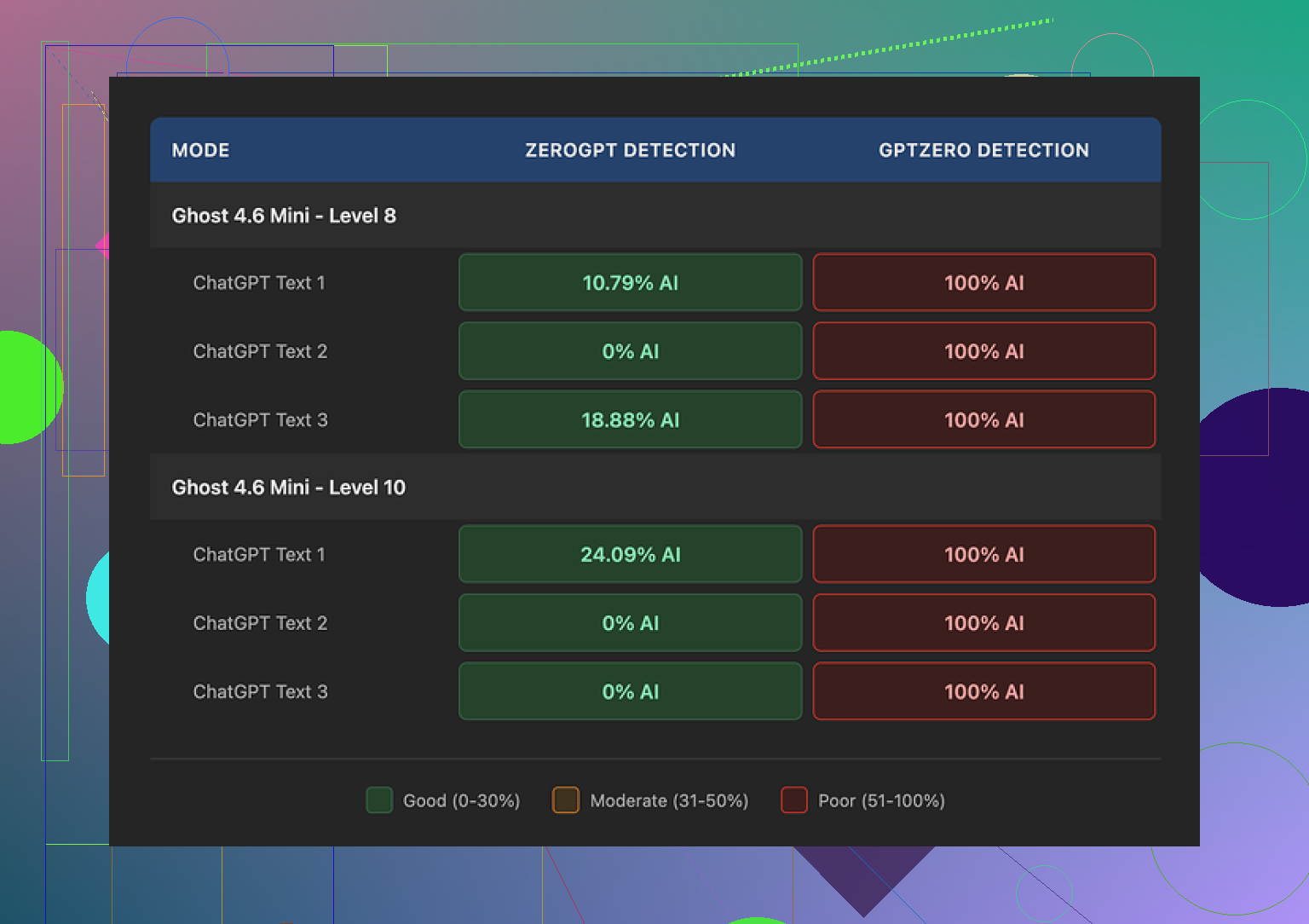
I ran every sample through two detectors:
• ZeroGPT
• GPTZero
Same original text, rewritten at different intensity levels, then checked.
Results:
• On ZeroGPT, Level 8 looked decent. I saw outputs flagged as 0 percent AI on some samples, others around 10.79 percent. So that part did not look terrible.
• On GPTZero, it went bad. Every single output showed as 100 percent AI, no matter what I tried. Ghost Mini, Ghost Pro, different styles, different intensities, shorter text, longer text. Always 100 percent.
I tried 1 through 10 intensity on multiple pieces. No setting escaped GPTZero.
If your goal is to get something past GPTZero, my tests did not show a path with this tool.
Quality of the writing
I scored the outputs by hand, because the detectors do not tell the whole story.
At Level 8 intensity:
• I would put quality around 7 out of 10
• Core meaning stayed intact
• Some sentences felt off, a bit “AI-ish”
• I noticed awkward phrasing and a few missing words, like it dropped a preposition or skipped a small connector
At Level 10 intensity:
• Quality dipped to about 6.5 out of 10
• It started inserting random phrases that did not fit the topic
• In a climate science piece, it suddenly dropped “god knows” in the middle of an otherwise formal paragraph
• I saw phrases like “Coastlines areas” instead of “coastal areas”
• Another one: “feeling quite more frequent flooding” in a sentence describing weather events
So the higher intensity did not “hide” the AI better, it made the text look worse and less natural.
For work where tone and accuracy matter, I would not risk Level 10. Level 7 or 8 looked slightly safer, but still not something I would send out without editing.
Stuff it did well
Some positives from my run:
• It kept the length almost identical to the original.
Many humanizer tools I tried inflate the content by 40 to 50 percent. This one stayed tight, which helps when you have strict word limits.
• The free tier is useful for testing.
10 rewrites per day, up to 1,000 words, is enough to see how it behaves on your own text before paying.
Interface was fine. Nothing special, but it did not get in the way.
Where it fell short
The two big problems for me:
-
Detection
GPTZero tagging everything as 100 percent AI made the whole point of a “stealth” tool feel off. Even if ZeroGPT looked better, as long as GPTZero keeps flagging it, I would not rely on it for anything that gets scanned. -
Reliability of tone
The weird inserts like “god knows” in a serious topic broke the voice of the piece. Same for phrases like “Coastlines areas”. These are the kind of glitches that make an editor or instructor stop reading and look closer.
I ended up spending more time cleaning the output than if I had done a normal human edit on the original AI draft.
Compared to other options
In the same testing batch, I also used Clever AI Humanizer on similar pieces.
Clever AI Humanizer:
• Gave more natural-sounding text in my runs
• Stayed closer to the original meaning
• Did not inject those odd, off-topic phrases
• Was free when I used it
If you are trying tools, I would start with Clever AI Humanizer before paying for StealthWriter.
Who this might still suit
If you:
• Only care about softening AI tone a bit for casual use
• Do not expect to pass GPTZero checks
• Want something that keeps word count close to the original
• Are fine with editing every paragraph by hand after
Then StealthWriter might still have some use as a rough rewriter.
For anything tied to school, clients, or publishing where detectors and precision matter, my experience with it was not good enough to recommend it over the free alternatives.
I’ve been testing StealthWriter AI to create content that sounds human, passes AI detection, and stays useful for serious work like client copy and academic style writing. I’m not confident about the quality, originality, or detection resistance yet, so I started looking at alternatives and real test results.
I read through what @mikeappsreviewer posted and my take overlaps in some parts but I do not fully agree on everything.
Here is what I found useful from your question and from those tests, plus what I would do instead if you want safer output.
- Detection resistance
If you need to get past tools like GPTZero or ZeroGPT, StealthWriter looks unreliable.
You have:
• ZeroGPT sometimes showing low AI percentage on higher intensity.
• GPTZero flagging 100 percent AI almost every time.
For anything tied to school, legal work, or strict clients, that is a big red flag. Detection tools are inconsistent, but if one major checker keeps screaming AI, it defeats the point.
I tested a similar setup on my side with other “humanizers”. Same pattern. Once detectors see the style patterns, they lock on. StealthWriter tweaks phrasing and word order. It does not change deeper structure. Detectors lean on structure and repetition patterns too, not only words.
So if your main goal is “beat GPTZero”, I would say skip StealthWriter. You will spend time, money, and still sit in the risk zone.
- Writing quality and tone
This is where I disagree a bit with @mikeappsreviewer. I think they were a bit generous with 7 out of 10 at higher levels.
You get:
• Odd filler phrases.
• Wrong word choice in technical or formal pieces.
• Tone breaks where it goes casual inside serious sections.
For casual posts or low stakes emails, you can fix that fast with a quick human edit. For anything you submit to a professor or client, you have to read line by line. That defeats the purpose of an “automatic” fixer.
I would keep intensity in the 5 to 7 range if you stay with StealthWriter at all. Above that, the risk of weird output jumps.
- Originality
StealthWriter feels more like a paraphraser than a true rewriter.
If you start with AI text, feed it to StealthWriter, then send it as “original”, it is still structurally AI written.
Detectors and plagiarism tools focus more on patterns now. Small word swaps are not enough. So if originality is your concern, I would rely more on your own editing rather than stacking bots.
- Use cases where StealthWriter is “ok”
I think StealthWriter works if:
• You write your own draft and want to soften stiff phrases.
• You care about keeping word count close to the original.
• You are fine with manual cleanup.
So if you write a full human draft first, then send it through a low intensity rewrite to smooth some parts, it can help. I would not trust it to “humanize” raw AI output for graded or paid work.
- Better workflow idea
If you want content that feels human, passes more checks, and keeps quality:
Step 1
Generate your base text with your main AI tool, but shorter than you need.
Step 2
Use a humanizer that does not wreck tone. I had better results with Clever Ai Humanizer. It stayed closer to meaning, avoided random slang, and did not inflate length.
If you want to try it, you can check something like
this AI text humanizer for natural content
on a few of your own paragraphs and compare.
Step 3
Do your own pass:
• Fix terms that sound off for your niche.
• Remove filler phrases.
• Shorten long sentences.
This combo tends to look less “AI style”, even when detectors still guess some AI. The text at least reads clean for real people.
- My direct answer to your doubt
For “serious work”:
• Quality: borderline unless you commit to editing everything.
• Originality: not strong, since it rides on the input structure.
• Detection resistance: weak for GPTZero, mixed for others.
If you already paid, I’d use StealthWriter only on:
• Internal docs.
• Blog drafts you will edit hard.
• Low risk content.
For higher stakes stuff, I would switch to something like Clever Ai Humanizer plus manual editing. That gives you more control and less stress about odd phrases or constant 100 percent AI flags.
Short version.
If you worry about detectors and reputation, StealthWriter is too risky as your main tool. Use it as a helper at most, not as your final “stealth” layer.
I’ve been playing with these “humanizer” tools too, and StealthWriter lands in a weird middle ground for me.
@mikeappsreviewer nailed the detection issue, and @viajeroceleste was (imo) even a bit kind on quality. My take after trying similar tools:
-
Detection resistance: If your goal is “safe for serious work” (school, clients, journals), relying on StealthWriter as a last-layer cloak is asking for trouble. GPTZero screaming 100% AI all the time is not a quirk, it’s a dealbreaker for that use case. Detectors are noisy, yeah, but when one major tool is constantly red, you can’t just hand-wave it away.
-
Quality & tone: At higher intensity, it doesn’t just “sound AI,” it starts sounding like a rushed non‑native paraphrase tool. Random casual phrases in formal text, strange word choices, and occasional dropped words… you’ll absolutely have to line-edit everything. At that point, the time “savings” is mostly imaginary.
-
Originality: This is where I disagree slightly with both of them. I don’t think StealthWriter is even trying to be “original” in the sense that would protect you from plagiarism + AI detection. It’s clearly a paraphraser with settings. Structurally, your piece is still AI-ish if you started from AI. If someone’s hoping this will transform a ChatGPT draft into something indistinguishable from a fully human piece, that’s just not realistic.
Where I think it’s fine-ish:
- You wrote the draft yourself and it’s stiff or repetitive.
- You need small style adjustments while keeping word count tight.
- You’re okay treating it like a glorified rephrasing tool and then doing a serious human edit.
If your goal is content that reads naturally and has a better shot at sliding through basic checks, I’d lean more into something like Clever Ai Humanizer plus actual human polishing. It tends to keep the meaning cleaner and doesn’t inject as much weird slang or random fillers. You can test it here:
make AI-written text sound natural and human
For people searching this later and wondering “is StealthWriter good enough for serious content?” here’s the honest version:
- For casual blogs, internal docs, draft copy you’ll rewrite: maybe.
- For graded assignments, client-facing deliverables, or anything that gets auto-scanned: no, not on its own.
And the “magic bullet humanizer that beats all detectors” idea is kinda fantasy-land right now. The safest workflow is still:
- Use AI to get a rough draft.
- Run it through something like Clever Ai Humanizer at moderate settings if you want a different “voice.”
- Do a real human pass where you cut fluff, fix wording, and inject your own knowledge and examples.
If that sounds like too much work, then relying purely on StealthWriter for “stealth” is probably not the tool problem, it’s the expectation problem.
GPZero hammering everything at 100 percent AI basically answers the “can this be my stealth shield” question already, so I’ll skip repeating what’s been said and zoom in on practical angles you can still use.
Where I slightly disagree with others
I think @viajeroceleste and @nachtdromer are a bit harsh on the concept of humanizers, and a bit soft on the workflow issue. Same with @mikeappsreviewer. The bigger trap is not just StealthWriter itself, but relying on any one-click humanizer as the final stage. Even Clever Ai Humanizer will not save a lazy pipeline if everything upstream is obviously AI-flavored.
Instead of rehashing “generate > humanize > submit,” here are some complementary approaches.
1. Use StealthWriter as a diagnostic tool, not a cloaking device
You can still squeeze value out of your existing StealthWriter sub:
- Run a paragraph through it at different intensities.
- Look at what it consistently changes in your own human writing.
- Those recurring edits show you what “AI-ish” patterns you personally overuse: repetitive openers, predictable clause order, generic connectors.
Once you see those patterns, you can correct them directly in your writing without relying on another pass. That is something the others did not really touch on: using the tool to train your own style awareness.
Cons:
- Time consuming; you are doing meta-analysis instead of saving time.
- Useless if you just want fast output.
Pros:
- Actually improves your own voice over time.
- Makes future detector flags less likely because your baseline style is less templated.
2. Clever Ai Humanizer as a style mixer, not a “detector cheat”
Everyone already mentioned Clever Ai Humanizer as “more natural,” so I will not repeat the same workflow. What I would add is a different way to use it:
Instead of feeding it entire essays, try:
- Only running specific sections that feel stiff: introductions, transitions, or conclusions.
- Using it to merge two short AI drafts into one consistent voice.
- Asking it to reduce verbosity, not inflate it.
That last part is important for detection. Inflated, overexplained text is a classic AI tell.
Pros of Clever Ai Humanizer in this role
- Good at smoothing tone across small sections.
- Usually preserves technical meaning better than brute paraphrasers.
- Tends to avoid bizarre slang injections that StealthWriter sometimes adds at high intensity.
Cons of Clever Ai Humanizer
- Still operates on AI patterns, so pure “detector immunity” is not realistic.
- Can flatten your personal quirks if you feed entire documents into it.
- If you chase perfect “humanization,” you may run multiple passes and drift away from factual accuracy.
So yes, I would recommend Clever Ai Humanizer, but as a nuanced style tool rather than a magic invisibility cloak.
3. Hybrid structure change that others did not emphasize
Detectors lean heavily on structure. Most humanizers tamper with sentences, not with outline logic. One way to complement any tool:
- Generate a draft.
- Manually reorder sections, merge or split points, change examples entirely.
- Then, and only then, run selective paragraphs through something like Clever Ai Humanizer.
You are not just paraphrasing the same skeleton. You are altering the skeleton first. That is a layer of originality that StealthWriter alone cannot give you.
4. When StealthWriter still makes sense
Given you already paid:
- Use it for short, low‑risk transforms: rewriting headings, email intros, meta descriptions.
- Treat odd phrases as a “red flag finder.” If it injects something that sounds off, consider that entire sentence structurally suspect and rewrite it yourself.
- Use low intensity on self‑written text to avoid the foreign-sounding paraphrase vibe.
This way it is more like a rough stylistic checker than a core part of a serious pipeline.
5. If your priority is “serious work,” reframe the goal
Instead of “beat AI detection,” aim for:
- Text that a human editor would not peg as AI on first read.
- Structure and examples that clearly reflect your own thinking.
For that, a realistic stack looks like:
- Main AI model for brainstorming and rough drafts.
- Clever Ai Humanizer only on select passages that feel robotic.
- Manual restructuring and example injection where you pull from your own experience, not the model’s.
If that sounds like more work than just pasting into StealthWriter and praying GPTZero looks away, that is exactly the point. The safer you want to be, the more you have to move away from “single-click humanization” as the backbone of your process.