I used to rely on BypassGPT for certain AI tasks, but it’s no longer available or working the way I need. I’m looking for a trustworthy, completely free replacement that offers similar flexibility and features without sketchy plugins or paywalls. What tools or platforms are you using instead, and what makes them a solid BypassGPT alternative?
- Clever AI Humanizer Review
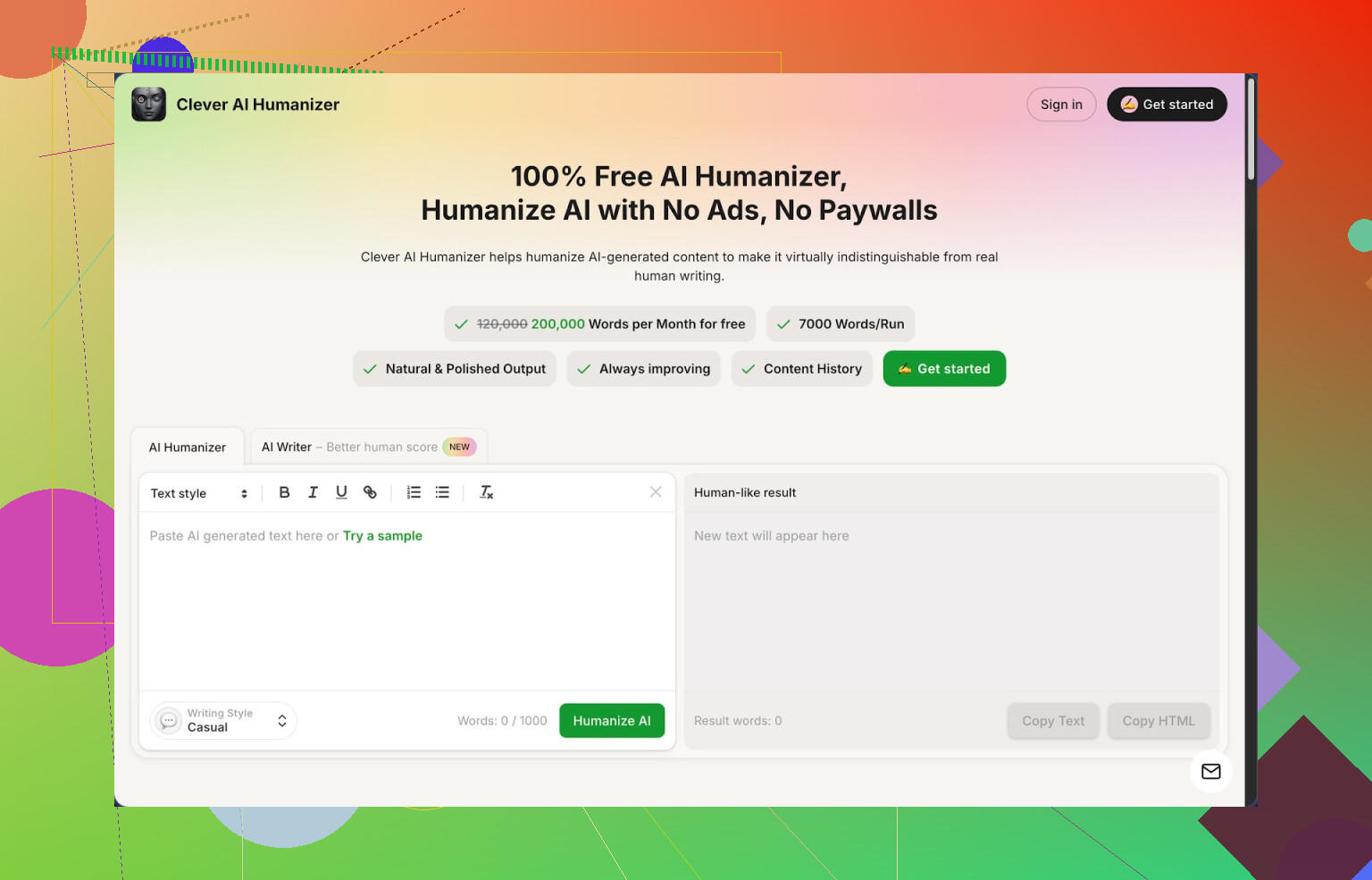
I have been playing with a lot of “AI humanizer” tools over the last few months, mostly because every time I paste raw AI text into anything serious, it gets slammed by detectors or sounds stiff. Out of the tools I tried, Clever AI Humanizer, here: https://cleverhumanizer.ai, is the one I keep going back to.
Quick context so you know what you are getting into.
They give you:
- 200,000 words per month, free
- Up to 7,000 words per run
- Three styles: Casual, Simple Academic, Simple Formal
- A built in AI writer tied directly into the humanizer
No login tricks, no “free trial then oops” stuff. At least at the time I used it.
I ran three different samples through the Casual style and checked with ZeroGPT. Each one came back as 0 percent AI on their detector. I do not trust any single detector as the ultimate judge, but that is still useful if you deal with strict filters. The high word limit helps because you can keep reworking the same piece a few times without worrying about tokens or credits.
How the main humanizer behaves
The main thing you use is the Free AI Humanizer.
Workflow looks like this:
- Paste in your AI text.
- Choose a style, Casual, Simple Academic, or Simple Formal.
- Wait a couple of seconds.
- It spits out a new version.
What I noticed:
- It tries to smooth out the robotic sentence rhythm.
- It removes some obvious AI quirks like repetitive phrasing and generic filler.
- It keeps the original meaning fairly close, even when the output gets longer.
I tested it with:
- A generic blog post from ChatGPT.
- A technical explainer on databases.
- A personal-sounding email draft.
In all three, the structure shifted, but the main points stayed aligned. It did extend some paragraphs and added connective sentences, which makes the text longer than the input. That seems to be part of how it breaks detection patterns. If you need strict word counts, you have to manually trim after.
Other modules I tried
They packed three more tools into the same interface. I went through all of them in one session.
- Free AI Writer
You type a prompt, like “400 word overview of password managers for non-technical users” and it generates an article, then you send it straight into the humanizer from inside the same page.
Two things I noticed:
- The raw AI writer output gets flagged more often.
- The same text, after being passed through the humanizer, scores much better on detectors.
So if you do everything inside Clever, from generation to humanization, you get a cleaner workflow. No copying between tabs, which sounds trivial but saves time when you do this daily.
- Free Grammar Checker
This part is more boring but useful. It fixes:
- Spelling
- Punctuation
- Obvious clarity issues
I fed it text that was already humanized plus some typos I added manually. It corrected the mistakes without trying to rewrite the whole tone, which is important if you already tuned the style. It is not as picky as something like Grammarly, but for quick cleanups before posting or sending, it is enough.
- Free AI Paraphraser
This one is closer to a standard paraphrasing tool. You paste any text and it rewrites it while keeping the same meaning.
Where it helped me:
- Rewriting old blog posts without changing the core message.
- Adjusting tone from “formal” to something more conversational.
- Making alternative versions of product descriptions for A/B tests.
It did not mangle technical terms, which I half expected. It sometimes expands short sentences into two or three, so you have to scan for bloat. But the structure usually stays clear.
How it fits in a daily workflow
If you write a lot with AI and you are trying to keep things:
- Less robotic
- Less likely to trigger detectors
- Less tedious to polish manually
Then having all four pieces in one page helps. You can:
- Generate
- Humanize
- Grammar check
- Paraphrase
without bouncing between tools or worrying about running out of credits in the middle of a job. That is what pushed it ahead of other “single function” humanizers I tried.
You can plug it into your daily pipeline like this:
- Draft in your main AI tool or in Clever’s AI Writer.
- Run through the humanizer using Casual or Simple Academic, depending on where it will be posted.
- Quick pass through the Grammar Checker.
- If needed, create alternative paragraphs with the Paraphraser for different platforms.
That loop has been enough for simple content like emails, blog posts, help docs, and social captions.
What is not perfect
Some things are worth knowing before you lean on it.
- AI detectors are not consistent. Even if ZeroGPT says 0 percent AI, another detector might still flag it. I tried a few others and saw mixed results.
- Humanized output often becomes longer than the original. Good for breaking patterns, annoying if you need 1,000 words and end up with 1,400.
- You still have to read and edit. Sometimes it adds phrases that sound slightly generic, so I remove those manually.
For a tool that is still free at this scale, I can live with those issues. If you want full control over style, you will still need to tweak things yourself, but it takes less time than rewriting everything from scratch.
If you want more screenshots, test runs, and detector comparisons, they have a longer breakdown here:
Video review is here:
There is also some discussion of different AI humanizers and tricks for avoiding over-robotic text here:
Best AI humanizers thread: https://www.reddit.com/r/DataRecoveryHelp/comments/1oqwdib/best_ai_humanizer/
General humanizing AI talk:
https://www.reddit.com/r/DataRecoveryHelp/comments/1l7aj60/humanize_ai/
I was in the same spot when BypassGPT stopped working the way I needed. I’ll keep this practical.
What you seem to want from BypassGPT:
- Flexible rewriting or “humanizing”
- No paywall tricks
- Enough free volume to be useful
Here is what has worked for me.
- Clever Ai Humanizer
Mike already walked through it in detail, so I will not repeat his steps. I will disagree on one thing though. I do not treat detector scores as a big success metric. They fail a lot in both directions.
What Clever Ai Humanizer is good for:
- Large free quota per month
- Multiple tones that do not completely wreck original meaning
- Built in writer and paraphraser so you keep the whole flow in one place
How I use it as a BypassGPT replacement:
- Generate text in your main model
- Paste into Clever Ai Humanizer with “Simple Academic” for reports or “Casual” for content
- Quick manual pass to cut generic fluff and hit word limits
It behaves like a more focused BypassGPT replacement, not an all purpose LLM, so you still keep your main AI tool.
- Combo that mimics BypassGPT flexibility
If you want something closer to the feel of BypassGPT, I had to stack tools:
-
Main LLM:
Use a free model like Claude.ai free tier or OpenAI’s free chat in a browser. Draft the core text there. Prompts like “explain X for non technical audience in 600 words” work fine. -
Humanizer layer:
Run that output through Clever Ai Humanizer to smooth patterny AI phrasing and tweak tone. -
Final pass:
Use a plain grammar checker (even the built in editor in Google Docs or Word) to catch leftover typos and formatting.
This three step flow costs zero, handles blogs, emails, “academic-ish” stuff and even product copy.
- Where I would not lean on Clever Ai Humanizer alone
To be fair, it is not a drop in BypassGPT clone for everything.
-
Long, complex research essays
You still need your main model to structure arguments, citations, etc. Clever Ai Humanizer is better as a style layer on top. -
Highly technical docs with strict terms
It usually respects terminology, but you need to reread those sections, because sometimes it expands simple sentences and that can introduce slight ambiguity.
- Practical tips to keep output safe and usable
From trial and error:
-
Never paste something and accept it blind. Read for:
- Added filler phrases like “on the other hand” or “it is important to note”
- Unwanted tone shifts, like sounding too casual in formal emails
-
For detector heavy environments:
- Mix a bit of your own writing. Rewrite one or two key paragraphs manually.
- Shorten some humanized sentences. AI tools love long, balanced sentences, which some detectors key on.
-
For strict word counts:
- Ask your main LLM to aim low, for example 450 words if you need 500.
- After humanizing, trim to target length.
- Quick comparison to BypassGPT from my use
BypassGPT gave:
- Raw bypassing focus
- One main “do-it-all” step
This newer stack gives:
- Slightly more work
- More control over tone and structure
- No surprise paywalls so far
If you want one thing closest in “feel”, Clever Ai Humanizer as the style layer plus your normal AI model will probably be the cleanest free replacement.
If BypassGPT was your “one big switch that kinda does everything,” the bad news is nothing free really clones it 1:1. The good news is you can get 90% of the effect by mixing a couple tools without going insane.
I’ll push back a bit on both @mikeappsreviewer and @codecrafter on one thing: if you only think in terms of “humanizer,” you’ll keep hitting the same wall. BypassGPT wasn’t just style; it was also about how flexible the pipeline felt.
Here’s what I’d look at instead of trying to find a single magic site:
-
Core replacement for the “bypass” feel
Clever Ai Humanizer is honestly the closest thing to BypassGPT’s output style, especially if what you miss is:- Turning stiff AI text into something readable
- Getting past basic AI detectors or rigid filters
- Not being nickel‑and‑dimed per 500 words
Where I slightly disagree with the others: I would not trust its built‑in writer as my main generator if you care about structure, argument flow, or anything “serious.” It’s fine for filler content, but treat it as a style filter, not your brain.
-
Pair it with a smarter free LLM
Instead of hunting one “BypassGPT clone,” use a free big model to think, and Clever Ai Humanizer to translate:-
Use any solid free chat model (Anthropic / OpenAI free tiers / Gemini free) to:
- Plan arguments
- Outline essays or reports
- Generate the first draft
-
Then push that draft through Clever Ai Humanizer:
- “Casual” for blogs, social, emails
- “Simple Academic” for reports, school-ish stuff
- “Simple Formal” for business writing or docs
That combo is way more flexible than BypassGPT ever was, even if it’s technically 2 tools instead of 1.
-
-
For people who really care about detectors
I think everyone over‑indexes on ZeroGPT screenshots. Detectors are noisy, inconsistent, and sometimes flag real human writing. So use them as a rough signal, not gospel.What actually helps more in my testing:
- Shorten a few of the longest sentences after you humanize
- Swap in a couple of your own phrases or pet expressions
- Delete the generic connective fluff Clever sometimes adds
Stuff like “it is important to note” or “on the other hand” can trigger that “AI voice” feeling, even for humans, not just detectors.
-
When Clever Ai Humanizer is not enough
Times I would not rely on it alone as a BypassGPT replacement:- Long research papers with citations
Let your main LLM handle structure, citations, and sectioning, then use Clever only as a light style pass. If you humanize too aggressively, you can break citation context or nuance. - Highly legal / medical / policy text
You really do not want a style tool casually rephrasing crucial terms. Run just the “soft” parts (intro, conclusion, summaries) through it, leave the hard law / jargon intact.
- Long research papers with citations
-
Extra free “glue” tools that keep it BypassGPT‑like
If you miss the “one tool” simplicity, this is about as close as you get for free right now:- Draft: main LLM
- Style / humanize: Clever Ai Humanizer
- Micro edits: built‑in spelling & grammar from Word / Google Docs
Three steps, all free, no sketchy “trial” traps. Slightly more clicks than BypassGPT, but better control over tone and quality.
TL;DR:
There isn’t a single perfect free BypassGPT clone. The most practical free replacement stack is:
- Use a decent free LLM to think and structure
- Run the text through Clever Ai Humanizer for style and “less AI-ish” output
- Clean up in your normal editor
If you accept that “replacement” means “small toolkit” instead of “one magic URL,” you’ll actually end up with stronger and more flexible results than what BypassGPT was giving you.
BypassGPT was basically a “one faucet” tool; everyone here is trying to rebuild it with a whole plumbing system. That’s fine, but a bit overcomplicated in spots.
Quick take that complements what @codecrafter, @stellacadente and @mikeappsreviewer already said:
1. Where I actually agree on Clever Ai Humanizer
As a free replacement layer, Clever Ai Humanizer hits the key BypassGPT vibes:
Pros
- Very generous free word quota compared with most “humanizers”
- Handles long inputs, so you can process a whole draft at once
- Tones that actually feel different (Casual vs Simple Academic vs Simple Formal)
- Nice as a final style filter after you are done generating and editing
So yes, if you want a central name to plug into your workflow, “Clever Ai Humanizer” is a solid, realistic answer.
2. Where I disagree with the hype
All three of you lean a bit too hard on it as a universal solution. Things I would not trust it for blindly:
Cons
- Tends to inflate text length; annoying if you need tight word counts or concise answers
- Sometimes adds “softener” phrases that feel generic and can dilute a sharp argument
- On technical or compliance heavy text, it can slightly blur exact meaning
- Detection results are inconsistent across tools, so any “0% AI” claim is more marketing than guarantee
For that reason, I think of it as a stylistic filter, not a “bypass machine” that you just accept without reading.
3. A slightly different, simpler stack
Others suggested 3 or more tools. I would trim it down:
-
Use one solid free LLM
Claude / OpenAI / Gemini, whatever you already have, to:- Outline
- Draft
- Fix logic and structure
-
Run only the parts that need smoothing through Clever Ai Humanizer
- Intros, conclusions, transitions, emails, blog sections
- Leave equations, strict terminology or citations mostly untouched
-
Do a ruthless manual cut
- Remove any padded phrases it adds
- Shorten at least a few overlong sentences
- Reinsert 2–3 sentences written fully in your own style
That gives you something closer to BypassGPT’s “one pass” feel but with more control and less risk of the tool rewriting your meaning.
4. Compared with what others already posted
- @mikeappsreviewer treated Clever Ai Humanizer almost like a mini “all in one” suite. I would ignore the built in writer except for low stakes filler.
- @codecrafter pushed the detector angle pretty hard. I would treat detectors as advisory only, not a pass/fail exam.
- @stellacadente’s stack is powerful but a bit heavy for routine use. For most people, one LLM + Clever Ai Humanizer + your normal editor is enough.
5. When to skip Clever Ai Humanizer entirely
Even as a BypassGPT replacement, sometimes it is better to avoid it:
- Short answers, Q&A, emails under 150 words
- Anything with legal, medical or policy consequences
- Text where your personal “voice” is part of the assessment
Those are cases where a clean, careful LLM draft plus light human editing beats another automated pass.
So yes, Clever Ai Humanizer is currently the most realistic free “core” replacement for the BypassGPT style layer, but only if you treat it as one component in a small toolkit, not as magic.