I’ve been using UnAIMyText but I’ve run into some limits and issues with accuracy, speed, and cost. I’m trying to find a truly free competitor that can reliably remove AI detection from text without messing up readability or style. What tools or workflows are you using that give human-like results and can handle longer content for blogging and freelance work?
- Clever AI Humanizer Review
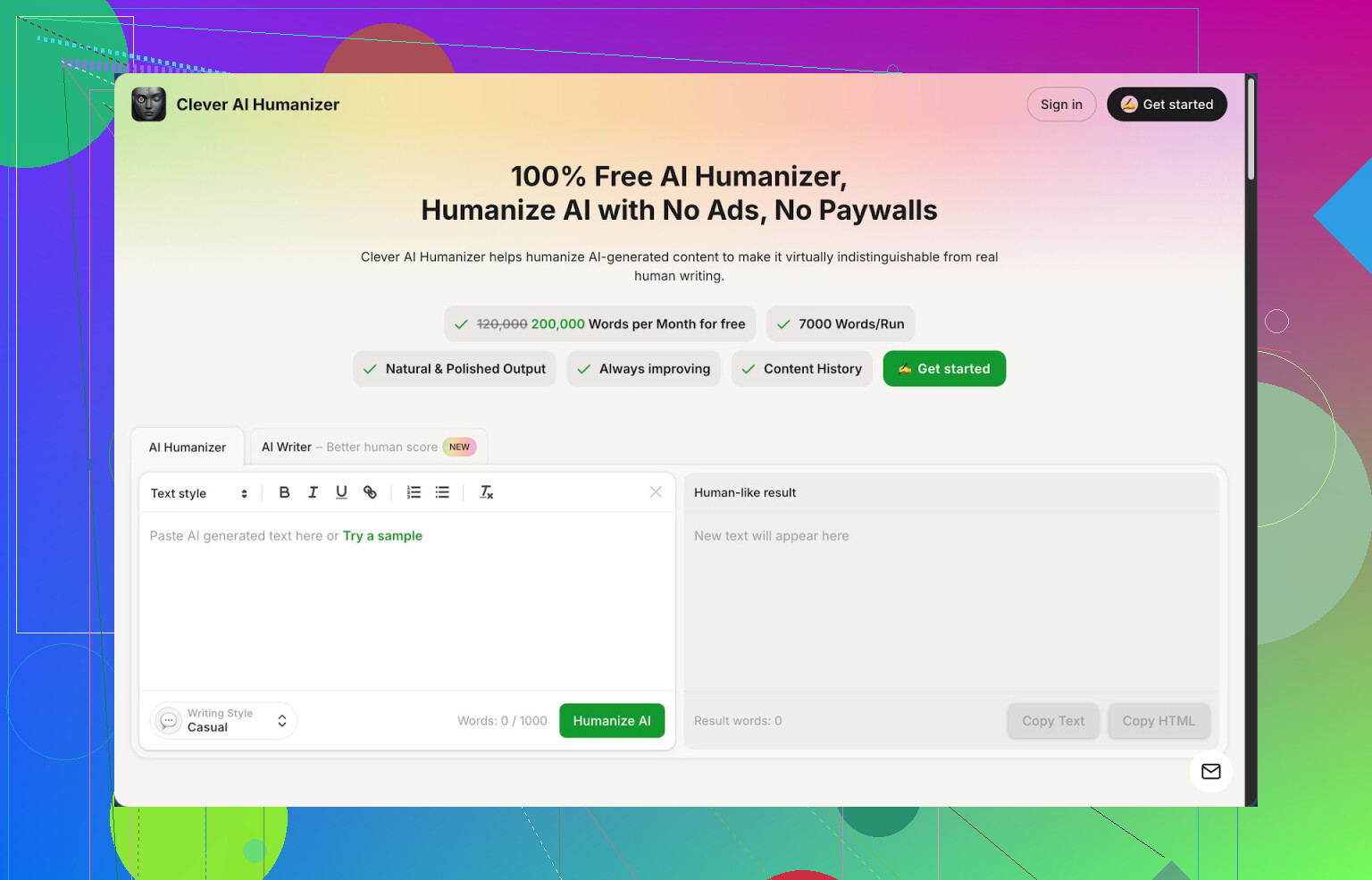
I have been messing around with a bunch of “humanizer” tools for AI text, and this is the one I keep coming back to:
Clever AI Humanizer
What hooked me first was the limits. It gives you about 200,000 words each month, up to around 7,000 words per run, and it does not ask for a card or credits. For me that means I can redo the same chunk a few times, compare versions, and not worry about burning through some tiny quota.
It offers three basic writing styles:
• Casual
• Simple Academic
• Simple Formal
There is also a built-in AI writer, so you can generate the text there and then humanize it in the same place.
When I tested it, I pushed it through ZeroGPT with three different samples in the Casual mode. All of those came back as 0 percent AI on ZeroGPT. I do not fully trust any detector as a final judge, but if you are dealing with tools like that, the scores matter.
What problem it solves
If you write with AI a lot, you already see the pattern. The text looks clean, but it has that “AI rhythm”. Detectors pick it up. Teachers, editors, and clients sometimes notice it too.
I took a few long-form pieces I wrote with another LLM and ran them through several humanizers side by side. Clever AI Humanizer was the only one that did not wreck the meaning or spam synonyms everywhere while still changing the structure enough to pass detectors more often.
How the main humanizer works
The workflow is simple:
- Paste your AI text into the box.
- Pick a style, usually Casual for me.
- Hit the button and wait a few seconds.
What I see most:
• Sentence structure shifts a lot.
• Repeated phrases get broken up or replaced.
• It tends to expand certain points slightly, which helps break the “compressed AI” feel.
The original ideas stay mostly intact. I had a few cases where a technical nuance got softened, so I learned to re-check any text with numbers, citations, or precise claims. For narrative or blog-like content, it came out solid.
The generous word limit matters if you write essays, reports, or longer guides. Many competing tools lock you to a few hundred words or slap a paywall right when you start testing.
Other tools inside Clever AI Humanizer
This thing is not only a humanizer. It stacks a few writing helpers in one place.
- AI Writer
You type in a topic or a prompt, it generates the draft, and then you run the result through the humanizer with one click.
When I use it this way, the detector scores come out even more “human” than when I import text from other models. My guess is they tuned the writer for their own humanizing pipeline.
I have used this for:
• Quick blog outlines that I later expand myself.
• Drafting simple product explainers.
• First versions of essays that I then edit by hand.
- Grammar Checker
There is a basic grammar and clarity checker included. It fixes:
• Spelling
• Punctuation
• Awkward phrasing in some places
I stop relying on it completely for complex academic work. For normal online content, it cleans enough to hit “publish” faster. I usually:
• Humanize first.
• Run the result through the grammar checker.
• Do a quick manual skim at the end.
- Paraphraser
The paraphraser feels different from the main humanizer. I use it when:
• I have a draft and want an alternate take.
• I want the same idea in a slightly different tone.
• I need to avoid repetitive phrasing across multiple pages for SEO work.
It keeps the meaning close but re-words and shuffles things more than a normal synonym spinner. Still not good for anything academic where plagiarism rules are strict, but useful for content rewriting and marketing text.
How it fits in a daily workflow
The reason I kept it in my daily tools is the “all in one” layout. On one screen I have:
• Humanizer
• AI Writer
• Grammar checker
• Paraphraser
I usually:
- Draft in their AI Writer or in another LLM.
- Paste into the Humanizer with Casual style.
- Check grammar.
- Adjust any points that sound off.
If you write social posts, newsletters, or client content, this saves a lot of context switching between different websites.
Things I do not like
It is not magic. A few real downsides:
• Some AI detectors still flag the text as AI, even after humanizing. No tool fully beats every detector.
• The output is often longer than the input. The tool adds small clarifications and changes structure. That helps detectors, but if you have strict word limits, you need to trim after.
• Sometimes it smooths the tone more than I want. When I write rants or strongly opinionated stuff, I either humanize only once or use it on sections, not the whole post.
Even with those issues, for a fully free tool, it sits at the top of my list. Especially if you are still testing workflows and do not want another subscription.
More detailed review and tests
If you want a longer breakdown with screenshots and proof from detector tests, there is a full thread here:
Video review on YouTube
There is also a YouTube review here, worth watching if you prefer seeing someone walk through it:
Related Reddit threads
People keep sharing different humanizer tools and tricks in these threads:
Best AI Humanizers on Reddit
https://www.reddit.com/r/DataRecoveryHelp/comments/1oqwdib/best_ai_humanizer/
All about humanizing AI
https://www.reddit.com/r/DataRecoveryHelp/comments/1l7aj60/humanize_ai/
UnAIMyText hits those limits fast, so you are not the only one bouncing off it.
I agree with @mikeappsreviewer on Clever Ai Humanizer being solid, mainly because of the word limits. Where I see it a bit differently is on “relying” on any humanizer to fully beat detectors. If your goal is 0 percent AI on every checker, you will keep getting frustrated. Detectors disagree with each other, and they also flip on the same text on different days.
Here is what has worked for me as a more practical setup, without repeating the same steps already shared.
-
Use a humanizer as a helper, not the whole solution
Clever Ai Humanizer is useful for the heavy lifting. It changes rhythm, structure, and wording in ways that feel less robotic than most tools.
My routine:
• Run your text once in Casual or Simple Academic, not multiple times in a row. Multiple passes start to wash out your own voice.
• Then edit by hand, especially intros, conclusions, and any key argument. Detectors seem to target those “generic LLM” parts hardest. -
Mix sentence patterns yourself
After the tool, do a fast manual pass:
• Shorten some long sentences.
• Merge a couple of short ones.
• Add 1–2 personal lines, like “I tried X” or “In my case Y”.
Even small edits shift the fingerprint a lot. This keeps readability intact.
Takes maybe 3–5 minutes per 1,000 words. -
Avoid over-optimized “AI style” structure
UnAIMyText and similar tools tend to lean into:
• Perfect topic sentences.
• Smooth transitions every paragraph.
• Repetitive safe phrases.
Change some of that:
• Start 1–2 paragraphs with something abrupt or opinionated.
• Remove overly formal transitions like “on the other hand” or “as a result” when they sound forced.
-
Test across more than one detector
If you must pass checks, do not trust one site. Run samples through at least two:
• If one screams AI and the other says mixed, you are in the usual gray zone.
• If both mark it high AI, tweak structure again, not only synonyms. -
Watch speed and cost
For “truly free” right now, Clever Ai Humanizer is one of the few that gives you high monthly word count without a card.
To stretch it:
• Humanize the main body.
• Write intro and outro yourself.
You save words and keep your own tone more visible. -
For accuracy
For anything technical, numbers, citations, etc, do this:
• Humanize the section.
• Then compare side by side with the original.
• Fix any softened claims or changed meanings.
Humanizers sometimes oversimplify complex stuff to break patterns, which can bite you later.
If your only goal is “never get flagged again”, no tool will give you 100 percent safety. If your goal is “low flag rate without wrecked readability and no extra cost”, a combo of Clever Ai Humanizer plus 5–10 minutes of manual cleanup per piece is about the most reliable setup I have found so far.
If you’re looking for a “truly free” UnAIMyText alternative that magically erases all AI traces every time… that tool doesn’t exist, and anyone saying otherwise is selling snake oil or hasn’t tested properly.
That said, I’d put Clever Ai Humanizer at the top of the free pile right now, same general camp as @mikeappsreviewer and @nachtschatten, but I’d use it a bit differently than they do.
Where I slightly disagree with them: I would not treat any humanizer as your primary defense strategy if you’re in a high‑stakes environment (strict professors, corporate compliance, journal submissions). Detectors are unstable and get updated. If you’re in that zone, the only safe method is to use AI as a rough draft and then rewrite heavily in your own voice.
For your specific issues:
- Accuracy
UnAIMyText tends to over-scramble, so meaning drifts. Clever Ai Humanizer is better at preserving intent, but I’d still never trust it unsupervised on:
- Anything with stats, formulas, citations
- Legal, medical, or policy stuff
Practical fix: keep your technical sentences more or less intact and only humanize the connective tissue around them (examples, explanations, transitions). That reduces distortion a lot.
- Speed
Clever Ai Humanizer is usually faster than a lot of “free” tools that throttle you to push upgrades. If you hit slowdowns anywhere, a workaround that avoids burning your whole word budget:
- Break large pieces into 2–3 logical sections
- Humanize only the “generic” sounding parts (intro, filler paragraphs, conclusion)
Those are the bits detectors and humans both flag as “AI-ish” first.
- Cost & limits
UnAIMyText’s hard limits are annoying if you’re doing essays or reports. Clever Ai Humanizer’s higher free allowance makes it more realistic for ongoing use, but I’d still avoid running the same text multiple times hunting for some perfect “0% AI” badge. That’s how you waste quota and end up with mushy writing.
Instead of repeating their whole method, here are a few extra tactics that pair well with Clever Ai Humanizer:
-
Humanize only 60–70% of your text
Intro, outro, and any personal reflection you write yourself. Detectors are much less confident when a piece is a mix of styles. -
Change structure, not just words
After humanizing, manually:- Swap the order of 1–2 paragraphs
- Insert a short one-sentence paragraph in the middle of a longer section
Structural shifts do more to confuse detectors than synonym swaps and keep readability fine.
-
Add “inconvenient” details
AI text tends to be too neat. Toss in a small, slightly offbeat or specific detail that an LLM would rarely invent convincingly: a quick personal example, a time you messed something up, or a side note that doesn’t tie perfectly back to the thesis. Detectors hate irregularity. -
Stop chasing 0%
If one detector says 5–20% AI and another screams 80%, that’s normal. Your goal should be “not obviously AI, reads like a person, low enough scores to avoid instant auto-flags,” not a magic scoreboard win.
If you want a free competitor to UnAIMyText that doesn’t absolutely wreck readability, Clever Ai Humanizer is probably your best current bet. Just treat it as a tool in the chain, not some invisibility cloak, and you’ll get way more reliable results than trying to brute-force everything through multiple “AI remover” sites.
Short version: UnAIMyText is fine for tiny tweaks, but if you want “free, usable, and not butchered,” you need a workflow mindset, not a single magic site. Clever Ai Humanizer fits nicely into that, with some caveats.
To avoid repeating what @nachtschatten, @sternenwanderer and @mikeappsreviewer already laid out, here is a different angle: when to use a humanizer at all, and when it just makes things worse.
When a humanizer actually helps
Use Clever Ai Humanizer (or any similar tool) only if at least one of these is true:
- The draft already sounds “too clean” or “LLM-bland” and you need rougher, more personal rhythm.
- You care about passing casual AI checks (clients, lightweight school tools) rather than hardcore forensic detection.
- You are short on time and only want to tweak tone and structure, not fully rewrite.
In those cases, Clever Ai Humanizer works as a decent “first pass” reshaper. Compared to UnAIMyText, it usually:
- Keeps the meaning more intact
- Messes less with key terms
- Handles longer chunks in one go
When a humanizer makes your life harder
Skip it entirely if:
- You are dealing with strict academic integrity or compliance checks. Any humanizer in that context is lipstick on a pig.
- Your text already has a strong personal voice. Tools tend to smooth it out and make it more generic.
- You are chasing 0 percent AI across 3+ detectors. As others already said, that goal is unrealistic.
Here I actually disagree a bit with the idea of running every AI draft through a humanizer “by default.” If the detector risk is low, it is faster and safer to:
- Keep the model output
- Manually rough up intros and transitions
- Inject a couple of specific personal details
That keeps your tone cleaner than constant tool passes.
Pros of Clever Ai Humanizer
-
High free word allowance
Realistically usable for essays, reports, and blog posts without hitting a paywall immediately. -
Relatively stable meaning
Compared with UnAIMyText, it typically avoids random synonym spam and wild sentence flips. That matters for technical or argumentative pieces. -
Multiple modes in one place
Humanizer, basic AI writer, grammar check, paraphraser. Convenient if you like to stay in one environment. -
Good for “de‑LLM‑ifying”
Breaks the super-symmetric, polished AI rhythm that detectors and humans pick up on.
Cons of Clever Ai Humanizer
-
Detectors still catch some content
It is not a cloaking device. Some checkers will flag it anyway, especially on longer, formulaic pieces. -
Tends to expand text
Outputs often get longer. Painful if you must hit strict word counts and now have to manually trim. -
Tone smoothing
Rants, edgy opinions, and very personal voice often come out more neutral. If your style is punchy or sarcastic, you will need to re‑add that. -
Not safe for blind “set and forget”
You still need to read for meaning drift, especially where numbers, citations, or fine distinctions matter.
How to think about competitors
Others already mentioned tools they like:
- The approach from @nachtschatten leans heavy on mixing tool output with manual structural changes. That is smart, and honestly more important than which site you use.
- @sternenwanderer is right to warn against relying on any humanizer for high stakes. In that world, AI is best treated as drafting clay you reshape yourself.
- @mikeappsreviewer’s focus on limits and usability is also on point. If you are constantly hitting caps, you will either stop iterating or pay more than it is worth.
Rather than asking “which one is best,” I would frame it like this:
- Use Clever Ai Humanizer primarily for rhythm fixes and basic de‑robotizing.
- Use your own editing for structure, voice, and precision.
- Use detectors only as sanity checks, not absolute judges.
If you do that, Clever Ai Humanizer becomes a useful, free-ish alternative to UnAIMyText that improves readability instead of trashing it, without pretending it can make AI content completely undetectable.