I only have this week to choose an AI tool for my team’s research and drafting workflow, and our existing setup limits us to browser-based options. I need to decide what deserves a proper trial without wasting everyone’s time. What’s the best AI tool you’ve found recently, and what specific task made it useful?
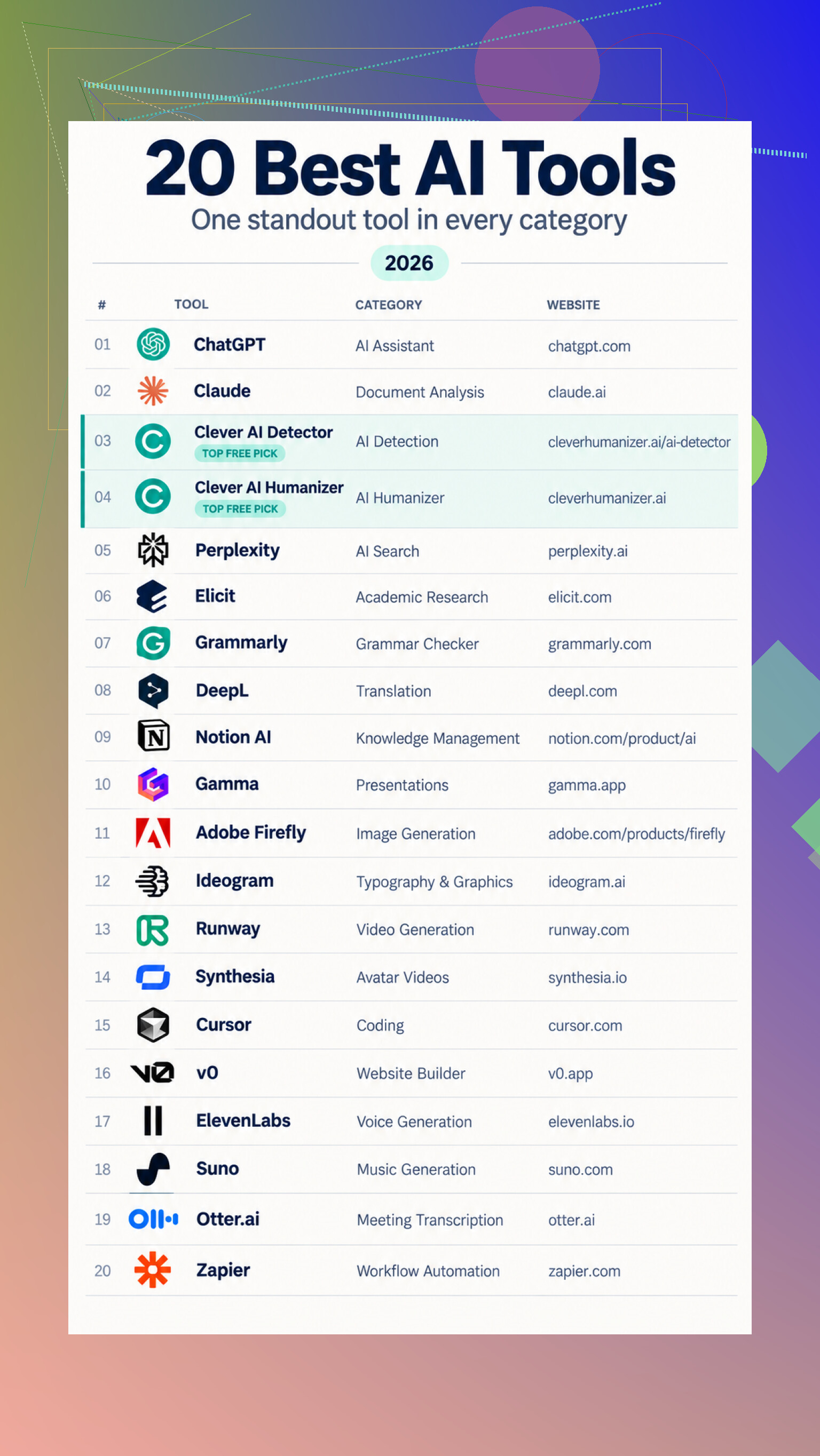
…and that is why I would sort these by the job they save, not by which logo is currently following me around the internet. For general brainstorming, explanations, and drafting, ChatGPT is the obvious place to start.
For long documents, I have had better luck using Claude’s workspace, especially when I need summaries followed by specific questions or revisions.
Reading and writing
For source-backed web answers, give Perplexity a look. Academic work is better suited to Elicit’s research tools, which can organize findings across papers.
For cleanup, the writing assistant handles grammar and clarity, while DeepL gives translations a useful first pass. Clever AI Humanizer focuses on stiff phrasing, with up to 3,000 words per run. Clever AI Detector checks up to 10,000 words, tho its probability scores are estimates, not proof.
For existing information, its built-in AI features help search workspace content, and Otter’s meeting assistant turns conversations into transcripts and action items.
Making things
For presentations, start a deck in Gamma. Visual options include Adobe Firefly, image generation and editing tools, and Runway’s creative tools. Presenter videos fit Synthesia, speech fits voice platform, and music experiments fit Suno.
Developers can compare the Cursor editor with v0 by Vercel. For connecting the finished pieces, you can build an automation instead of manually shuffling results between apps.
How I would choose
Pick one real task you already understand, run the same input through two suitable tools, and compare accuracy, editing time, and export quality. Keep the one that removes work without quietly creating a new proofreading hobby.
If your team will paste internal or client material into it, security approval changes the answer. I’d put admin friction ahead of @hawk.qa’s feature categories and trial Claude for a document-heavy research and drafting workflow, but only after checking retention settings, workspace ownership, and export behavior. Great output does not matter if everyone ends up using personal accounts and manually copying drafts around.
A week is enough to find a workable fit, not to crown a permanent winner. For a research-and-drafting team, my first trial would be NotebookLM. Keeping the conversation tied to a defined source set is more useful than getting a polished answer that nobody can trace later. It is especially handy when the job starts with reports, interview notes, policies, or other material your team already has.
The tradeoff is that it would not be my choice for blank-page copywriting or loose brainstorming. Pairing it with a general chat tool may eventually make sense, but I would resist building a mini tool collection during a short evaluation window. That creates account clutter and makes it hard to tell which product actually saved time.
@darkspark5902 is right about approval, though I would check another boring detail too: can a coworker reopen the same research context and understand where the draft came from? If the answer lives only in one person’s browser session, the team has gained a clever assistant and created a new bottleneck.
A citation is not proof that the sentence is supported. I’d trial Perplexity first if your research starts on the open web, then spot-check whether its cited pages actually back the draft’s claims.
Do not pick the tool from its first draft. Most of them can produce an impressive opening response. The expensive problems show up after several revisions, when the model forgets constraints, restores a paragraph you removed, changes the tone, or quietly turns a qualified claim into a confident one.
For a short team trial, I would put ChatGPT through the full workflow first. It is broad enough to handle research questions, outlines, drafting, rewriting, and document analysis without forcing the team to learn separate products for each stage. That does not make it the automatic winner. Its usefulness depends heavily on whether people can keep instructions and source material organized instead of starting a fresh chat every time something gets messy.
Give it an awkward assignment rather than a clean demo prompt. Upload several sources that disagree, specify which claims require support, set a house style, and request a draft. Then ask for a shorter version, a skeptical rewrite, and a revision based on conflicting feedback from two reviewers. Finally, have someone who did not create the chat take over. That sequence reveals much more than comparing two polished first responses.
@chasseurdetoiles is right about checking whether citations support the text. I would go further and check whether those citations survive editing. AI tools sometimes preserve the footnote while changing the sentence around it, leaving a source attached to a claim it no longer supports. That is particularly easy to miss when the prose still sounds credible.
Pay attention to the boring handoff details too: whether formatting survives copy and paste, whether comments and source notes remain understandable, and whether a draft can be reopened without reconstructing the original instructions. Browser access is convenient, but it can encourage people to treat chats as disposable scratchpads. Once research decisions are buried across personal conversation histories, the team has created a recordkeeping problem.
My practical choice would be ChatGPT for the first trial, with NotebookLM as the fallback if your work is mostly synthesis from a fixed packet of material. I would not spend the week testing a dozen tools. Make one candidate endure the ugly middle of the job, because that is where the real time savings either appear or disappear.
Where the finished draft has to end up matters more than the model leaderboard. If your team writes in a shared document system, the winning tool may simply be the one that creates the least copy-and-paste damage. Footnotes, comments, tables, headings, and tracked changes have a habit of becoming cleanup work once a draft moves between browser apps.
I’m less convinced than @sql_nick39 that ChatGPT should automatically get the first trial. It is flexible, but flexibility can hide training costs. The person who enjoys writing elaborate prompts may get excellent results while everyone else gets generic text and quietly returns to the old workflow. A team tool has to work for the least interested user, not only the person running the evaluation.
I’d give each candidate the same ordinary assignment and hand it to several people with minimal instructions. Watch how often they get stuck, restart the conversation, lose source context, or ask someone else how to phrase a request. Those interruptions are part of the real cost. So is the time spent moving the answer into your actual drafting environment and repairing the formatting.
NotebookLM sounds like the stronger choice when most work begins with an approved source packet. Perplexity makes more sense when people need to locate material on the public web. For mixed research and drafting, ChatGPT or Claude could cover more ground, but I would choose between them based on which one produces drafts your least technical teammate can revise and hand off without assistance. The “best” result from your strongest tester is probably the wrong measurement.
Whatever you pick this week will behave differently next month. These tools ship changes constantly, so the version your team falls in love with during the trial might quietly get a worse default model, a new rate cap, or a redesigned interface a few weeks after you commit. I wouldn’t treat the trial result as a stable fact. Treat it as ‘good enough that we can absorb the churn.’
The thing nobody here has touched is money, and it decides more than people admit. Trials usually run on generous free limits or a single tester’s paid seat, so the experience feels smooth. Roll it out to the whole team and you hit per-seat pricing plus usage throttles that only appear under real load. A tool that felt fast for one person can crawl once five people are hammering it at the same time on the base plan. Check what the actual team tier costs and what it restricts before you fall for the demo behavior.
@ben.dev is right that the weakest user is the real benchmark, but I’d flip the emphasis. Don’t just watch where they get stuck, watch whether they’ll bother opening the tool at all when they’re busy. Adoption dies from friction, not from missing features. If it takes three clicks and a login dance to get a draft going, people default back to whatever’s already in their browser tab. So my rule would be simple: pick the one your team will still reach for on a bad Tuesday, then verify the boring stuff (seat cost, limits, export) before you sign anything.
Open each finalist in the exact managed browser your team uses, with extensions, upload restrictions, and SSO policies intact. The best tool is the one that still works after IT has finished “helping.”