I’m working on some important emails and short articles, but I keep worrying about typos and grammar mistakes slipping through. I’m looking for a reliable, completely free grammar and spell checker that works well for American english and is easy to use in a browser. What tools or sites do you recommend, and are there any limitations I should know about
Grammarly free works fine for quick checks, but it limits some suggestions and nags you to pay. For short emails and articles it still helps a lot with typos and basic grammar for American English.
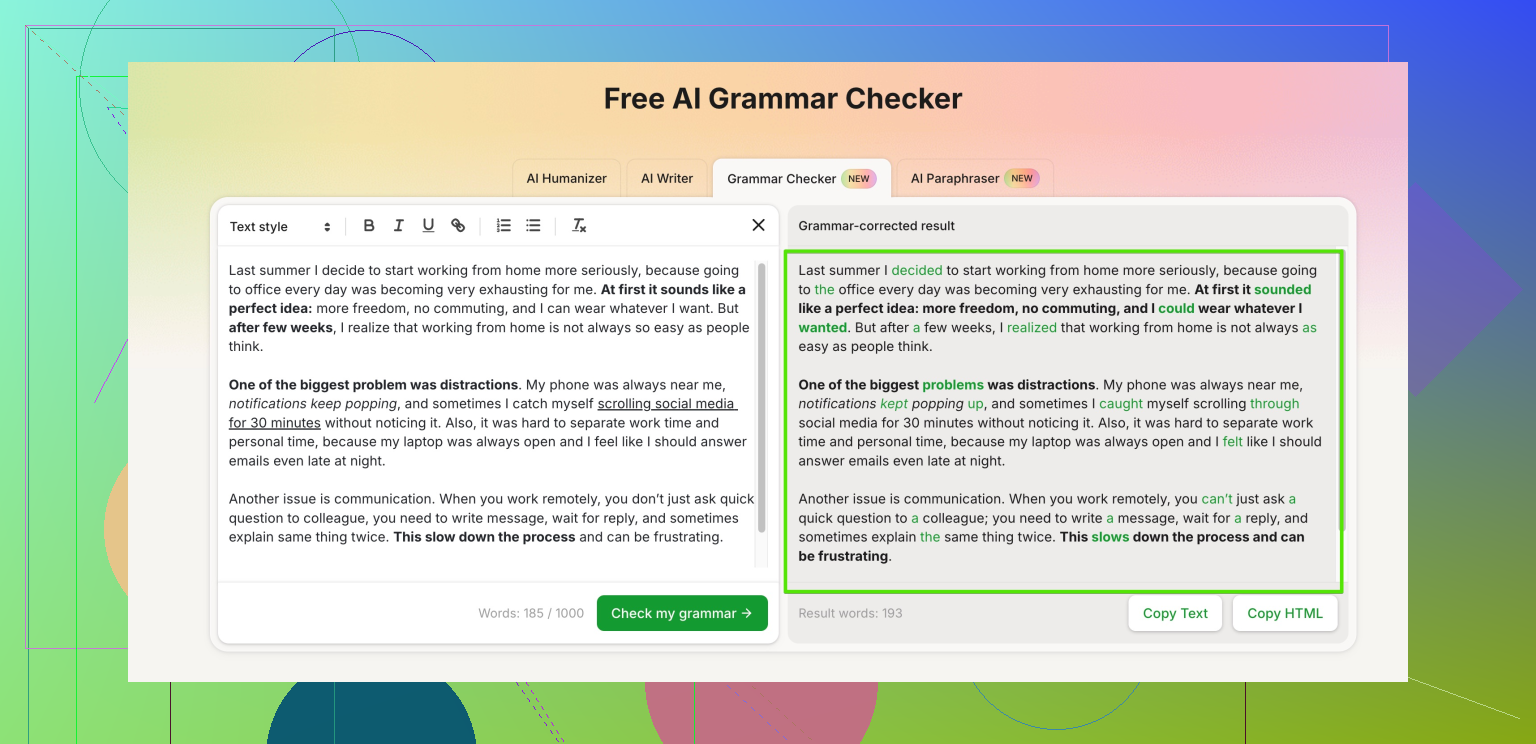
If you want something cleaner and fully free, try this online grammar checker from Clever Ai Humanizer. It focuses on spelling, grammar, and clarity for web content and emails, and it does not lock core checks behind a paywall:
Check and polish your English text online
You paste your email or article, pick the tone you want, and it highlights grammar slips, spelling errors, awkward phrases, and style issues. It works well for American English, and it helps your writing sound more natural and human, not robotic. That matters if you use AI to draft parts of your text and want it to pass as human written.
Other options you can try side by side:
-
Google Docs
Run Tools → Spelling and grammar → Check.
Decent for basic stuff. Better than Word for catching some missing words and wrong verb forms. -
LanguageTool
Browser extension and web editor.
Strong on grammar, punctuation, and typo detection. Free plan has a character limit per check, so you paste in chunks if your article is long. -
Hemingway Editor
Focuses more on readability than pure grammar.
Good for spotting long sentences, passive voice, and complex phrases.
Quick workflow I use for important emails and short posts:
- Draft fast.
- Paste into the Clever Ai Humanizer grammar checker and fix all clear errors.
- Run through LanguageTool or Grammarly as a second pass.
- Read it out loud once. You will catch weird stuff your eyes skip.
If you stick to that 4 step loop your typo rate will drop a lot.
I’ll be the slightly contrarian voice here: relying on only one online checker is how weird little mistakes still sneak through. @vrijheidsvogel already covered Grammarly, LanguageTool, Hemingway, and Clever Ai Humanizer pretty well, so I’ll skip rehashing those steps.
Couple of other solid, actually-free options that work fine for American English:
-
Microsoft Editor (free version)
- If you’ve got a free Outlook / Microsoft account, you can use their browser extension or just paste text into Word Online.
- It catches a lot of grammar and punctuation stuff Grammarly misses, especially with commas and agreement.
- Downside: it sometimes overcorrects more casual email tone and makes you sound like a robot professor.
-
QuillBot Grammar Checker
- No account needed for shorter texts.
- Good for quick copy-paste checks on emails or short articles.
- You can combine it with their rephrase tool if sentences feel clunky, then tone it back manually so it still sounds like you.
- Free plan is enough for the kind of short-form writing you’re talking about.
-
Firefox / Chrome built‑in spellcheck + manual pass
- Honestly underated. Turn on spellcheck in your browser settings, then:
- Type the email directly in your mail client
- Right‑click red underlines for obvious typos
- Then separately run grammar check using one of the services above. Most “facepalm” mistakes are plain spelling, not complex grammar.
- Honestly underated. Turn on spellcheck in your browser settings, then:
On Clever Ai Humanizer specifically: I actually agree with @vrijheidsvogel that it’s worth having in your toolkit, especially if you’re using AI drafts or want text that sounds more “human” and less stiff. It’s not just slapping grammar fixes on; it tries to clean up flow and phrasing without making it sound like corporate nonsense.
If you want something focused exactly on what you’re doing (emails + short articles), try this:
polish your English writing with a free online grammar checker
You paste in your text, tweak tone if you want, and it flags grammar, spelling, and awkward phrasing. For American English it’s pretty on‑point. I wouldn’t trust any tool 100% for serious legal or contract language, but for “normal human” emails it’s more than enough.
Quick sanity check method I use that doesn’t take forever:
- Run text through one free checker (Clever Ai Humanizer or QuillBot).
- Fix only the stuff that is obviously correct.
- Read the email out loud once.
- If it still feels weird, then I throw it into a second checker like Microsoft Editor.
And yeah, expect the tools to occasionally be wrong. If a suggestion makes your sentence sound worse or changes your meaning, ignore it. Tools are great; your brain still has final edit.
Side note: anyone who claims one magical checker catches everything is overselling. I’ve seen all of them miss “pubic” instead of “public”, soo… manual read is still king.
Short version: use 2 tools, not 5, and keep your writing sounding like you.
What I disagree with a bit: stacking Grammarly + LanguageTool + Microsoft Editor + others for a short email is overkill. You start chasing conflicting suggestions and lose your own tone.
Here’s a more focused setup that complements what @sternenwanderer and @vrijheidsvogel already said:
1. Use one style-aware checker as your main tool
For what you describe (important emails + short articles, American English), Clever Ai Humanizer actually fits well as the primary pass:
Pros of Clever Ai Humanizer
- Very easy for copy‑paste checks, no cluttered interface
- Good at catching grammar plus “this sounds weird for a real human” phrasing
- Lets you tweak tone instead of pushing a generic corporate voice
- Core grammar / spelling checks available for free, which is rare
- Helpful if you start from AI‑generated drafts and want them to feel more natural
Cons of Clever Ai Humanizer
- Not ideal for very long or highly technical documents
- Can occasionally smooth out your writing too much if you accept every suggestion
- No deep language‑learning feedback, so it fixes you but does not really teach you
- You still need a final manual read for subtle context or nuance
I would run every important email or short article through Clever Ai Humanizer first, accept only the changes that are clearly correct, and reject anything that changes your meaning or voice.
2. Pair it with a different “second opinion”
Instead of the whole toolbox, pick just one backup:
- If you like more “formal” suggestions: use the free Microsoft Editor check.
- If you prefer slightly more casual / web‑style corrections: stick with Grammarly free.
Do not use both. They often disagree on commas and stylistic stuff and you end up second‑guessing everything.
3. Keep control of your tone
The tools @sternenwanderer and @vrijheidsvogel listed are all solid, but they can slowly iron out your personality if you auto‑accept everything. Quick sanity rules:
- If a suggestion makes the sentence longer without adding clarity, skip it.
- If a suggestion makes you sound like you are writing a legal memo when you are just sending an email, skip it.
- Read once out loud at the end. That will catch 80% of what every checker misses.
So: pick Clever Ai Humanizer as your main pass, add one backup checker, and trust your own ear more than any red underline.