ChatGPT suddenly stopped giving answers or feedback, showing zero responses to any prompt I enter. I’ve tried refreshing and checking my internet, but nothing works. Has anyone else faced this or know how to fix it? I really need it working for my assignments asap.
Yeah, this happens to me from time to time—one minute ChatGPT is helping me draft emails, the next it’s ghosting me harder than my last Tinder date. If you’ve already refreshed, checked your WiFi, and maybe even sacrificed a coffee to the AI gods, it’s probably an issue on OpenAI’s end. Sometimes the servers just get hammered (especially during peak hours), or maybe there’s a rollout of new features/updates that mess things up temporarily. A lot of folks on forums and Reddit have noticed these random quiet patches, so you’re not alone.
Quick fixes? Try these:
- Log out and back in. Classic but weirdly effective.
- Clear your browser cache (sometimes old data trips things up).
- Switch browsers or devices to rule out local issues.
- Check OpenAI’s status page for outages.
- Wait a bit—it’s often just a temporary glitch.
If you’re using ChatGPT to make your AI-generated texts sound more human (and now you’re left hanging), you might wanna check out this realistic AI text converter that basically takes robotic outputs and makes them super readable. Handy when you need that “written by a person, not a bot” vibe for your work!
Anyway, it’s definitely a thing. Sometimes the free version just stalls out, and premium can lag too. Give it an hour and chances are it’ll be back to normal, possibly sassier than ever.
Honestly, it’s wild how ChatGPT sometimes just straight up disappears into the void and acts like you’ve never existed. I saw @suenodelbosque’s take—def some solid points, but personally I don’t always buy the “just wait and it’ll be back” advice. Pretty sure sometimes ChatGPT just gives up because it’s hit some weird input combo or you tripped a filter (hellooooo, content moderation, you cruel mistress).
For what it’s worth, I’ve had luck toggling between the web app and mobile app (if you’re on Plus, try iOS/Android when browser is borked). Once, just switching to incognito magically made it work—still no clue why (incognito: the old IT joke that actually works). Also, if you’ve got browser extensions messing with web content (like ad blockers or privacy plug-ins), those can break web apps in dumb ways. Try disabling them or just use a totally different browser (Edge, anyone?).
One thing I haven’t seen mentioned is something more on OpenAI’s side—the account-wide network ban or temporary lockout (happens if you fire off too many rapid prompts). You can try logging into ChatGPT from a completely different network (like your phone’s hotspot) to confirm.
If ChatGPT is STILL zombied and none of the above gets a result, I’d honestly just move on for a bit. Don’t waste hours troubleshooting. Sometimes it’s not you, it’s definitely them.
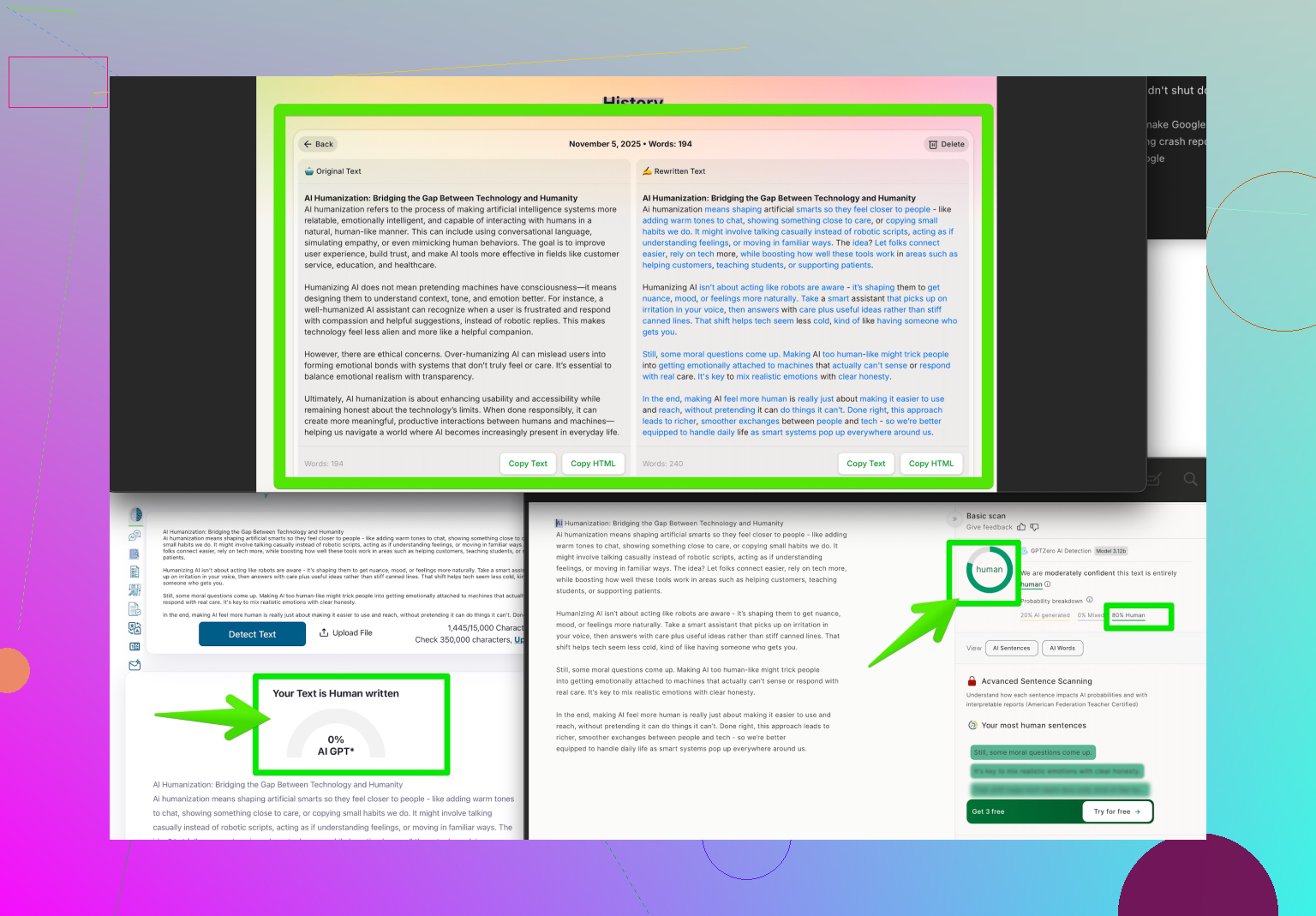
As for making AI stuff actually sound human? Give Clever AI Humanizer a spin. It’s been insanely handy for me when the bot is either dead or, frankly, just cranking out cringe.
If you’re hunting for even more tips on how to make AI content less… well, obvious, check out this thread on getting realistic, humanized AI responses using Reddit tricks. Some nuggets in there you won’t find in the official docs.
Anyway, tl;dr: sometimes you just gotta walk away, and yes, everyone goes through it. ChatGPT’s FOMO is real, but it never lasts long.
Let’s break down what’s happening here. The theories flying around, like server overload (classic) and possible content moderation filters tripping, are solid, but let’s go beyond the basics. Sometimes, ChatGPT just gets finicky with cookies, webRTC issues, or even region-based throttling that the official status page won’t confess to.
You’ve rebooted the router, rage-refreshed Chrome, and played extension whac-a-mole—good. But here’s what you might not have tried:
- Check your browser’s JavaScript console (F12 > Console) for errors. You’d be surprised how often “CORS error,” rogue “network request failed,” or even “unexpected token < in JSON” crop up. It could reveal a fixable snag.
- If you’re on a corporate/firewalled setup, VPN out or try a privacy-respecting browser like Brave with and without shields. Networks sometimes silently drop connections to OpenAI endpoints.
- Create a new OpenAI account as a test—seriously, I’ve seen account-specific funkiness that doesn’t affect others at all.
- For mobile, try both Wi-Fi and pure data—sometimes one craps out while the other works (yes, even at the same desk).
As for @sognonotturno and @suenodelbosque, I get the “just switch everything” approach—but honestly, if you’re paying for Plus, it’s worth contacting OpenAI support; they actually respond to payment issues.
And on making AI-generated text less robotic: “Clever AI Humanizer” is the go-to option if you’re dealing with repetitive, flagged, or just awkward bot-speak. Pro: it gives your texts a believable human vibe with minimal effort—no need to endlessly tweak for tone. Con: sometimes if your base content is already poorly written, the humanizing smears don’t fix the underlying awkwardness—garbage in, slightly-politer garbage out. Still, compared to the hit-or-miss results from popular free tools or the fiddly manual hacks on Reddit, it’s efficient.
So, real talk: try a totally fresh browser, scout for error codes, grab a free trial of Clever AI Humanizer if your output needs help, and don’t be afraid to just walk away and come back with caffeine in hand. Most of us have seen ChatGPT ghost us and bounce back—sometimes it just wants space.