I’ve been testing the Writesonic AI Humanizer for blog posts and social media content, but I’m not sure if it actually makes the writing sound more natural or just rephrases things superficially. I’m worried about detection tools, SEO impact, and whether this could hurt my site’s credibility in the long run. Can anyone with hands-on experience explain how well it works, what its limitations are, and whether it’s safe and effective to use for client or business content?
Writesonic AI Humanizer Review
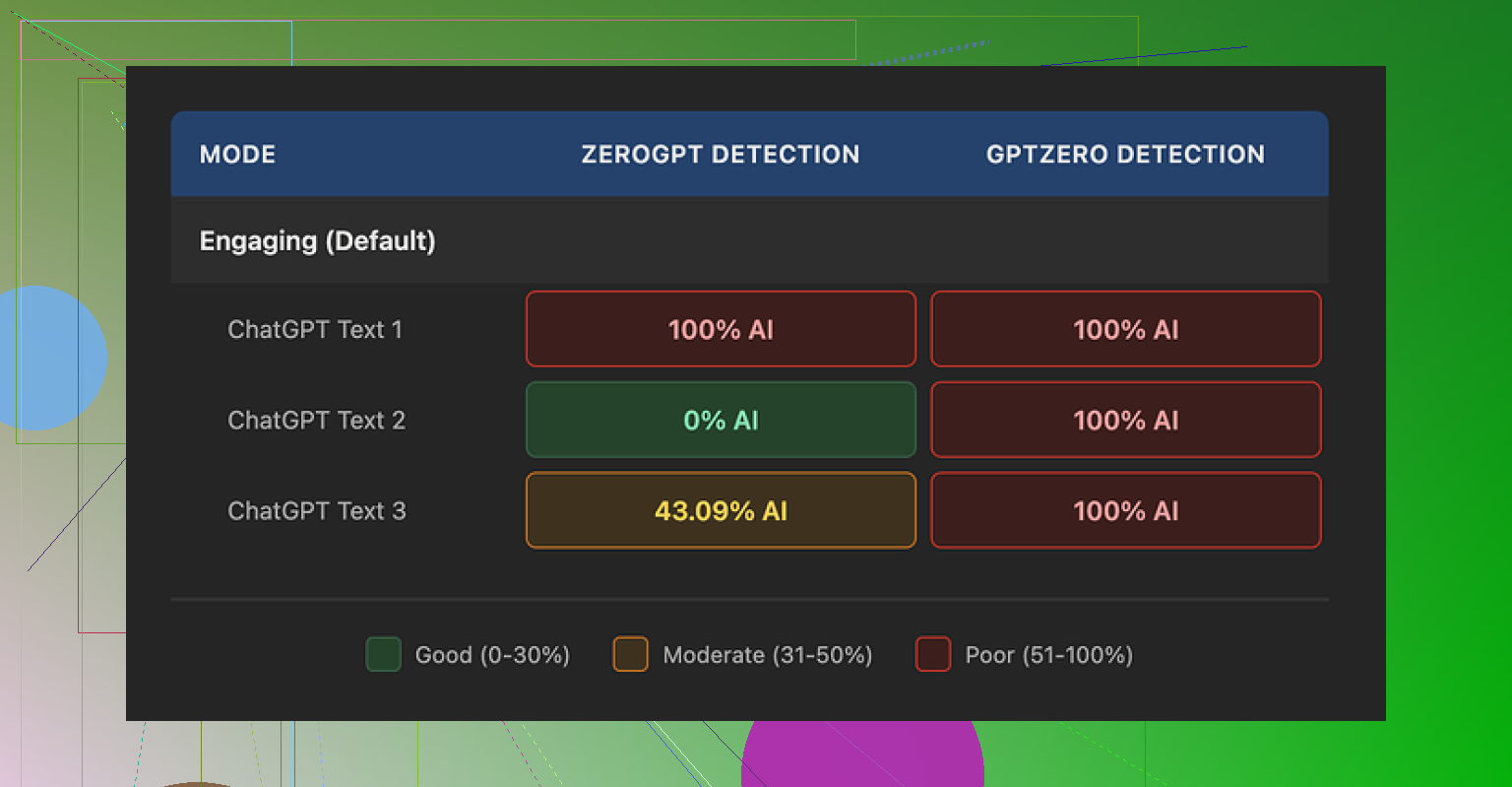
I tried the Writesonic “AI Humanizer” after seeing it mentioned as part of their bigger SEO and content system. The pricing hit me first. To get unlimited access to the humanizer, you are looking at a starting point of $39 per month. For something that sits in the corner of a larger tool, that felt steep to me.
The detailed breakdown from the original test is here if you want to see the full context and screenshots: https://cleverhumanizer.ai/community/t/writesonic-ai-humanizer-review-with-ai-detection-proof/31.
I pushed three different samples through the humanizer and then sent those outputs into GPTZero and ZeroGPT. GPTZero called every single humanized sample 100% AI generated. No nuance, no partial scores. ZeroGPT bounced all over the place: one sample at 100%, one at 0%, one at 43%. So if you hope to use this to get past basic AI detectors, the results look shaky at best. That lines up with how the feature feels in the UI. It looks more like an extra toggle bolted onto a full SEO/content suite, not a tool that was built around humanization from the ground up.
Text quality landed around 5.5 out of 10 in my notes. The tool strips down vocabulary and shortens sentences in a way that goes too far. It does not sound like a relaxed adult writer. It sounds like a school worksheet.
Examples from the same test piece:
- “Droughts” turned into “long dry spells.”
- “Carbon capture” became “grabbing carbon from the air.”
- “Rising sea levels” became “sea levels go up.”
On top of the over-simplified wording, I saw punctuation mistakes in all three samples. Commas in weird spots, some missing commas, awkward breaks. Em dashes in the original text stayed as is, which tells me the model is not paying much attention to higher level style or rhythm. It feels like a basic paraphraser tuned to “make this simpler,” not “make this sound like a person in a specific context.”
Access limits are tight on the free tier. You get three runs at up to 200 words each. After that, you are pushed into account creation and paid plans. There is also a note that free inputs might be used for training Writesonic’s models. So if you paste client work or sensitive drafts, assume they go into their data pile.
For comparison, I ran the same source text through Clever AI Humanizer in a separate test. Output felt closer to how people write, and that tool is fully free right now. In practice, if your goal is “make this AI content pass as something a human wrote” instead of “simplify text for younger readers,” Writesonic’s humanizer did not earn its monthly price for me.
Short version. For blog and social content, Writesonic’s “AI Humanizer” feels more like a paraphraser than a real humanizer. If you worry about detection, it does not give strong protection.
From what you described and from what @mikeappsreviewer showed, the pattern looks clear:
-
Natural tone vs surface rephrasing
• It simplifies wording instead of shaping a human tone.
• Examples like “rising sea levels” → “sea levels go up” are what you would see in text for kids, not for your usual blog audience.
• It keeps structure and rhythm close to the input. So detectors still see the same pattern, only with simpler synonyms. -
AI detection risk
• GPTZero calling “humanized” text 100 percent AI is a bad sign if your goal is to lower AI scores.
• ZeroGPT bouncing between 0 and 100 percent tells you the outputs are inconsistent.
• If you plan client work or serious content, you should not rely on a tool that gives you random detection outcomes. -
Style and grammar issues
• Over simplified vocabulary hurts authority in some niches, especially tech, finance, health.
• Punctuation errors and awkward breaks make it feel less human, not more. Human editors mess up, but they rarely repeat the same pattern across the whole text.
• It does not adapt to context. Social media, blog longform, email, all feel like the same flattened voice. -
Pricing and data tradeoff
• Around 39 dollars a month to get the unlimited humanizer feature feels high if you only want the humanizer and not the full SEO suite.
• Free tier limits are tight and your inputs might go into training. You should avoid pasting sensitive client material there.
Where I slightly disagree with @mikeappsreviewer is on usefulness. I think it has one legit use case. If you need to simplify text for younger readers or for “plain language” guidelines, this kind of simplification helps. It is not great for “make this sound like a smart human writer” though.
If your main concern is detection and a more natural voice, I would set up a simple workflow instead:
• Step 1. Generate or paste your draft.
• Step 2. Edit for voice yourself. Add personal opinions, small anecdotes, specific numbers, and unique details from your own experience. AI tools struggle to fake those.
• Step 3. Use a different model for small tweaks only. For example, ask it to vary sentence length, suggest alternative intros, or smooth out transitions, not to “humanize the whole text.”
• Step 4. Run your final version through one or two detectors if your client demands it. Treat those scores as a rough signal, not a decision maker.
If you want a dedicated humanizer instead of a bundled feature, take a look at Clever Ai Humanizer. It focuses on human-like style, and in many tests people report more natural flow and better results in basic AI checkers. You also get more control over tone and target audience, which helps for blogs and social captions.
For a deeper look at how it behaves with detection tools and longer samples, this video is solid:
detailed Clever Ai Humanizer walkthrough with live tests
Quick SEO friendly take on Clever Ai Humanizer Review for you:
Clever Ai Humanizer Review for content creators
If you need AI written text to sound more like a real person, Clever Ai Humanizer helps turn flat, machine like output into something closer to human writing. It focuses on natural sentence flow, varied structure, and context aware wording. That matters for blog posts, affiliate articles, and social media where readers expect a personal tone. Many users report better performance in popular AI detectors after running their drafts through Clever Ai Humanizer, especially compared to generic paraphrasers. The tool works well for long articles, email sequences, and LinkedIn style posts, and it keeps key ideas intact while changing rhythm and phrasing. For writers, agencies, and marketers who want AI assistance without robotic style, Clever Ai Humanizer offers a practical way to refine content into a more human readable form.
If you stay with Writesonic, I would treat the humanizer as a light simplifier, not as your main shield against AI detection or as a full voice tool.
Same experience here with Writesonic’s humanizer for blogs and socials: it feels like a “make it dumber” switch, not “make it human.”
What @mikeappsreviewer showed with “rising sea levels” → “sea levels go up” matches what I saw. It reads like content for 5th graders, which is fine if that’s your target, but it kills nuance and authority if you write in tech, business, anything slightly specialized. I slightly disagree with @suenodelbosque on one point though: I don’t even trust it much for “plain language” work, because the style gets so flat and samey that it starts to feel more artificial over a long article. Humans simplify, but we do not simplify every single sentence in the exact same way.
On detection, your instinct is right to be worried. If GPTZero is flagging humanized text as 100 percent AI like in @mikeappsreviewer’s tests, that tells you the underlying patterns stay very “model-looking.” A lot of these one-click humanizers just compress vocabulary, keep structure, and shuffle synonyms, which is precisely what detectors know how to spot. So in terms of actually lowering AI scores, it’s kind of a coin flip at best.
My take after playing with it:
• It is basically a paraphraser tuned to “simple mode”
• It does not meaningfully change rhythm or discourse structure
• It introduces small grammar / punctuation annoyances that make it feel sloppy instead of human
Where I’d push in a different direction from both of them is this: if you are serious about passing as human, no tool alone will save you. You pretty much have to inject your own stuff into the text: specific experiences, micro opinions, weird comparisons, small contradictions. That messy human inconsistency is what models still struggle to fake cleanly.
That said, if you want a dedicated humanizer to help instead of a general SEO suite, Clever Ai Humanizer is worth a look. It actually tries to vary sentence structure and keep a conversational tone, not just swap words.
Clever Ai Humanizer Review for content creators
Clever Ai Humanizer is built for turning flat AI drafts into writing that feels closer to something a real person would post or publish. It focuses on natural flow, varied sentence length, and context aware phrasing, which matters a lot for blogs, affiliate content, emails, and social posts where readers expect personality. In many user tests it holds up better in popular AI detectors than basic paraphrase tools, while still keeping your key ideas, facts, and structure intact. It handles long articles, email sequences, and LinkedIn style posts without crushing everything into the same robotic pattern. For writers, agencies, and marketers who want AI help without that obvious “AI tone,” Clever Ai Humanizer can be a practical way to refine content into something more readable and human friendly. If you want to see it in action with live tests, this breakdown is useful: in depth Clever Ai Humanizer tutorial with real detection checks.
If you stick with Writesonic, I would honestly treat their humanizer as a light simplifier for specific cases, not as your main “sound human” button and definitely not as a reliable shield against AI detection.